
3 Phase ACH Setup for Small Service Businesses With Automation
3 Phase ACH Setup for Small Service Businesses With Automation
The fastest way into ACH payments setup is this: pick your origination route (your bank’s portal, accounting software, or a payment processor), enable ACH on a business bank account, and collect the three things Nacha requires before you send a dime, which are routing and account numbers, the account type, and a signed authorization. Confirm your bank has activated origination on your account rather than just deposit access, then run a small test batch before payroll or vendor volume goes live.
TL;DR:
- Small businesses should test ACH origination with a small batch of five to ten transactions and verify settlement and reconciliation before scaling up.
- Using payroll or accounting software to generate NACHA files is ideal for under 50 transactions monthly, as it reduces manual errors and streamlines transmission.
- Ensuring the correct SEC code and a signed authorization are critical; mislabeling or missing documentation can cause batch rejections and compliance issues.
- Banks require specific approval and an origination agreement separate from opening a checking account, with details on transaction limits and risk assessment.
- Automating ACH reconciliation and monitoring with a dedicated operations platform helps detect missed payments or returns early, preventing revenue losses.
Table of Contents
- How to Set Up ACH Payments the Right Way
- What Information and Authorizations Do You Need?
- What Do You Need From Your Bank to Originate ACH?
- How Do You Build and Submit an ACH File?
- How Long Does ACH Verification and Settlement Take?
- What Happens With ACH Returns and Disputes?
- Common ACH Setup Pitfalls (and How to Avoid Them)
- How Automation Fits Into ACH Operations
- A Recommended Rollout for Small and Mid-Size Service Businesses
- Simplify ACH Recovery With an Operations Platform Built for Service Businesses
- Sources
How to Set Up ACH Payments the Right Way
Every business lands on one of three origination paths, and the right one depends on volume, not ambition.
A bank portal works for companies moving a handful of payroll runs or vendor payments a month. You log in, enter recipient details manually or upload a simple template, and the bank handles formatting and transmission. It’s the slowest to scale but requires zero technical setup.
Accounting or payroll software (QuickBooks, Gusto, ADP, and similar platforms) generates NACHA-formatted files automatically from your existing payroll or bill-pay data, then either transmits them directly or hands them to your bank for submission. This is the sweet spot for most small and mid-size service businesses because it eliminates manual re-entry errors, which are one of the most common causes of rejected batches.
A payment processor or API (think Stripe-style integrations) suits businesses collecting recurring customer payments, subscription billing, or high-volume vendor disbursements. Processors typically bundle instant account verification and mandate capture into the signup flow, cutting the manual compliance work but adding per-transaction fees.
Before you commit, run through this checklist:
- Volume: Under 50 transactions a month favors a bank portal; over that, software or a processor pays for itself in saved labor.
- Integration needs: If you already run payroll or invoicing software, check whether it exports NACHA files natively before adding a new tool.
- Reconciliation: Processors often auto-match payments to invoices; bank portals usually require manual reconciliation against your ledger.
- Cost structure: Banks often charge flat monthly ACH fees, while processors charge per-transaction, which changes the math at scale.
Pick the route that matches this month’s volume, not the one you hope to have in three years.
What Information and Authorizations Do You Need?
Every ACH transaction needs the same core data, regardless of which route you choose:
- Routing number (nine digits, identifies the receiving bank)
- Account number (identifies the specific account)
- Account type (checking or savings)
- Receiver’s legal name, matching the bank account exactly
- Your company’s legal name and identification, as it will appear on the receiver’s statement
The trickier part is the Standard Entry Class (SEC) code, a three-letter tag that tells the ACH network what kind of transaction this is and what rules apply. PPD covers consumer payments like payroll direct deposit. CCD covers business-to-business payments. WEB covers consumer payments authorized online. TEL covers consumer payments authorized by phone. Mislabeling a payroll deposit as CCD, or a web-authorized customer payment as PPD, is a documented cause of batch rejections and can trigger compliance review.
The 10-day rule: Nacha requires originators to produce a valid, signed authorization on request, and industry practice treats 10 business days as the enforcement window for proving you have one on file. Miss that window and you risk forced reversal or compliance action.
The authorization itself must be in writing or an equivalent authenticated electronic record, and it has to state the terms of the payment along with the receiver’s right to revoke it. Build a retrieval system now. Scrambling to find a six-month-old signed mandate during a dispute is a bad way to spend an afternoon.
What Do You Need From Your Bank to Originate ACH?
Opening a business checking account does not automatically grant ACH origination rights. That’s a separate approval, and it’s the single most common setup mistake according to Nacha’s own quick-start guidance for businesses new to ACH.
Getting activated typically involves:
- Submitting business formation documents (articles of incorporation, EIN confirmation, business license)
- Signing an ODFI agreement (Originating Depository Financial Institution agreement), which spells out your transaction limits, liability terms, and reporting obligations
- Underwriting review, where the bank assesses your expected volume and risk profile before setting daily or monthly caps
Most businesses stay with their existing bank or a processor rather than pursuing direct Fed access. Direct FedACH origination through FedLine Web or FedLine Advantage makes sense only for organizations with the internal IT resources to manage hardware and software testing requirements ahead of a scheduled production cutover. For everyone else, that complexity outweighs the savings.
Pro Tip: Ask your bank these three questions before you sign anything: What’s the daily cutoff time for same-day submission? Do you support Same Day ACH, and what’s the added fee? What fraud monitoring is included versus sold as an add-on?
Get those answers in writing. Verbal assurances about cutoff times have a way of becoming very different once you miss payroll by six hours.
How Do You Build and Submit an ACH File?
A NACHA-formatted file is a fixed-width text file organized into batches, each one carrying a file header, one or more batch headers (tagged with the SEC code for that batch), individual entry detail records with the routing, account, and dollar amount, and a file control record with running totals that let receiving banks confirm nothing got corrupted in transit.
Submission generally happens one of three ways:
- Manual entry through your bank’s portal, typing or uploading individual payments, which works fine at low volume but doesn’t scale.
- NACHA export from payroll or accounting software, where the platform generates the file automatically from your existing payroll run or bill-pay batch and either transmits it directly or hands it to your bank.
- API submission through a processor, which builds the file programmatically and handles transmission, often with built-in validation before anything reaches the network.
Before you submit anything, run a validation pass: confirm batch totals match your intended disbursement, double-check every SEC code against how each authorization was actually collected, verify effective dates fall on banking days, and let your software calculate the entry hash automatically rather than trusting a manual total. A single transposed digit in an entry hash can bounce an entire batch.
How Long Does ACH Verification and Settlement Take?
Prenotification, a zero-dollar test entry sent before your first real payment to confirm the account details are valid, is optional under Nacha rules but still standard practice for new payroll enrollments and larger vendor relationships.
Most businesses skip prenotes in favor of faster methods:
- Micro-deposits, where you send two small test amounts and the receiver confirms them back to you
- Instant account-verify services, which check account validity in real time through the receiving bank, cutting verification from days to seconds
On timing: Nacha estimates roughly 80% of ACH payments settle in one banking day or less. Same Day ACH exists for urgent payroll corrections or last-minute vendor payments, but it runs on strict operator cutoff windows, and missing one pushes the payment to the next standard settlement cycle. Build scheduling buffers into your payroll calendar rather than relying on same-day processing as your default.
What Happens With ACH Returns and Disputes?
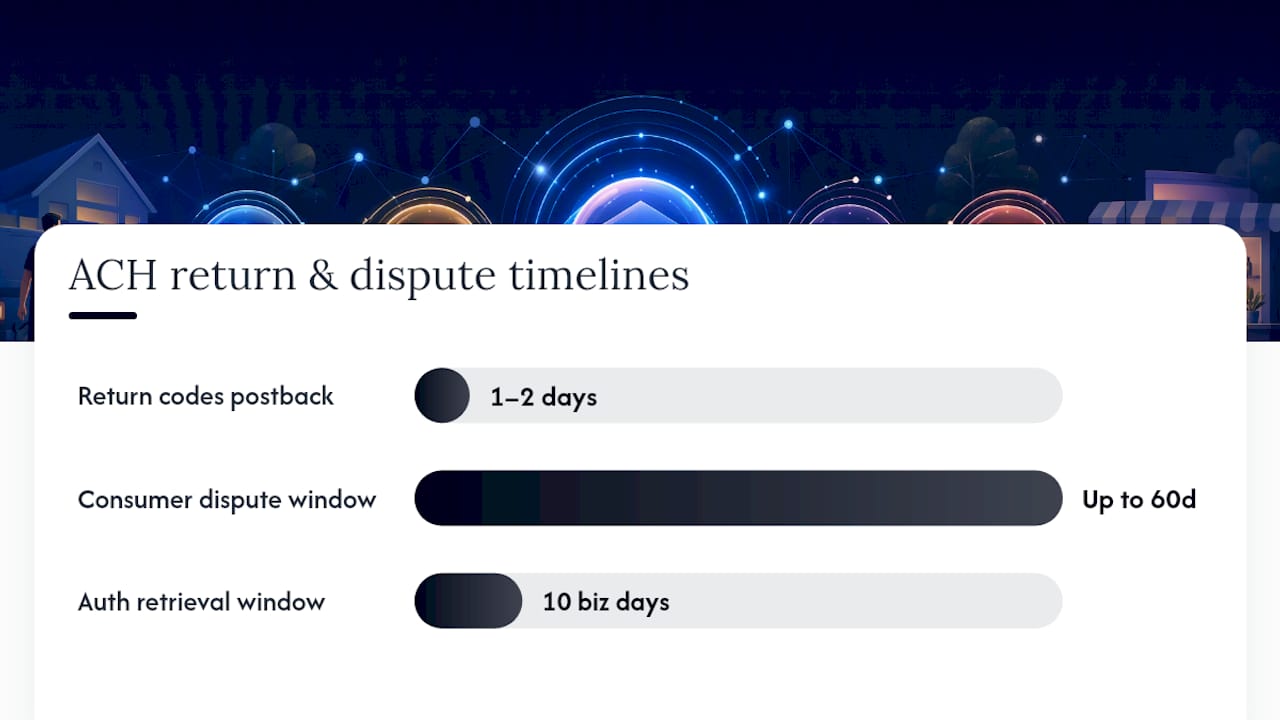
Returns happen. Insufficient funds, closed accounts, and incorrect account numbers account for the bulk of them, and most return codes post back to you within one to two banking days of the original transaction.
Consumer-authorized debits carry a longer tail: receivers generally have up to 60 days to dispute an unauthorized debit, which is why retention discipline matters more than most businesses assume.
- Keep every signed or authenticated authorization on file, retrievable within the 10-business-day production window Nacha enforcement expects.
- Log the collection method (web form, phone call, paper signature) alongside each authorization so you can defend the SEC code you used.
- Set up automated alerts for return codes so a pattern of R01 (insufficient funds) or R03 (no account/unable to locate account) gets flagged before it becomes a trend.
- Layer in secondary verification, like account-verify services, for any new customer or vendor relationship carrying above-average dollar amounts.
A dispute you can’t document isn’t a payment problem anymore. It’s a compliance problem, and those cost more to fix.
Common ACH Setup Pitfalls (and How to Avoid Them)
- Do run a pilot batch first. Send a small vendor or payroll batch, confirm settlement, and reconcile it against your ledger before scaling to full volume.
- Do verify every new account with micro-deposits or an instant verify service rather than trusting whatever number a vendor emails you.
- Do map SEC codes deliberately. Document which authorization method triggers which code, and audit that mapping quarterly.
- Don’t assume your retail business account includes origination rights. Request that permission explicitly during setup.
- Don’t skip the ODFI agreement review. Transaction limits buried in that agreement can quietly cap your growth.
Pro Tip: If a batch gets rejected, check the return code first before touching your file. Most rejections trace back to a mismatched account number or a wrong SEC code, not a formatting problem in the file itself.
How Automation Fits Into ACH Operations
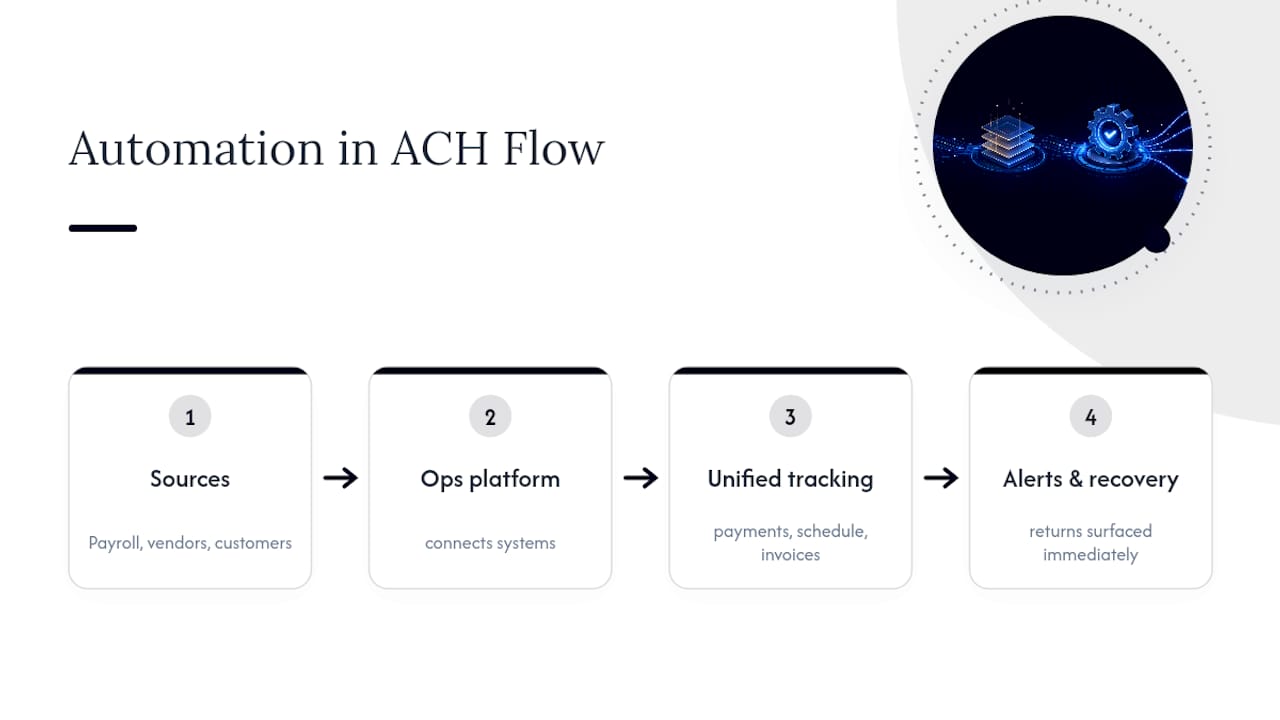
Manual reconciliation is where most of this breaks down in practice. Home service businesses running payroll, vendor payments, and customer collections through separate tools often lose track of which ACH batch tied to which invoice, and a missed return code can sit unnoticed for weeks. An operations platform connects those disconnected systems, tracking payment status alongside scheduling and invoicing data so a returned payment or an unreconciled deposit surfaces immediately instead of showing up as a surprise at month end. That kind of visibility, drawn from a $2.3 billion revenue leak study across home service operators, is exactly where automated recovery earns its keep.
A Recommended Rollout for Small and Mid-Size Service Businesses
If I were advising a service business finance team through this, I’d push back on the instinct to automate everything at once. ACH rewards patience in the first sixty days and punishes it after that.
Phase 1: Enable origination and run a genuinely small test batch, five to ten transactions, not fifty. Watch every return code personally.
Phase 2: Turn on accounting or payroll software exports and reconcile daily for at least a month. Daily reconciliation catches SEC code mistakes while they’re still one-line fixes instead of dispute headaches.
Phase 3: Automate monitoring and scale volume once Phase 2 has run clean for a full payroll or billing cycle. This is where platform integrations pay off, because manual reconciliation that worked at fifty transactions a month collapses at five hundred.
Skip a phase and you’ll find out why it existed the hard way.
— Tarun
Simplify ACH Recovery With an Operations Platform Built for Service Businesses
Setting up ACH origination solves the front end. What most service businesses actually struggle with is the back end: missed payments, unreconciled deposits, and returns that slip through because nobody’s watching every batch every day. An operations platform can connect to existing systems and surface missed or delayed payments in real time instead of leaving them for your bookkeeper to find weeks later.

For franchise operators, the same visibility can extend across every location, letting corporate leadership spot which sites are collecting cleanly and which ones are losing revenue to unreconciled ACH activity. If you’re running payroll, vendor payments, or recurring customer billing across multiple crews or locations, see how a platform handles reconciliation and revenue recovery by booking a demo.
Sources
- How ACH works | ACH Guide for Developers (Nacha)
- FedACH Origination and Receipt Services Setup (Federal Reserve Banks)