
Franchises: After Hours Call Handling Built Into Your Ops Platform
Franchises: After Hours Call Handling Built Into Your Ops Platform
After hours call handling means letting an AI agent inside your operations platform answer, qualify, and book calls the moment they come in, at 2 AM or 2 PM. Done right, it captures leads that would otherwise go to voicemail and turns them into booked jobs automatically. Platforms like JobOS Pro build this capability directly into the same system that runs your dispatch and invoicing, so nothing gets lost between the phone and the field.
TL;DR:
- Automated, AI-native call handling can significantly reduce missed calls by directly booking or qualifying leads during after-hours periods.
- Running phased pilots starting during peak seasons helps identify system issues and sets realistic expectations for full deployment.
- The cost-saving potential depends on reducing manual follow-up, speeding up payments, and capturing missed emergency calls, often surpassing platform subscription expenses within a few months.
- Ensuring data quality through regular checks on field mapping, contact deduplication, and dashboard accuracy prevents routing errors and duplicate records.
- Standardizing after-hours call handling across franchise networks boosts overall revenue recovery and minimizes variability in customer experience.
Table of Contents
- How an AI-Native After-Hours Agent Works Inside Your Platform
- What After-Hours Calls Actually Cost You in Missed Revenue
- How to Roll Out Automated After-Hours Call Coverage
- Is the Investment Worth It Compared to Hiring or Outsourcing?
- Keeping Your Data Clean: Dashboards, KPIs, and Silo Risks
- Why Franchise Networks Can’t Afford Inconsistent After-Hours Coverage
- Get After-Hours Call Handling Built Into Your Operations Platform
- Sources
- FAQ
How an AI-Native After-Hours Agent Works Inside Your Platform
The agent that answers your phone at midnight needs to do more than take a message. It has to capture the caller’s name, address, service type, and urgency level, then write that information directly into your job record, no re-typing required.
That writeback step is where most after-hours solutions fail. A third-party answering service takes the call on a separate system, then emails or texts your office a summary. Someone still has to open that message, check for duplicates, and manually create the job. An AI-native agent skips that entirely because it runs on the same data model as your scheduling board and customer history.
Once the call ends, the platform applies routing logic automatically:
- Standard requests get booked directly into the next available slot, no human touch needed.
- Emergency calls (a burst pipe, a dead furnace in January) escalate immediately to an on-call technician or manager.
- Estimate requests get queued for morning follow-up with the details already attached.
- Post-job calls can trigger automated review requests once the ticket closes.
Because the agent shares one data model with dispatch, it can check real scheduling windows and past-customer history before making a decision, something answering services relying on separate systems simply cannot do without manual reconciliation.
What After-Hours Calls Actually Cost You in Missed Revenue
Home-service businesses lose more money after hours than most owners realize until they look at the numbers. Industry data consistently shows a meaningful share of inbound calls arrive outside standard business hours, when phones ring straight to voicemail in most shops. Callers who hit voicemail rarely wait around. They call the next name on their search results.
The core math: every missed call is a lead your competitor books instead. Recovering even a fraction of that traffic with immediate, automated answering changes your monthly revenue line more than most marketing spend does.
JobOS Pro’s analysis of missed-call costs for HVAC businesses breaks down exactly how that leakage compounds over a year. To build your own version of that math, track these four numbers starting on day one of any pilot:
- Missed-call rate: the percentage of after-hours calls that go unanswered today.
- Capture rate: how many of those calls the AI agent now answers and logs.
- Booking conversion: how many captured calls turn into scheduled jobs.
- Revenue recovered by time window: multiply booked jobs by your average ticket, segmented by hour, so you can see exactly when leakage is worse.
How to Roll Out Automated After-Hours Call Coverage
Rolling out an AI-native after-hours agent works best as a staged project, not a flip-the-switch weekend. Here’s the sequence that limits risk and gets you to measurable results fastest:
- Audit your current setup. List every phone number in use, map existing call flows, note your actual after-hours windows, and confirm which FSM or CRM endpoints need to receive data.
- Connect telephony and test field mapping. Route your numbers into the platform, then run test calls to confirm caller name, address, and job type land in the right fields without duplicating existing contacts.
- Configure your business rules. Set booking windows, define what counts as an emergency, decide whether after-hours pricing flags apply, and assign on-call overrides for holidays or high-demand seasons.
- Run a single-office pilot. Scope the rollout to one location or one shift first. A small, contained test surfaces integration issues before they affect your whole network and gives you real conversion numbers to evaluate.
- Expand in stages. Once the pilot script and automation rules are tuned, roll out location by location, training staff on the new workflow as you go and setting a review cadence for the rules you configured.
Pro Tip: Run your pilot during your busiest seasonal month, not your slowest. A quiet month hides the exact call volume and edge cases you need to see to trust the system.
Is the Investment Worth It Compared to Hiring or Outsourcing?
Weigh three costs against each other: the subscription for an integrated platform, a dispatcher’s hourly wage plus benefits, and per-minute fees from a traditional answering service. The subscription usually wins on pure math once you factor in what a dispatcher or answering service cannot do, book jobs directly into your schedule without a second data-entry step.
The bigger savings often hide in what you stop paying for indirectly:
- Fewer manual follow-up tasks for your morning office staff.
- Faster invoice-to-payment cycles because jobs get logged and scheduled the same night.
- No missed emergency calls that turn into one-star reviews the next morning.
A basic payback framework: take your current missed-call rate, apply a realistic capture-rate improvement, multiply by your average ticket, and compare that monthly recovered revenue against the subscription cost. If recovered revenue clears the subscription within the first two or three months, the case is closed. If the gap is thin, an incremental add-on might cover you until call volume grows.
Keeping Your Data Clean: Dashboards, KPIs, and Silo Risks
An after-hours agent is only as good as the data it writes back, and that data has to survive contact with your existing systems without creating duplicates or routing errors. Run these checks before you go live and revisit them monthly:
- Field mapping tests: confirm every captured field lands correctly in your FSM/CRM, not just most of them.
- Contact dedupe checks: verify returning customers get matched to their existing record instead of spawning a duplicate.
- Writeback verification: spot-check a sample of after-hours bookings weekly to confirm they appear correctly on the dispatch board.
Build three reports from day one: a missed-call funnel showing where calls drop off, a follow-up conversion report tracking how many queued estimates get closed, and revenue recovered by time window. The most common failure mode isn’t the AI misunderstanding a caller. It’s disconnected systems forcing manual re-entry that introduces duplicate records and routing mistakes. A native platform avoids that because there’s only one data model to keep clean. Assign one operations lead to own the routing rules and review the dashboards on a fixed weekly cadence, not an as-needed basis.
Why Franchise Networks Can’t Afford Inconsistent After-Hours Coverage
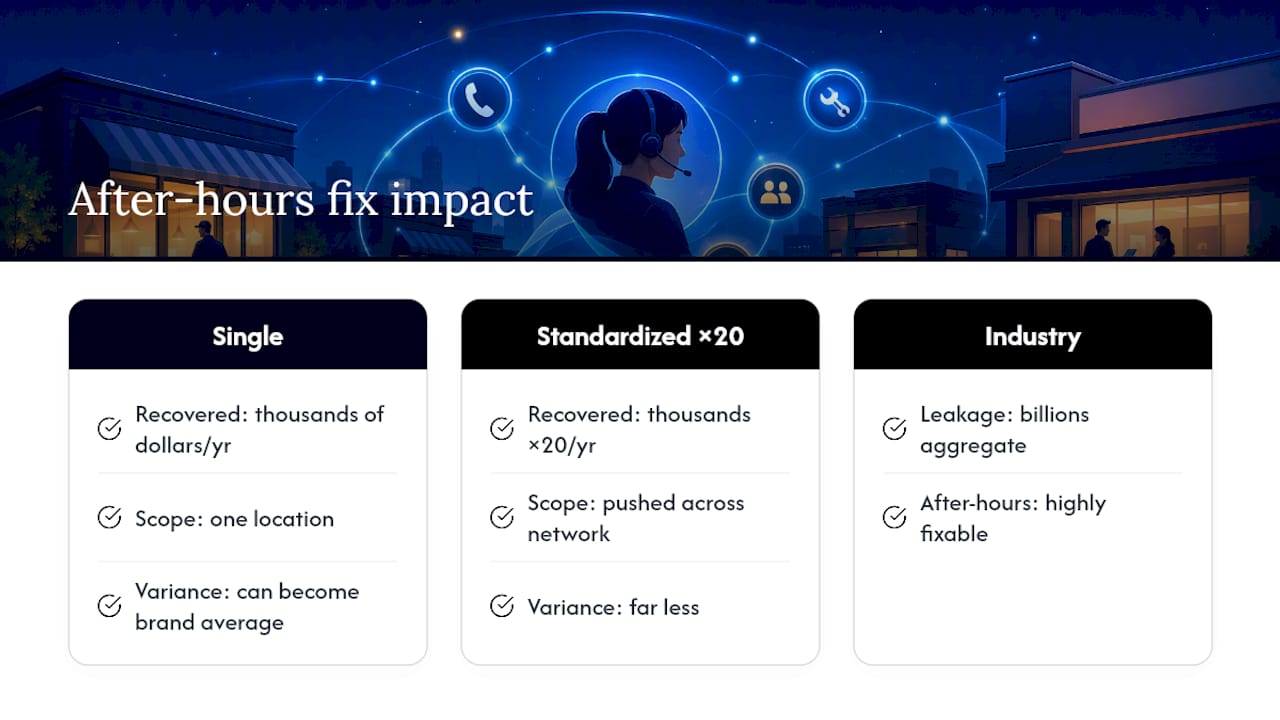
Franchise operators lose the most when after-hours handling varies by location, because one office’s missed-call habit quietly becomes the brand’s average. Multi-location intelligence fixes that by surfacing which locations handle after-hours calls well and pushing that standard across the network instead of leaving it to individual managers.
The ROI compounds at scale. A single-location fix recovers thousands of dollars a year. Applied to twenty locations with standardized rules and centralized monitoring, the same fix recovers it twenty times over, with far less variance. JobOS Pro’s revenue-leak research points to billions in aggregate leakage across the home-service industry, and after-hours calls are one of the most fixable categories in that pile.
— Tarun
Get After-Hours Call Handling Built Into Your Operations Platform
Most home-service owners patch after-hours coverage with a mix of voicemail, a call service, and hope. JobOS Pro replaces that patchwork with one AI receptionist that shares your actual scheduling data, so a call at midnight becomes a booked job by morning instead of a message someone has to chase down.

The platform pairs that after-hours agent with multi-location benchmarking, automated estimate follow-up, and the same revenue-leak analysis behind JobOS Pro’s HVAC missed-call research. Franchise operators get one dashboard showing which locations capture calls well and which ones leak revenue every night. If you run integrations or onboarding through a marketing partner, HarbourSide Digital supports automation setup alongside the rollout.
Start with the free AI dispatch guide to see the framework in detail, or skip straight to a working demo and book a demo to see it running on your actual call volume.
FAQ
What Does “After Hours Call Handling” Mean in This Context?
It refers to an AI-native agent built into your operations platform, like JobOS Pro, that answers and books after-hours calls directly, rather than an outsourced call center relaying messages.
How Is This Different From an Outsourced Answering Service?
An integrated agent writes booking data directly into your scheduling and customer records with no manual re-entry, while outsourced services operate on separate systems and require your staff to process messages afterward.
How Long Does a Pilot Rollout Usually Take?
Most operators scope a pilot to a single office or shift, verify writebacks and call scripts over a few weeks, then expand once conversion numbers look solid.
What Should I Track First After Launch?
Start with missed-call rate, capture rate, booking conversion, and revenue recovered by time window, then build dashboards around those four numbers.
Can This Work Across Multiple Franchise Locations?
Yes. Multi-location intelligence standardizes after-hours rules across a network and lets corporate leaders spot which locations are leaking revenue after hours.