
Call Tracking That Recovers $18,000/Year for Home Service Ops
Call Tracking That Recovers $18,000/Year for Home Service Ops
A call tracking integration built for operations, not marketing, connects your phones directly to your field-service platform so every call becomes a job, a booking, or a recovery action. Owners get faster dispatch, dispatchers get context on every ring, and franchise leaders get attribution data across every location. The payoff shows up fast: fewer missed jobs, quicker booking cycles, and a clear dollar figure on what the phone line is actually worth.
TL;DR:
- Call tracking integration should focus on real-time data flow from telephony sources like hosted PBX, SIP, or cloud APIs to avoid delays that impair emergency or same-day bookings.
- Ensuring caller ID matching, de-duplication rules, and immediate follow-up actions for voicemails are critical to prevent missed jobs and inaccurate records.
- Pilots should start with overflow and after-hours lines, then expand gradually once measurable improvements in call-to-booking conversion and recovered jobs are observed over at least two billing cycles.
- Five key metrics to track include missed-call rate, call answered live, conversion rate, recovered jobs, and attribution accuracy, with even one recovered job potentially covering the cost of the system.
- The platform’s AI-native design, like JobOS Pro with its AI receptionist, ensures seamless call capture and job creation, making ROI more predictable compared to piecemeal or legacy approaches.
Table of Contents
- What Does Call Tracking Integration Mean for Home-Service Operations?
- How Do You Feed Call Data Into Your FSM Platform?
- What’s the Right Rollout Sequence for a Pilot?
- Which Metrics Actually Prove ROI?
- Why Do Call Integrations Fail, and How Do You Fix It?
- What JobOS Pro Sees Across Franchise Networks
- How JobOS Pro Fits Into Your Call Recovery Strategy
- Sources
- FAQ
What Does Call Tracking Integration Mean for Home-Service Operations?
Forget dynamic number insertion and marketing attribution dashboards. For a home-service business, call tracking integration means one thing: the phone call becomes operational data the moment it happens, flowing straight into your dispatch board, your quoting workflow, and your revenue reports.
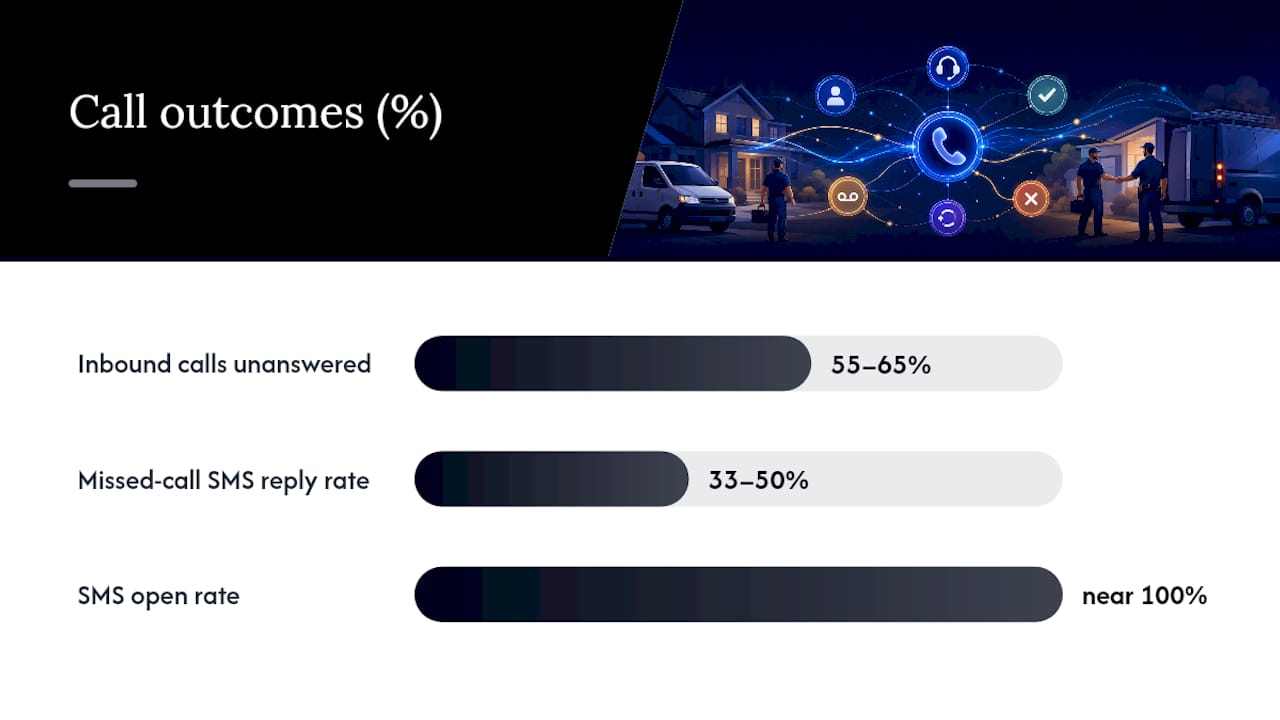
The scale of the problem justifies the investment. Industry aggregates show 55 to 65 percent of home-service inbound calls go unanswered, and live-answered calls convert dramatically better than anything routed to voicemail. When a missed-call automation follows up, the math gets more interesting: missed-call text-back sequences fire an SMS quickly and pull reply rates often between one-third and one-half, against SMS open rates near total readership levels.
Here’s what a working integration actually does with that call data:
- Logs the caller, timestamp, and reason for the call the instant the phone rings
- Creates a job or lead record in your field-service platform automatically
- Routes urgent calls (no heat, active leak, no AC) to the next available technician
- Attaches revenue once the job books, closing the loop from ring to ticket
That loop, ring to ticket, is the entire point. Without it, you’re running call analytics with no connection to what the call actually produced.
How Do You Feed Call Data Into Your FSM Platform?
Every home-service phone system emits data somewhere. The question is whether your field-service platform can catch it in real time or only sees it hours later in a batch report.
Three telephony sources typically generate the events you need: hosted PBX systems, SIP trunking providers, and cloud telephony APIs (Twilio, RingCentral, and similar carriers). Each one can emit a webhook the moment a call starts, ends, or gets transferred, along with a recording URL and a post-call log.
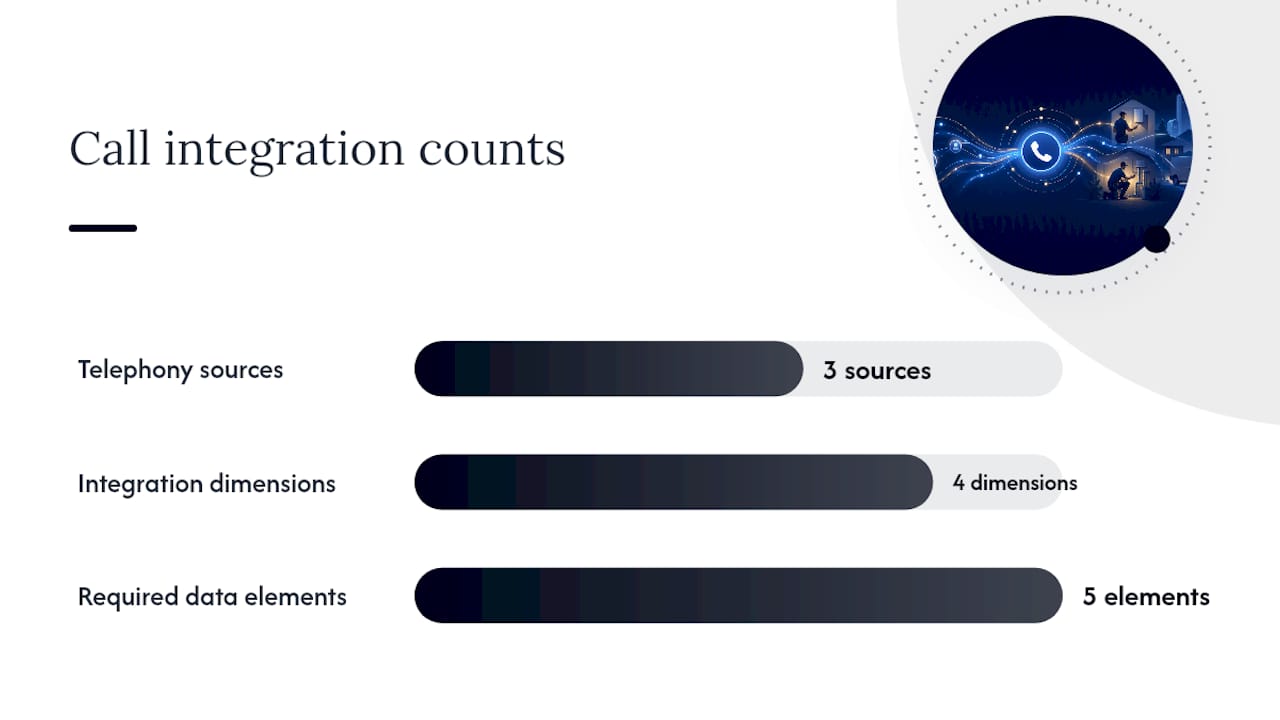
Real-time sync matters more than most owners assume. A batch import that runs every few hours might miss a same-day emergency booking window entirely, and by the time the record lands in your dispatch board, a competitor already answered. According to Tradesly’s evaluation framework for FSM call integrations, integration quality should be judged on four dimensions: API depth, real-time sync, context preservation, and quality monitoring, because these drive booking outcomes more directly than any list of feature checkboxes.
Whichever architecture you choose, preserve these data elements without exception:
- Caller ID and phone number, matched against existing customer records
- Qualification fields (service type, urgency, address if captured)
- Transcript or intent flags from AI call handling
- Recording URL for training and dispute resolution
- Timestamps for call start, answer, and transfer
Skip context preservation and you end up with a call log that looks complete but tells your dispatcher nothing useful about what the customer actually needs.
What’s the Right Rollout Sequence for a Pilot?
Rolling out call tracking integration across every line on day one is how pilots fail. Start narrow, prove the lift, then expand.
- Pick a low-risk starting point. Overflow calls and after-hours volume are the safest pilot targets because they don’t touch your daytime dispatch workflow. Define success metrics before you flip the switch, not after.
- Run the technical setup checklist. Audit your current phone flows, map fields between your telephony source and your FSM platform, enable webhook or API credentials, and configure warm-transfer rules plus missed-call SMS templates.
- Build the operational checklist alongside it. Write CSR scripts or AI prompts for common call types, set dispatch rules for warm transfers, define escalation paths for emergencies, and train staff on the new flow before go-live.
- Set your scaling gate. Only expand to peak-hour and full-line coverage once you see a measurable percentage lift in call-to-booking conversion and a repeatable number of recovered jobs per week.
Practical guidance from Tradesly’s call-intake research backs this sequence: overflow and after-hours first, then peak windows, then full rollout, minimizing disruption while you prove the conversion lift is real.
Pro Tip: Run your pilot for at least two full billing cycles before judging results. One slow week will skew your numbers in either direction, and franchise leaders comparing locations need at least 60 days of clean data to trust the comparison.
Which Metrics Actually Prove ROI?
Seven numbers matter here: missed-call rate, calls answered live, call-to-book conversion rate, recovered jobs per period, average ticket value, booking lag (time from call to job creation), and attribution accuracy, meaning what percentage of booked jobs trace cleanly back to a specific call.
The math on one recovered job: If your average ticket runs $1,500 and your integration conservatively recovers just one additional job per month, that’s $18,000 in annual revenue traced directly to calls that would otherwise have gone unanswered or unbooked. Weigh that against a monthly software subscription, and the payback window for most operators lands inside the first month.
For franchise networks, the same call-level attribution rolls up into something more valuable: a benchmarking layer. Once every location reports call-to-booking conversion on the same metric definitions, corporate leadership can spot which locations are leaving jobs on the table and which ones are converting overflow calls at twice the network average.
Why Do Call Integrations Fail, and How Do You Fix It?
Most integration failures trace back to four recurring problems.
- Missing or mismatched fields. A caller ID that doesn’t match your customer database creates duplicate records instead of updating existing ones. Fix it with strict field mapping and a sync test before launch.
- Batch delays create late jobs. If your sync runs every few hours, a call at 9 a.m. might not hit the dispatch board until noon. Sub-second webhooks and a proper event queue solve this.
- Duplicate job records. Set de-duplication rules using both the call-event ID and the job ID on every write, so records merge instead of stacking.
- Voicemail with no follow-up. Every voicemail should trigger an immediate SMS with a clear next step, not silence until someone checks the box.
One more thing worth flagging: call recording and automated texting both carry consent requirements that vary by state, so confirm your setup meets local recording-disclosure and texting-consent rules before you scale.
What JobOS Pro Sees Across Franchise Networks
This platform was built as an AI-native operating platform from the ground up, specifically to catch the revenue that disconnected phone systems and disconnected software let slip through. That framing matters because most call handling gets bolted onto existing tools after the fact, and the seams show up as missed jobs.
Internal research backs the scale of the problem: JobOS Pro’s revenue leak study identified $2.3 billion in lost revenue across franchise networks, with missed calls and broken process handoffs as principal contributors. That number isn’t abstract when it’s your overflow line ringing unanswered on a Saturday.
The rollout pattern we recommend to franchise operators mirrors the pilot sequence above: start with overflow and after-hours coverage, measure the booking lift over a full cycle, then expand to peak windows once the data holds up across multiple locations.
— Tarun
How JobOS Pro Fits Into Your Call Recovery Strategy
If you’re weighing whether to build this integration piecemeal or run it on a platform designed for it from day one, here’s the practical difference: Jobospro is built AI-native from the ground up, so call capture, job creation, and attribution run as one connected system instead of three tools stitched together after the fact.

The platform’s AI receptionist, Kate, answers instantly, qualifies the caller, and books the job while the caller is still on the line, feeding straight into missed-call recovery workflows that run alongside your existing systems like Jobber and QuickBooks rather than replacing them outright. For franchise leaders, that same call data rolls up into multi-location benchmarking, so corporate can see exactly which locations are converting overflow calls and which ones need attention.
Pricing information and plan details are available on the JobOS Pro pricing page. The fastest way to see the fit for your operation is to book a demo and start a pilot on your overflow or after-hours line, the same low-risk starting point we walked through above.
FAQ
What Is Call Tracking Integration for Home-Service Businesses?
It’s the connection between your phone system and your operations platform that turns every call into a trackable job record automatically. Instead of a call log sitting separately from your dispatch board, the call itself creates the booking, the quote, or the recovery action in real time.
How Does Call Tracking Integration Differ From Marketing Call Tracking?
Operations-focused call tracking feeds phone data into job creation, dispatch, and revenue attribution inside your FSM platform. Marketing call tracking, by contrast, focuses on ad attribution and campaign analytics, which is a separate use case entirely.
How Much Does JobOS Pro Cost?
JobOS Pro’s Starter plan runs $199 per month, Growth is $349, and Pro is $549, with custom Enterprise pricing for franchise networks, all listed on the pricing page.
How Long Does It Take to See ROI From a Call Integration Pilot?
Most operators running an overflow or after-hours pilot see measurable conversion data within one to two billing cycles. A single recovered job at a $1,500 average ticket often covers the monthly subscription cost outright.
What Metrics Should I Track First?
Start with missed-call rate, call-to-booking conversion, and recovered jobs per week, since these three numbers show the clearest lift once your integration goes live. Add average ticket value and attribution accuracy once you have a few weeks of clean data to compare against.