
Cut Costs 60%: Customer Communication Automation for Home Services
Cut Costs 60%: Customer Communication Automation for Home Services
Customer communication automation combines AI and rules-based workflows to send, route, and resolve customer messages across channels without manual work on every touchpoint. Done well, it cuts resolution time, lowers support costs, and lets your team handle more volume without adding headcount. The payoff shows up fastest in billing reminders, appointment confirmations, and ticket triage. The harder question is choosing the right approach and rolling it out without breaking what already works.
TL;DR:
- Customer communication automation excels in high-volume, low-complexity tasks like billing reminders, appointment alerts, and support ticket triage, delivering rapid ROI.
- AI-driven systems depend heavily on well-structured knowledge bases and clear governance rules to accurately understand intent and escalate issues appropriately.
- Vendors should be evaluated based on integration capabilities, data ownership, security, channel support, and total cost over time to avoid costly mismatches.
- Proper rollout requires starting with a single high-impact use case, thorough preparation, and phased expansion driven by measurable KPIs.
- Ongoing measurement of key metrics such as handle time, customer satisfaction, and deflection rate is essential for continuous improvement and maximizing automation benefits.
Table of Contents
- What Is Customer Communication Automation, and How Does It Differ From CRM?
- Where Does Automation Actually Move the Needle?
- How Does AI Actually Power the Automation?
- How Do You Evaluate Vendors Without Getting Burned?
- How Do You Roll Out Automation Without Breaking What Works?
- What Does the Research Actually Recommend?
- What Privacy and Compliance Rules Apply to Automated Messaging?
- How Do You Get Staff to Actually Adopt the New System?
- How Do You Measure ROI and Keep Improving After Launch?
- Where Should Leaders Actually Focus First?
- Where JobOS Pro Fits for Home Service and Franchise Operators
- Sources
What Is Customer Communication Automation, and How Does It Differ From CRM?
Customer communication automation, often shortened to CCM, is the technology layer that generates, personalizes, and delivers messages across email, SMS, chat, voice, and in-app channels based on triggers, rules, or AI decisions. It’s easy to confuse with adjacent categories, so here’s the practical distinction.
CCM vs. CRM vs. CXA, in plain terms:
- CRM (Customer Relationship Management) stores the data: contact records, job history, payment status, past interactions.
- CCM (Customer Communication Automation) acts on that data: it decides what message goes out, when, and through which channel.
- CXA (Customer Engagement Automation) sits a layer above both, using behavioral triggers and orchestration to scale personalized interactions across mobile and web platforms, according to Guideflow’s analysis of customer communications management software.
Think of CRM as the filing cabinet, CCM as the mailroom, and CXA as the strategist deciding what the mailroom sends and to whom.
Most mature automated customer engagement setups share the same architectural skeleton, regardless of industry:
- Orchestration layer — decides the sequence and timing of messages across channels.
- Routing engine — sends tickets, calls, or chats to the right human or AI agent based on urgency, topic, or customer history.
- Knowledge base — the structured content an AI agent pulls answers from.
- AI agents — handle discrete jobs like drafting a response, summarizing a call, or flagging sentiment.
- Integrations — the connective tissue linking automation to your CRM, phone system, and accounting software.
Enterprise vendor overviews consistently flag omnichannel orchestration and knowledge-driven generative AI as the two capabilities that separate a mature CCM platform from a glorified autoresponder, per OpenText’s customer communications management overview. If a platform can’t tie those channels together with a shared customer record, you’re buying point solutions, not a system.
Where Does Automation Actually Move the Needle?
The return shows up fastest in high-frequency, low-complexity interactions. That’s not a coincidence. Repetitive, rules-friendly communications are exactly where AI and automation replace manual effort without introducing risk.
Four use cases consistently deliver measurable ROI:
- Billing and collections reminders. Automated nudges before and after a due date recover cash faster than a manual call queue, and they never forget to follow up.
- Appointment confirmations and reminders. A missed appointment costs a service business a full slot of revenue; automated confirmations reduce no-shows without staff intervention.
- Ticket triage and routing. AI classifies incoming requests by urgency and topic, then routes them to the right person or resolves them outright.
- Post-service follow-ups and NPS surveys. Automated check-ins catch dissatisfaction early, before it turns into a bad review or a lost customer.
Statistic Callout: Organizations using AI-driven customer service automation report resolving support tickets up to 3 times faster while cutting support costs by as much as 60 percent, according to Kommunicate’s research on AI customer service automation. Separately, effective CCM platforms help 75 percent of users cut content production time by 25 to 50 percent or more, per OpenText’s data on omnichannel customer communications.
Those numbers only mean something if you’re tracking the right metrics. The KPIs that matter for customer communication automation are:
- Average Handle Time (AHT) — how long a resolution takes once a human or AI agent engages.
- CSAT — direct customer satisfaction scores tied to specific interactions.
- Deflection rate — the percentage of contacts resolved without a human touch.
- Time-to-resolution — the full clock from first contact to close.
- Revenue recovery — dollars collected or retained because of faster, more consistent follow-up.
If you’re not measuring at least three of these before and after a rollout, you won’t know whether automation is actually working or just running.
How Does AI Actually Power the Automation?
Automation without AI is just scheduled messaging. AI is what lets a system understand intent, gauge tone, and make a judgment call instead of following a rigid script. Four technical building blocks do most of the work:
- Natural Language Processing (NLP) reads incoming text or transcribed speech and extracts intent, entities, and urgency.
- Sentiment analysis flags when a customer is frustrated, letting the system escalate before a small problem turns into a canceled contract.
- Speech-to-text and summarization convert calls into searchable, structured records in near real time.
- Agentic decisioning lets an AI agent take a multistep action, like rescheduling an appointment or issuing a partial credit, without waiting for human sign-off on every step.
None of this works reliably without clean data behind it. AI success depends heavily on a well-structured, AI-ready knowledge base. Without one, AI systems tend to fall back on generic answers or hand the conversation off to a human anyway, according to Fin. That’s the part vendors gloss over in demos: the AI is only as good as the documentation and data structure feeding it.
The strongest deployments treat AI as agent empowerment rather than agent replacement. The goal is delegating routine tasks to AI while humans handle complexity and emotional nuance, a framing Aircall’s research on AI in customer communications backs with a simple observation: sentiment analysis and real-time agent assists let human teams focus on higher-value interactions instead of getting buried in routine tickets.
Governance matters just as much as capability. Before AI touches a live customer conversation, decide:
- Which actions AI can take autonomously (sending a confirmation, answering a status question)
- Which actions require human review (issuing a refund over a set dollar amount, canceling a contract)
- How escalations get logged and audited
- Who reviews flagged sentiment cases, and how fast
Speech analytics paired with automatic summarization doesn’t just save admin time. It surfaces coaching patterns and emotional cues in calls in near real time, which turns every recorded interaction into a training asset instead of a compliance archive, per Acrobits’ analysis of AI in customer communications.
Pro Tip: Before evaluating any AI vendor, audit your existing knowledge base for gaps. If your team can’t find a consistent answer to a common question today, no AI model will find one either.
How Do You Evaluate Vendors Without Getting Burned?
Vendor selection for communication workflow automation usually goes wrong in one of two ways: buyers pick the flashiest AI demo without checking data access, or they pick the cheapest tool and discover it can’t integrate with anything.
Six criteria separate a platform that fits from one that becomes shelfware:
- Integration depth — does it connect natively to your CRM, phone system, and accounting software, or does it need custom middleware?
- Data access and portability — can you export your own data cleanly if you switch platforms later?
- Security and compliance posture — does the vendor publish its certifications, or do you have to ask twice?
- Channel coverage — does it actually support the channels your customers use, not just the ones that look good in a sales deck?
- Customization limits — can you adjust routing logic and escalation rules without opening a support ticket?
- Total cost of ownership over time — what does the platform cost in year three, not just the discounted first-year rate?
That last point deserves real scrutiny. A detailed breakdown of custom software versus off-the-shelf tools over a 3 to 5 year horizon shows how quickly “affordable” platforms turn expensive once you factor in add-on fees, integration workarounds, and forced upgrades.
Bring these questions into every vendor demo or RFP:
- What happens to our data if we cancel the contract?
- Can we start with a limited pilot, or is full deployment required on day one?
- How does the AI handle a question it doesn’t have a confident answer for?
- What’s the average time to a live integration with our existing CRM and phone system?
- Who owns the escalation logic, us or the vendor’s default settings?
Watch for these red flags during evaluation:
- A closed AI model with no visibility into how it reaches a decision
- Limited or undocumented APIs that make future integrations painful
- Vague answers about who controls and owns your customer data
- No pilot option, meaning you’re locked into a full rollout before you’ve proven value
If a vendor can’t answer the pilot question clearly, that’s often the clearest signal of how the rest of the relationship will go.
How Do You Roll Out Automation Without Breaking What Works?
Skipping the pilot phase is the single most common mistake in customer communication automation projects. Teams see a compelling demo, sign a contract, and try to automate five channels at once. Six weeks later, customers are getting duplicate messages and nobody trusts the system.
A safer, proven sequence looks like this:
- Pick one narrow, high-volume use case and one channel. Appointment reminders over SMS, or billing follow-ups over email, are ideal starting points because the logic is simple and the volume is high enough to generate real data fast.
- Clean up your knowledge base and run API checks. This is unglamorous work, but it’s where most AI failures originate. Practitioners routinely spend weeks restructuring content and adding metadata specifically to make documentation AI-readable and reduce hallucinations.
- Design human routing and escalation rules before launch, not after. Decide exactly which scenarios kick a conversation to a person, and test those rules with real edge cases.
- Set a measurement plan tied to specific KPIs, then commit to a review cadence, weekly for the first month, biweekly after that.
- Scale channel by channel, using pilot data to justify each expansion instead of a blanket rollout.
Statistic Callout: Many automation platforms are explicitly built for gradual, controllable deployment rather than a total operational overhaul, letting teams start with safe, high-volume, repetitive tasks before scaling, according to a complete guide to Kommunicate’s automation platform.
For most small and mid-market service businesses, a realistic pilot runs 4 to 8 weeks, covering knowledge-base prep, integration testing, and a limited live rollout on one channel. Full-scale, multichannel automation across billing, scheduling, and support typically takes 3 to 6 months to mature, depending on integration complexity and how much internal data cleanup is required. Budget expectations should scale with ambition. A single-channel pilot costs meaningfully less than a full omnichannel platform with AI agents across voice, chat, and email, so scope your first phase to prove ROI before committing to the larger spend.
What Does the Research Actually Recommend?
Strip away the vendor marketing, and a few consistent findings emerge from research and practitioner experience alike.
- Effective platforms cut content production time by 25 to 50 percent or more for the majority of users, a direct efficiency gain that compounds across every campaign and follow-up sequence, per OpenText.
- AI-driven support automation resolves tickets roughly 3 times faster while cutting support costs by up to 60 percent, according to Kommunicate.
- The hardest operational barrier isn’t the AI model. It’s knowledge-base readiness, the unglamorous work of structuring content so AI stops guessing and starts answering correctly.
- Zero-lock-in implementations, meaning gradual automation with clear handoff rules and sandboxed AI agents, consistently reduce risk during the migration from human-only workflows to AI-assisted ones.
Home service businesses face a specific version of this problem: fragmented tools, missed calls that never get logged, and revenue leaks that show up nowhere in a standard dashboard. A $2.3 billion revenue leak study found that missed calls, uncollected payments, and scheduling delays quietly drain profit across the industry, precisely the gaps that structured communication automation is built to close. JobOS Pro’s AI agents are built around that exact insight, connecting missed-call recovery, invoicing, and multi-location reporting into one operational layer instead of another disconnected tool.
What Privacy and Compliance Rules Apply to Automated Messaging?
Automating customer communication means handling more personal data with less direct human oversight, which raises the compliance bar, not lowers it. Every message trigger, every AI-summarized call, and every stored contact preference is a data point that falls under consumer privacy expectations and, depending on your industry and location, regulatory obligations like consent requirements for SMS and email marketing.
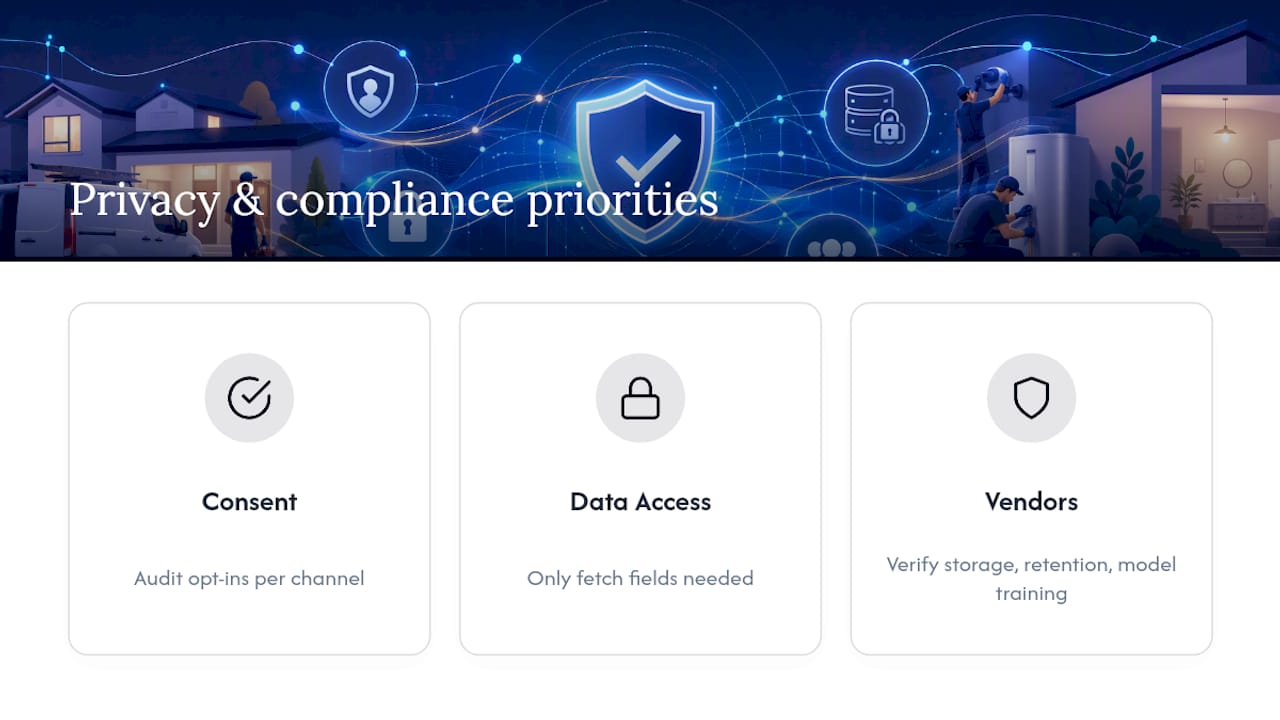
Three practices matter most in practice:
Consent tracking. Automated systems need a clear, auditable record of what each customer opted into, by channel. A customer who agreed to email billing reminders hasn’t automatically agreed to marketing texts.
Data minimization. AI agents pulling from a knowledge base or CRM should only access what’s needed to resolve the specific interaction in front of them. Broad, unrestricted data access increases both the risk of a breach and the blast radius if one happens.
Vendor accountability. When a third-party AI platform processes customer conversations, your business remains responsible for how that data gets stored, used, and secured. That makes vendor due diligence part of compliance, not just procurement. Ask directly where customer data is stored, how long it’s retained, and whether it’s used to train the vendor’s broader AI models, some do this by default unless you opt out.
None of this should slow down a pilot. It should shape which use cases you automate first. Billing reminders and appointment confirmations carry lower compliance risk than automating conversations involving sensitive financial disputes or health-adjacent service details, so sequence your rollout accordingly.
How Do You Get Staff to Actually Adopt the New System?
The technology rarely fails first. The adoption does. Front-line staff who’ve spent years handling customer calls and messages manually will resist a system that seems to second-guess their judgment or, worse, threatens their job security.
Address that directly instead of hoping it resolves itself. Frame automation explicitly as agent empowerment, the same framing that separates successful AI rollouts from failed ones: AI handles the repetitive volume, humans handle the judgment calls and the emotionally charged conversations. Say that plainly, early, and often.
Three practical steps make the difference between adoption and quiet sabotage:
Involve frontline staff in pilot design. The people fielding calls and tickets every day know exactly where customers get confused or frustrated. Their input on escalation rules and edge cases is more valuable than another vendor demo.
Train on the exceptions, not just the happy path. Staff need confidence handling the cases where AI hands off a conversation, not just watching a smooth demo where everything works.
Set a feedback loop for flagged AI errors. When an AI agent gets something wrong, staff need a fast, simple way to report it, and they need to see that reports actually change the system. Nothing kills trust faster than reporting a bug that never gets fixed.
Give this rollout the same weight as any other operational change. Skipping structured training because “it’s just software” is how good pilots quietly fail six months in.
How Do You Measure ROI and Keep Improving After Launch?
ROI on customer communication automation isn’t a single number you calculate once. It’s a moving baseline you track against the KPIs set before launch: AHT, CSAT, deflection rate, time-to-resolution, and revenue recovery.
Start with a clean before-and-after comparison on your pilot channel. If appointment reminders were the pilot, compare no-show rates for the eight weeks before automation against the eight weeks after. That single comparison, isolated to one variable, tells you more than a company-wide dashboard full of unrelated metrics.
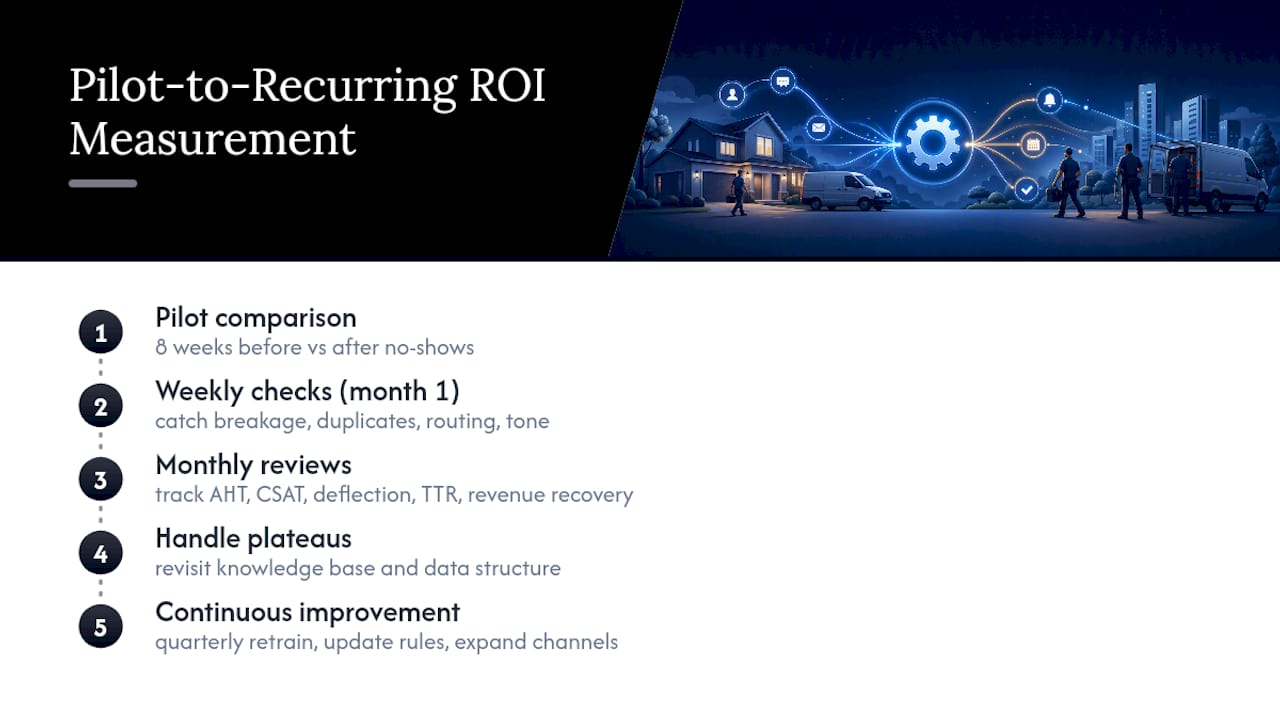
From there, build a recurring review cadence. Weekly checks in the first month catch obvious breakage, duplicate messages, wrong routing, tone mismatches. Monthly reviews after that should focus on trend direction: is deflection rate climbing steadily, or did it plateau after an initial bump?
Plateaus are common and not necessarily a failure signal. They usually mean the knowledge base needs another pass, or the AI is hitting edge cases it wasn’t trained to handle. Treat every plateau as a prompt to revisit your data structure before assuming the technology has hit its ceiling.
The businesses that get the most out of automation treat it as a living system, not a one-time deployment. They revisit escalation rules quarterly, retrain on new common questions as products or services change, and expand to new channels only after the current one hits a stable, measured performance level.
Where Should Leaders Actually Focus First?
Most leaders overinvest in picking the “smartest” AI model and underinvest in the boring work: cleaning up the knowledge base and defining escalation rules before anything goes live. That priority order is backwards, and it’s the single biggest reason pilots stall.
Two things matter more than the AI model itself. First, get your data structured enough that AI can answer confidently instead of guessing. Second, decide upfront exactly which decisions stay with a human, then write that rule down before launch, not after a customer complaint forces the conversation.
I’ve seen the pattern repeat across industries: teams that skip data prep spend the first quarter fixing AI mistakes instead of measuring improvement. Teams that spend two extra weeks on knowledge-base cleanup before launch see cleaner metrics almost immediately. Measure early, even if the early numbers are unflattering, and commit to iterating rather than expecting a finished system on day one.
— Tarun
Where JobOS Pro Fits for Home Service and Franchise Operators
If you run a home service business, the gap isn’t usually strategy. It’s disconnected tools that let calls, payments, and follow-ups slip through unnoticed. JobOS Pro is built specifically to close that gap, connecting AI agents, missed-call recovery, and automated invoicing into one operational layer that works alongside the software you already use, including Jobber and QuickBooks.

JobOS Pro’s AI receptionist captures leads and answers routine inbound questions around the clock, while automated invoicing and payment follow-ups target the exact revenue leaks that manual processes miss: uncollected payments, missed appointment confirmations, and slow collections cycles. For franchise operators, multi-location intelligence gives corporate leaders a single view into which locations are converting calls into revenue and which ones are leaking it, so you can standardize what’s working instead of guessing location by location.
This fits best for HVAC, plumbing, electrical, landscaping, cleaning, roofing, and pest control operators who are past the manual-tracking stage and need automation that plugs into their existing stack rather than replacing it. If billing delays or missed calls are costing you jobs, start with a look at how to cut days sales outstanding and get customers to pay faster, or book a demo to see how JobOS Pro maps to your specific revenue leaks.
Sources
- Personalize customer communications with omnichannel solutions — OpenText
- AI-Powered Customer Service Automation Platform | Kommunicate
- What is AI in customer communications? — Aircall