
Dunning Emails for Ops Teams: Recover Revenue Faster
Dunning Emails for Ops Teams: Recover Revenue Faster
A dunning email is a scheduled message that alerts a customer to a failed charge or overdue invoice and gives them a fast, low-friction path to fix it. The recommended approach is automation: build failure-specific sequences that route by decline reason instead of blasting the same generic reminder to everyone. That single shift, paired with the security guardrails set by PCI DSS and the collection limits in the FTC’s FDCPA guidance, is what separates a dunning program that recovers revenue from one that just annoys people. A platform like JobOS Pro builds this logic in natively rather than bolting it onto existing billing tools.
A simple three-step cadence covers most subscription failures:
- Day 0: friendly notice the charge didn’t go through, with a one-click update link.
- Day 3: direct reminder naming the amount and consequence of inaction.
- Day 13: pre-lockout notice, the last message before access is typically suspended.
Key Takeaways
Automated, failure-specific dunning sequences with a same-day first send and a hard stop-on-success rule recover more revenue with less manual work than generic reminder blasts.
| Point | Details |
|---|---|
| Start same-day | Trigger the first email the moment a charge fails, not days later. |
| Route by decline reason | Match copy to expired card, insufficient funds, or fraud flags instead of one template. |
| Anchor on day 13 | Treat the pre-lockout email as the highest-stakes message in subscription sequences. |
| Track recovery in dollars | Measure recovered MRR and DSO movement, not just open rates. |
| Automate the whole loop | Jobospro triggers, routes, and stops dunning sequences automatically across every location. |
Table of Contents
- When Should You Send Dunning Emails?
- Why a Deliberate Dunning Strategy Pays Off
- How Do You Write an Effective Dunning Email?
- What Do Dunning Email Sequences Look Like?
- How Do You Automate Dunning Without Extra Headcount?
- When Should You Escalate Past Email?
- Which Metrics Show a Dunning Program Is Working?
- What Mistakes Sink Dunning Recovery Rates?
- What Does the Evidence Say About Automated Dunning?
- Running Dunning at Scale Across Multiple Locations
- Make Dunning One Less Thing You Manage Manually
- Where to Learn More About Compliance and Cadence
- Frequently Asked Questions
- Sources
When Should You Send Dunning Emails?
Timing depends on what triggered the problem. A failed card charge, an expiring card flagged in advance, a past-due B2B invoice, and a failed automatic retry all call for different starting points and different urgency levels.
Common triggers worth building rules around:
- Failed or declined charge at the point of billing
- Card expiring within the next 30 days
- Invoice past its due date with no payment logged
- Scheduled payment retry that also failed
- Pre-dunning warning sent before a renewal date
Subscription businesses run a dense, front-loaded cadence: several emails in the first two weeks, with day 13 as the critical pre-lockout message before most services suspend access, according to Baremetrics. B2B invoicing runs longer and slower, often stretching 30 to 60 days with fewer, more formal touches. Either way, the sequence should stop automatically the moment payment clears, the customer contacts support directly, or the account is canceled. Sending a reminder after the invoice is already paid is one of the fastest ways to erode trust.
Why a Deliberate Dunning Strategy Pays Off
Failed payments quietly drain subscription revenue. Without a structured sequence, a good share of those customers simply churn, not because they wanted to leave but because nobody reminded them their card expired. A deliberate program catches that revenue before it disappears.
The operational upside compounds beyond the recovered dollars:
- Fewer manual follow-ups for your billing or accounts receivable team
- More predictable cash flow and fewer surprise gaps at month-end
- Earlier visibility into billing system issues, like a payment gateway rejecting a whole card type
Recovering an existing customer through automated retries and reminders costs far less than re-acquiring one from scratch. That math alone justifies building the sequence properly instead of treating it as an afterthought.
How Do You Write an Effective Dunning Email?
Every stage of the sequence needs a subject line, a clear body, and one obvious next step. Skip any of those three and recovery rates drop.
Subject lines should be short enough to read fully on a phone screen and specific about the action needed. Test variations like “Your payment didn’t go through” versus “Quick fix needed: card update for [Account]” versus “Action required before [date].”
Body copy should answer three questions in the first two sentences: what happened, what to do, and what happens next. Every message needs the invoice number, the exact amount due, the retry or due date, and a direct update link. Vague copy that just says “there was an issue with your payment” forces the customer to guess, and guessing kills conversions.
The call to action should be singular: one button, one link, ideally a one-click card update rather than a multi-page checkout flow. Offer a secondary support contact for edge cases, but never let it compete visually with the primary action.
Tone should shift as the sequence progresses. Day 0 reads warm and assumes good faith (“this happens all the time”). By the final email, the language gets direct about consequences without turning threatening or shaming.
Deliverability matters as much as copy. Send from an authenticated domain using SPF, DKIM, and DMARC, avoid spammy formatting like excessive caps or urgent red banners, and always kill the remaining sequence the instant a payment succeeds.
Pro Tip: Route copy by decline code instead of writing one generic template. An expired card, insufficient funds, and a fraud flag each need a different fix, and naming the actual problem cuts confusion and speeds recovery, per SubRevival’s analysis.
What Do Dunning Email Sequences Look Like?
Three sequence lengths cover most situations. Pick the one that matches your billing model, then adapt the copy to your voice.
Compact 3-email subscription sequence:
- Day 0, soft: “Hi [name], your last payment didn’t go through. Update your card here and you’re all set.”
- Day 3, mid: “We tried again and the charge still failed. Update your payment method by [date] to avoid disruption.”
- Day 7, final: “This is your last reminder before we pause your account. One click fixes it.”
Full 7-email subscription recovery sequence (per Baremetrics’ documented cadence): opens with a same-day notice, adds two friendly nudges through day 5, shifts to direct language by day 9, and lands its highest-stakes message on day 13, the pre-lockout warning, before a final closure notice if the account lapses.
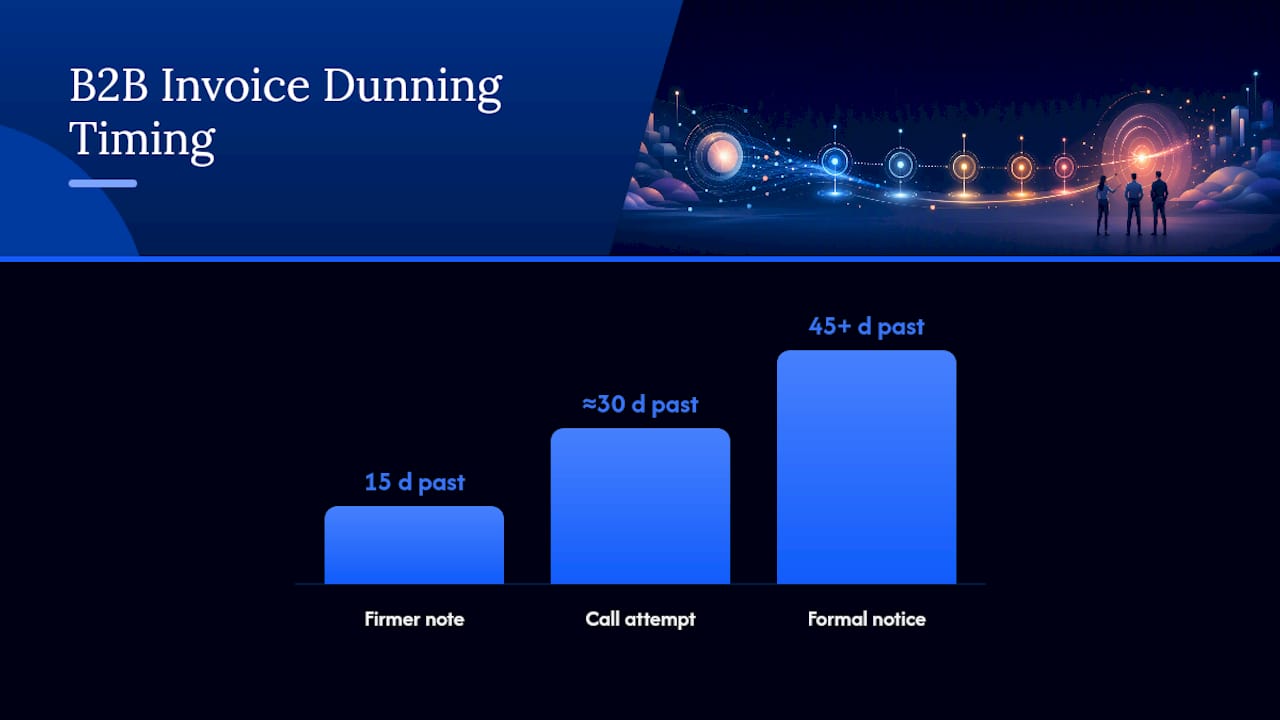
B2B invoice sequence over 30 to 60 days: a polite reminder a few days before the due date, a firmer note at 15 days past due referencing the invoice number and amount, a call attempt around day 30, and a formal notice or collections handoff past day 45.
Subject-line variations worth testing across any sequence: “Payment update needed,” “[Invoice #] is now past due,” and “Quick action needed on your account.”
Pro Tip: Keep three template variants ready, one for expired cards, one for insufficient funds, and one for generic invoice follow-up, rather than editing a single master template on the fly every time.
How Do You Automate Dunning Without Extra Headcount?
Automation lives or dies on a handful of technical pieces working together. Miss one and the sequence either fires late or keeps nagging a customer who already paid.
- Webhooks on failed charges that trigger the first email same-day
- A hard stop-on-success rule that kills the sequence the moment payment clears
- Retry scheduling synced to your payment gateway’s own retry attempts, like Stripe’s built-in smart retries
- Failure-code routing so copy matches the actual decline reason
Integration points matter just as much as logic. The sequence needs to talk to your payment gateway for tokenized card data, your billing system for invoice status, your CRM for account context, and your support desk for escalations. Platforms like JustPaid layer SMS fallback on top of email for customers who stop opening messages, and transactional email providers like Postmark handle the actual sending infrastructure with deliverability built in. Look for analytics that show recovered revenue in dollar terms, not just open rates.
When Should You Escalate Past Email?
Email carries most of the recovery work, but some accounts need a human. Set clear thresholds instead of leaving escalation to gut feeling.
- Move to a phone call when a B2B invoice passes 30 days past due with no response
- Suspend service access, rather than canceling outright, once the final subscription email goes unanswered
- Loop in accounts payable or a sales rep contact when the usual invoice recipient goes silent
- Reserve a formal demand letter or a collections partner for invoices well past 60 days
Every collection communication must avoid harassment, threats, or deceptive claims, guardrails the FTC’s FDCPA spells out clearly. Any payment link or stored card token in the flow needs to meet PCI Security Standards for handling that data.
Pro Tip: Log every contact attempt, email, call, and letter, with a timestamp. That audit trail protects you in a dispute and shows good faith if a customer challenges a suspension.
Which Metrics Show a Dunning Program Is Working?
Track a small set of numbers consistently rather than drowning in vanity metrics.
- Open rate and click-to-update rate for each email in the sequence
- Recovery rate, the share of failed payments ultimately resolved
- Recovered MRR in actual dollars, not just percentages
- Days Sales Outstanding (DSO) movement over time
- Sequence stop rate, how often customers resolve before the final email
Run A/B tests on subject lines, spacing between sends, failure-specific copy versus generic, and a single-click update link versus a multi-step form. Segment results by customer tenure, payment method, decline reason, and account value. A long-tenure customer with a simple expired card deserves gentler treatment than a new account with a repeated insufficient-funds decline.
What Mistakes Sink Dunning Recovery Rates?
Most underperforming programs share the same handful of flaws.
- Sending once and stopping: build a multi-touch sequence, not a single reminder.
- Aggressive language too early: save direct urgency for later stages.
- No stop-on-success rule: wire the sequence to cancel automatically on payment.
- Poor deliverability: authenticate your sending domain before scaling volume.
- One-size-fits-all copy: route messages by decline reason, not a single template.
What Does the Evidence Say About Automated Dunning?
Same-day first notices consistently outperform delayed ones on open and recovery rates, according to Baremetrics. Failure-specific messaging beats generic blasts for the same reason a targeted fix beats a guess. Both practices sit alongside PCI and FTC requirements as the baseline for any responsible program.
Running Dunning at Scale Across Multiple Locations
Applying this logic across a handful of accounts is straightforward. Applying it consistently across dozens of franchise locations, each with its own billing quirks, is where most operators lose control. The sequences drift, decline-code routing gets skipped, and every location reinvents its own cadence. Standardizing the logic once, and letting it run the same way everywhere, is what actually protects recovered revenue at scale.

Make Dunning One Less Thing You Manage Manually
Jobospro is built for operators who’d rather have failure-specific dunning run itself than manage spreadsheets of overdue accounts across locations. It triggers same-day reminders on failed charges, routes copy by decline reason, applies stop-on-success automatically, and orchestrates retries in sync with your payment gateway.

For multi-location operators, that same logic rolls up into benchmarking across every site, so corporate leaders can see which locations recover fastest and which need attention, without asking managers to compile reports. Jobospro also works alongside billing and CRM tools you already run, rather than forcing a rip-and-replace. If overdue invoices and failed payments are eating into your monthly revenue, see how to cut your DSO and get customers paying faster with a setup built specifically for home-service and subscription operations.
Where to Learn More About Compliance and Cadence
- PCI Security Standards: the technical baseline for handling card data or payment links securely.
- FTC’s FDCPA guidance: legal limits on tone, frequency, and disclosure in collection communications.
- Baremetrics’ dunning guide: detailed cadence examples and subject-line templates for subscription recovery.
Frequently Asked Questions
What is a dunning email, exactly? It’s an automated message sent after a payment failure or missed invoice, designed to get the customer to fix the issue with minimal friction, usually through a one-click update link.
How many dunning emails should a sequence include? Subscription sequences typically run three to seven emails over roughly two weeks. B2B invoice sequences run fewer, more spaced-out touches over 30 to 60 days.
Do dunning emails hurt customer relationships? Not when the tone stays friendly early and the copy is specific about what happened and how to fix it. Vague or aggressive language is what damages trust, not the reminder itself.
Should dunning emails include a phone call step? For subscriptions, usually not until very late. For B2B invoices, a call after 30 days past due is common practice alongside the email sequence.
What’s the difference between dunning and collections? Dunning is the automated, early-stage reminder process. Collections begins once an account moves past the point where a standard sequence has failed to resolve payment, often involving a formal notice or a third party.
Sources
- Fair Debt Collection Practices Act (FDCPA) — FTC
- PCI Security Standards — PCI SSC
- How to Write Effective Dunning Emails (With Examples) — Baremetrics
- Dunning Email Best Practices: Templates & Timing — SubRevival