
Stop $2.3B Leakage: Field Service Payroll That Ties Time to Pay Rules
Stop $2.3B Leakage: Field Service Payroll That Ties Time to Pay Rules
The fastest way to stop payroll errors in field service is to bind mobile time capture to configurable pay rules and automated tax workflows so every hour is auditable and job-costed. Get this right and two things follow: technicians get paid accurately every cycle, and your job-cost reports finally reflect real labor spend instead of guesswork. The sections below walk through the features, compliance rules, and workflows that make it happen.
TL;DR:
- Accurate mobile time capture with offline sync, GPS geofencing, and job-code attachment is essential for reliable payroll in remote field service environments.
- Configurable pay rules that automatically apply different rates, overtime thresholds, and shift differentials reduce manual errors and ensure compliance across multiple states or regions.
- Integration of payroll data into accounting and job-cost reports allows real labor costs to directly inform profitability analysis and pricing adjustments.
- Proper worker classification management, with separate workflows for employees and contractors, prevents costly retroactive audits and ensures correct tax reporting.
- A streamlined payroll workflow includes automated approval, tax processing, and year-end form generation, supported by a system capable of handling exceptions and retroactive adjustments.
Table of Contents
- Why Field Service Payroll Mistakes Cost More Than You Think
- What Payroll Features Actually Matter for Mobile Crews?
- How Do Worker Classification Rules Affect Payroll Processing?
- From Clock-In to Paycheck: The Payroll Workflow That Works
- Turning Payroll Into a Profitability Tool
- How JobOS Pro Fits This Payroll Checklist
- What Most Operators Get Backward About Payroll
- Get a Payroll System That Matches This Checklist
- Sources
- FAQ
Why Field Service Payroll Mistakes Cost More Than You Think
Manual time capture is where field service payroll breaks down first. A tech texts hours from a job site, a dispatcher retypes them into a spreadsheet, and by the time payroll runs, nobody can verify whether that number reflects actual work performed. That gap between reported hours and real hours quietly erodes margins on every job, because labor costs that don’t match timesheets distort job costing and the estimates built on top of it.
Pay disputes compound the problem. A technician who gets shorted on overtime or travel pay once will double check every future paycheck, and that erosion of trust shows up in turnover. Replacing a certified HVAC or electrical technician costs far more than the payroll software that would have prevented the dispute in the first place.
Then there’s regulatory exposure. Missed overtime, misclassified 1099 workers, or incomplete time records don’t just create internal friction. They create liability under wage-and-hour law that varies by state.
Field service payroll needs a defensible audit trail, not a good-faith estimate. That means:
- GPS geofencing that confirms a technician clocked in at the actual job site, not from home
- Timestamped entries tied to specific job codes rather than a daily lump sum
- Manager approvals logged before a payroll run, creating a record of who signed off and when
- Digital storage of corrections and retroactive adjustments, so year-end reconciliation doesn’t require guesswork
Systems built around location-aware pay rules and timestamped records reduce wage-and-hour risk precisely because they remove the ambiguity that turns a simple payroll error into a Department of Labor complaint.
What Payroll Features Actually Matter for Mobile Crews?
Not every payroll platform built for offices translates to a mobile workforce. Field service payroll has specific demands, and vendors that ignore them create more manual work than they save.
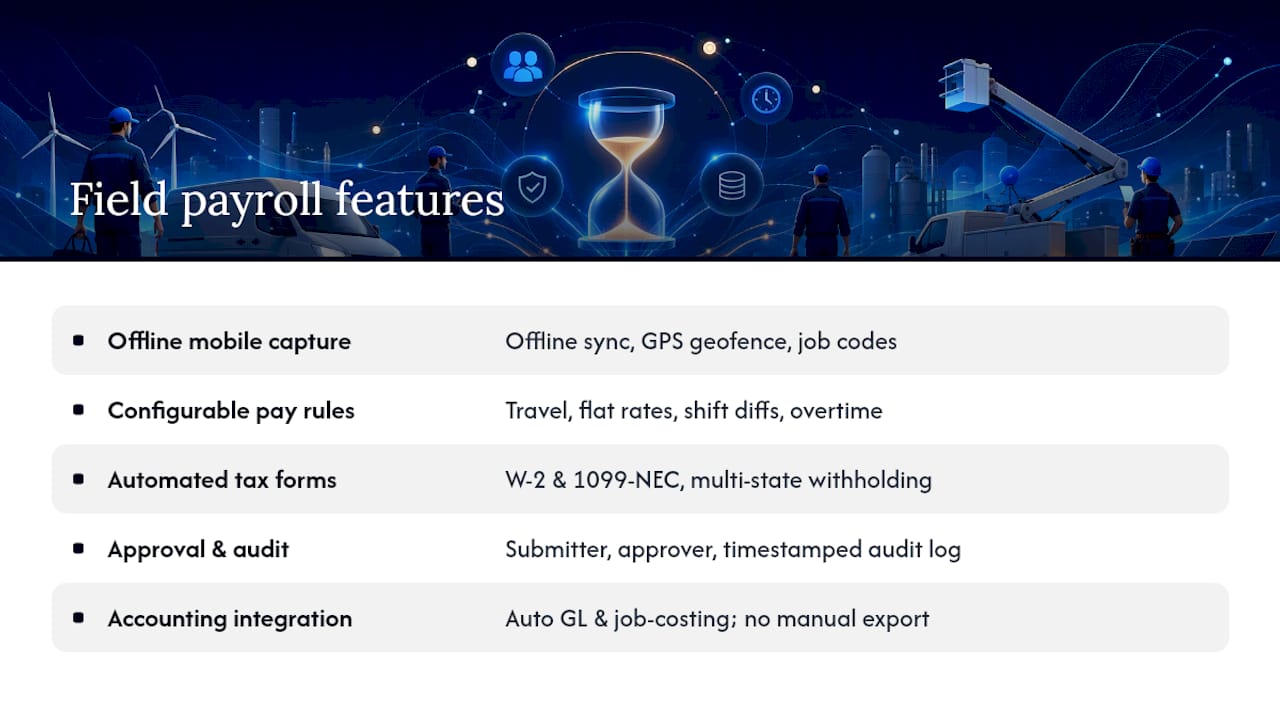
1. Mobile time capture that works without signal. Rural service calls and basements kill connectivity. Look for offline sync that queues entries locally and pushes them once a connection returns, with GPS geofencing and job-code attachment built into the clock-in itself.
2. Configurable pay rules. Travel time, per-job flat rates, shift differentials, and overtime thresholds all need to apply automatically based on the job type and location, not a payroll clerk’s memory.
3. Automated tax and year-end forms. W-2 generation for employees and 1099-NEC generation for contractors should happen without a separate filing project every January, including support for multi-state withholding when crews cross jurisdiction lines.
4. Approval workflows and audit logs. Every hour should carry a record of who submitted it, who approved it, and when. That log is what protects you in a wage claim or an IRS inquiry.
5. Integration with accounting and payroll processors. Payroll data should flow into your general ledger and job-costing reports without a manual export step.
When you sit down for a vendor demo, bring your actual pay rules and ask them to configure a live example.
Pro Tip: Ask the vendor to run a mock payroll cycle using your messiest real-world scenario, a tech who worked overtime across two counties with different minimum wage rules. If they can’t show you that math live, the platform isn’t ready for your crews.
How Do Worker Classification Rules Affect Payroll Processing?
Whether a worker is a W-2 employee or a 1099 contractor changes almost everything about how you run payroll. W-2 employees require tax withholding, unemployment insurance contributions, and often benefits administration. Contractors get paid gross, handle their own tax withholding, and receive a 1099-NEC rather than a W-2 at year end.
Under 2026 IRS guidance, the 1099-NEC reporting threshold rises to $2,000 or more paid to a contractor during the year, increasing from the prior lower threshold. That change reduces the number of small contractors you’ll need to issue forms for, but it doesn’t reduce the need for accurate tracking. Automated payroll systems handle this by generating the right form type based on how each worker is classified in the system from day one.
A few practices prevent classification headaches before they start:
- Run separate onboarding flows for employees and contractors so pay rules and tax treatment never get mixed
- Store classification decisions and supporting documents in one searchable place, not scattered email threads
- Apply overtime and minimum wage rules based on the technician’s actual work location, since rates and thresholds shift by state under the Fair Labor Standards Act
- Flag any contractor who starts looking like an employee, working set hours, using company equipment, before it becomes an audit finding
Getting classification wrong retroactively is far more expensive than building the right workflow up front.
From Clock-In to Paycheck: The Payroll Workflow That Works
A clean field service payroll process follows a predictable sequence, and each step is where automation removes a failure point that manual processing introduces.
- Field capture. A technician clocks in through a mobile app, and GPS geofencing confirms the location matches the assigned job.
- Job tie. The clocked hours attach automatically to a specific job code, so labor cost lands on the right work order instead of a general bucket.
- Manager approval. A supervisor reviews and approves the timesheet before it enters the payroll run, creating the audit record that protects you later.
- Payroll run. Approved hours flow into the pay engine, which applies the correct pay rules, overtime rates, and shift differentials automatically.
- Tax deposits and year-end forms. Withholding gets calculated and deposited, and W-2 or 1099-NEC forms generate based on each worker’s classification.
Exceptions still happen. A tech forgets to clock out, a job gets billed under the wrong code, or a correction surfaces after the payroll run closes. A good system supports off-cycle runs and retroactive adjustments without forcing you to unwind the entire pay period.
The integration question matters just as much as the workflow itself. Some operators run time capture and payroll on a single connected platform. Others sync data between a field service tool and a separate payroll processor. Either pattern works, but mapping job codes to payroll line items consistently is what keeps job costing accurate downstream. Get that mapping wrong once and every profitability report built on it is quietly false.

Turning Payroll Into a Profitability Tool
Payroll data is job-cost data if you attach it correctly. Every approved timesheet should map to a work order, so labor shows up as a real cost of goods sold line rather than an abstract payroll expense.
Once that mapping is in place, a handful of KPIs tell you where money actually goes:
- Labor cost per job, compared against the estimate to catch pricing drift early
- Technician utilization rate, revealing how much paid time converts to billable work
- Overtime share of total payroll, a leading indicator of scheduling problems
- Payroll leakage rate, the gap between hours worked and hours actually billed or reimbursed
Run these monthly, not quarterly. Accurate payroll data changes how you price future jobs, since labor costs that reconcile with actual timesheets make your estimates more reliable. Before analysis, clean the data: reconcile any off-cycle corrections, confirm every hour has a job code, and check that overtime calculated correctly for multi-state crews.
How JobOS Pro Fits This Payroll Checklist
JobOS Pro was built around the same problem this guide addresses: disconnected time capture and payroll create revenue leaks. Its multi-location intelligence gives franchise operators a single view of labor cost and payroll behavior across every location, standardizing pay rules and approval workflows instead of leaving each site to improvise. A $2.3 billion revenue-leak study informed the platform’s design, and the practical result for multi-location operators is fewer payroll disputes and faster, more consistent payroll runs across every crew.
What Most Operators Get Backward About Payroll
Most field service businesses treat payroll as an administrative task to survive each cycle, not as operational data. That’s backward. Payroll is the closest thing you have to a real-time labor cost report. If you’re only looking at it twice a month to cut checks, you’re ignoring the most current signal you have about margin erosion.
My priority order for operators fixing this: capture hours accurately first, automate the pay rules second, and integrate the data into accounting third. Skip the order and you’ll spend more time debugging automated errors than you saved by manual entry. Pilot any new system with one crew before rolling it out company-wide, train technicians on the mobile app before go-live, not after, and measure the leakage rate before and after to prove the change actually worked.
— Tarun
Get a Payroll System That Matches This Checklist
This platform offers an alternative to stitching together separate time-tracking, payroll, and job-costing tools for field service teams. It connects mobile time capture, configurable pay rules, and job-cost reporting in one system, so hours captured at the job site flow directly into accurate paychecks and real labor cost visibility, without a manual export step between platforms.

Before you book a demo, pull together your current pay rules (overtime thresholds, travel time policy, shift differentials), a list of your most common payroll exceptions, and a description of how your crews currently clock in. That gives the demo team enough to configure a live example using your actual scenarios instead of a generic walkthrough. Explore the industries JobOS Pro supports to see how the platform fits your trade, then book a demo to see your own pay rules running through it.
Sources
- Instructions for Forms 1099-MISC and 1099-NEC (IRS)
- Fair Labor Standards Act (FLSA) — U.S. Department of Labor
FAQ
What Are the Four Types of Payroll Systems?
Payroll systems generally fall into four categories: in-house manual payroll, in-house payroll software, outsourced payroll services, and integrated field service platforms that combine time tracking, pay rules, and tax filing in one system.
Is Field Service Payroll Part of Salesforce?
Salesforce offers field service management tools through its Field Service product, but it does not include native payroll processing. Most field service operators pair a scheduling and dispatch platform with a dedicated payroll system or an integrated solution like JobOS Pro that connects time capture directly to pay rules.
What Is the Most Widely Used Payroll Software?
Payroll software popularity varies heavily by industry and business size, and no single platform dominates field service specifically. What matters more than market share is whether the platform handles mobile time capture, geofencing, and job-code-linked pay rules, the features field service payroll actually depends on.
How Much Should You Pay for Payroll Services?
Payroll service costs vary by provider, employee count, and feature set, typically combining a base monthly fee with a per-employee charge. Current JobOS Pro pricing is available directly on the industries page, where you can see how payroll and workforce features fit each plan.
How Does Time Tracking Connect to Payroll in Field Service?
Time tracking feeds payroll by capturing GPS-verified clock-ins tied to specific job codes, which then flow through manager approval before a payroll run applies the correct pay rules and generates tax withholding automatically.