HVAC software for contractors is the single system that captures every incoming call, schedules the job, sends the estimate, and collects payment before a lead ever has the chance to go cold. For heating and cooling companies running three to fifteen trucks, this matters more than almost any other purchase decision, because most lost revenue never comes from a competitor underbidding the job. Instead, it slips away quietly through missed calls, forgotten follow-ups, and invoices that never get sent. In fact, industry data reviewed by JobOS Pro suggests home service operators lose 20 to 30 percent of potential revenue this way.
Direct answer: HVAC software for contractors is a platform that unifies scheduling, dispatch, estimates, invoicing and customer communication so a heating and cooling business stops losing jobs to slow response times. The best options for growing crews price the software flat rather than per technician, so the bill does not climb every time an owner hires.
What Is HVAC Software for Contractors?
HVAC software for contractors is a business management platform built specifically for heating, ventilation and air conditioning companies. Unlike generic project management tools, it typically bundles scheduling, dispatch, estimating, invoicing, payments and customer communication into one connected system. As a result, a dispatcher, technician and office manager can all view the same job record instead of updating three separate spreadsheets. Most platforms in this category also track technician location, job history and equipment details specific to HVAC work, such as refrigerant type or warranty status. Consequently, contractors gain visibility into where a job stands at every stage, from the first phone call through final payment.

HVAC software for contractors puts scheduling, estimates and job details in one place, even from inside the truck.
Why HVAC Contractor Software Fails to Stop Revenue Leaks
Many contractors already own some form of scheduling or invoicing tool, yet revenue still leaks out of the business. Why does this happen? Typically, it is because the software only handles one piece of the job while five to thirteen other disconnected tools handle the rest. For example, calls might go through one phone system, estimates through email, and payments through a separate app entirely. Because nothing talks to anything else, handoffs get dropped. A missed call after five o'clock never becomes a booked job. An estimate sent on Friday goes cold by Monday because no one followed up. Similarly, a completed job sometimes never gets invoiced at all, since no automated trigger exists to prompt billing.
According to U.S. Bureau of Labor Statistics data, demand for HVAC technicians continues to grow steadily, which means competition for skilled labor is rising alongside demand for service calls. Therefore, contractors who cannot capture and convert every inbound lead are leaving growth on the table for competitors who can. This is precisely the gap that dedicated HVAC software is designed to close.
Core Features Every HVAC Scheduling Software Needs
Not every feature matters equally. However, a handful of capabilities consistently separate software that plugs revenue leaks from software that merely digitizes a paper calendar. This is closely related to what modern field service management systems aim to solve across trades in general.
Missed-Call Capture and AI Receptionist
Peak-hour and after-hours calls make up a large share of inbound leads for most HVAC businesses. An AI receptionist can answer these calls, qualify the caller, check live technician availability, and book the appointment automatically. As a result, no lead sits in voicemail waiting for a callback that may never happen.
Estimates With Dynamic Pricing and Financing
Estimates that go cold usually lose because a competitor answered faster or offered financing on the spot. Presenting dynamic pricing and buy-now-pay-later options at the moment of decision, rather than days later, meaningfully improves close rates.
Payments, Invoicing and Text-to-Pay
A completed job that never gets invoiced is pure lost revenue. Automated invoicing paired with text-to-pay links closes this gap by billing the customer immediately after the technician marks the job finished.
Reviews and Reputation Management
Satisfied customers who never leave a review quietly dry up future lead flow. Automated review requests sent right after job completion turn happy customers into public proof that drives the next call.

A shared calendar keeps dispatchers, technicians and office staff aligned on every job.
Flat-Rate vs Per-Technician: How HVAC Business Management Software Pricing Works
Pricing structure is arguably the most consequential decision a contractor makes when choosing a platform. Per-technician pricing looks affordable at five trucks but becomes expensive quickly once a crew grows to fifteen or twenty. In contrast, flat-rate pricing keeps the bill fixed regardless of headcount.
| Pricing Model | Cost at 5 Techs | Cost at 20 Techs |
|---|---|---|
| Per-Technician | Lower upfront | Significantly higher |
| Flat-Rate | $199–$549/month | Same $199–$549/month |
For a deeper breakdown of how leading platforms stack up on this exact issue, the HVAC software comparison guide walks through feature-by-feature differences. Meanwhile, contractors specifically weighing enterprise-grade platforms may find the breakdown in why ServiceTitan can get expensive useful before signing a multi-year contract.
How to Choose the Right HVAC Software for Contractors in 5 Steps
Selecting the right platform does not need to be complicated. Following a structured process helps avoid an expensive, disruptive switch later.
- Audit your current revenue leaks. Review missed calls, unanswered leads, unpaid invoices and unsent review requests from the last ninety days.
- Map every handoff point in your workflow. List each moment a lead or job passes between tools or people, since leaks usually happen there.
- Compare flat-rate versus per-technician pricing. Project costs at twenty and thirty technicians before signing anything long-term.
- Test the platform with a free trial. Run it alongside existing tools for two to four weeks under real call volume.
- Roll out in phases with your field team. Migrate one crew first, gather feedback, then expand once the workflow is confirmed.
JobOS Pro vs ServiceTitan, Jobber and Housecall Pro
ServiceTitan offers deep functionality but bills per technician, which pushes total cost up sharply as a company scales past ten or fifteen trucks. Jobber and Housecall Pro, on the other hand, are simpler and cheaper to start with, but they generally lack the AI receptionist, dynamic financing and franchise-level reporting that growth-minded operators eventually need.
JobOS Pro is positioned between these extremes: more powerful than Jobber or Housecall Pro, and far simpler and cheaper than ServiceTitan, with flat pricing at $199, $349 or $549 per month regardless of technician count. It runs alongside existing tools like QuickBooks during a 30-day free trial, so switching does not require an immediate migration. Trades outside HVAC face similar leakage patterns too; electrical contractors can review comparable tools on the electrical contractor software page, and even businesses like landscaping crews using landscaping software deal with the same missed-call and invoicing gaps.
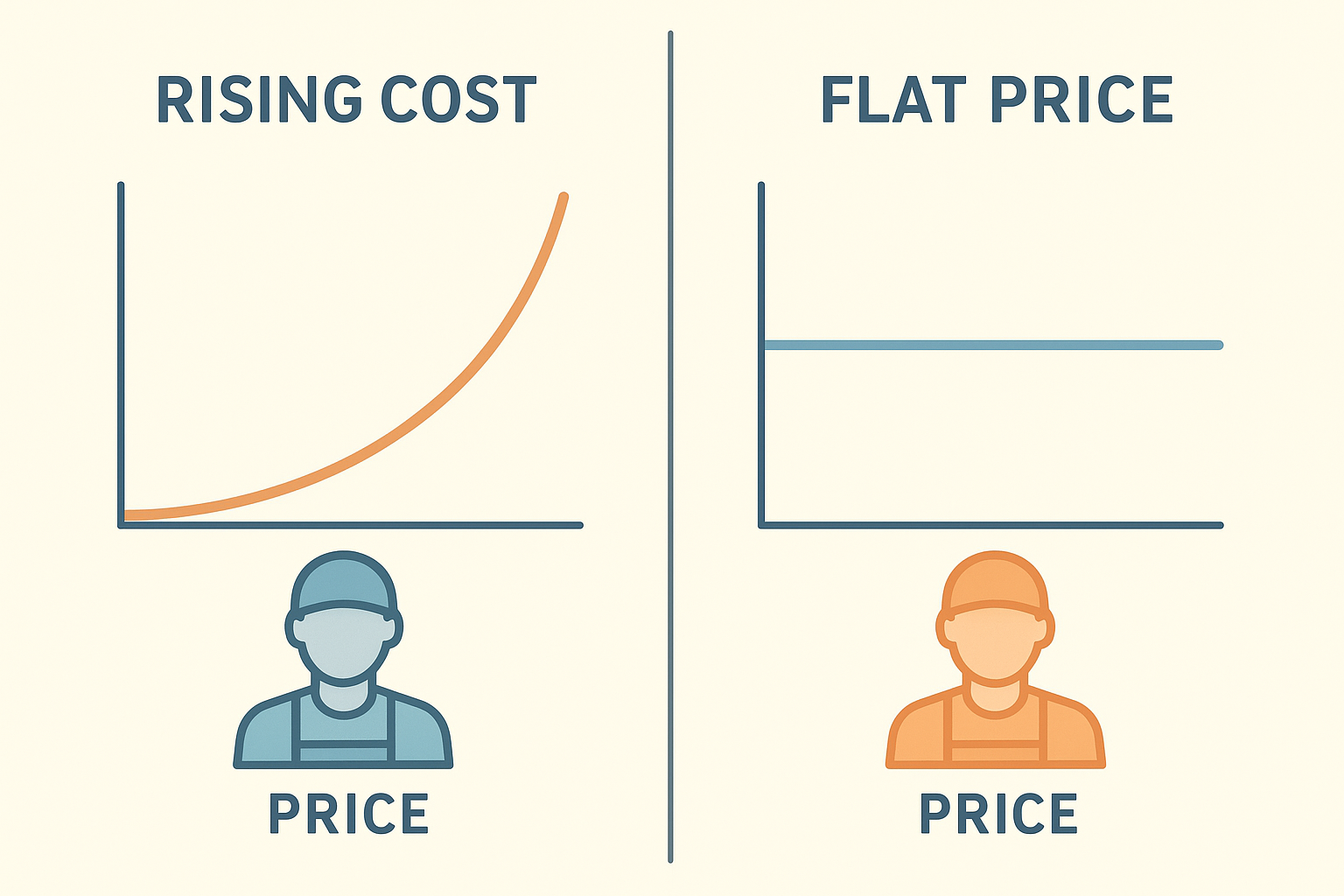
Flat-rate pricing keeps HVAC software for contractors affordable even as the crew grows.
Frequently Asked Questions About HVAC Software for Contractors
What is HVAC software for contractors?
HVAC software for contractors is a digital platform that manages scheduling, dispatch, estimates, invoicing and customer communication for heating and cooling businesses. It replaces spreadsheets and paper tickets with one connected system that tracks a job from the first phone call to the final payment.
How much does HVAC software for contractors typically cost?
Pricing varies widely, with some platforms charging per technician and others offering flat monthly rates. Flat-rate plans, such as $199 to $549 per month, let a growing crew add technicians without the software bill increasing.
How long does it take to implement HVAC software for contractors?
Most contractors can complete a basic setup within one to two weeks, including importing customer data and training staff. Full adoption across every feature typically takes another thirty to sixty days.
What is the difference between HVAC software for contractors and general field service software?
General field service software serves many trades with broad features, while HVAC-specific software includes tools built around seasonal demand, equipment tracking and financing options common to heating and cooling jobs.
Why do HVAC contractors lose revenue without dedicated software?
Without a connected system, calls go unanswered during peak hours, estimates get forgotten, and completed jobs sometimes never get invoiced. Industry estimates suggest home service businesses lose 20 to 30 percent of potential revenue to these internal handoff failures.
What features should growth-minded HVAC contractors look for?
Look for missed-call capture, dynamic estimate pricing, financing options, automated invoicing, review requests and a unified inbox across call, text and email. Above all, prioritize software that reduces the number of separate tools your team has to juggle.
Can HVAC software for contractors replace tools like QuickBooks or Jobber?
Some all-in-one platforms can replace five to ten point solutions, including basic accounting and scheduling tools, while others run alongside existing software like QuickBooks. Confirm integration or migration requirements before switching.
What common mistakes do contractors make when choosing new software?
A common mistake is signing a per-technician contract without projecting costs at future headcount, which can double the software bill within a few years. Another mistake is skipping a trial period and migrating every tool at once.
Is HVAC software for contractors worth it for a small 3-truck operation?
Yes, even small operations lose revenue to missed calls and slow follow-up, and a flat-rate platform can often pay for itself by recovering just one or two extra jobs per month.
How does AI answering calls help HVAC contractors?
An AI receptionist can answer inbound calls around the clock, qualify the caller, check technician availability and book the job automatically, capturing leads that would otherwise go to voicemail.
Does HVAC software for contractors help with reviews and reputation?
Many platforms include automated review requests sent after a job is marked complete, which helps convert satisfied customers into public reviews that support future lead flow.
What is the biggest difference between flat-rate and per-technician pricing?
Flat-rate pricing keeps the monthly software bill fixed regardless of headcount, while per-technician pricing increases every time a contractor hires, making scaling more expensive over time.
How do I switch HVAC software without disrupting operations?
Start by running the new platform alongside your current tools during a free trial, then migrate one crew or location first so staff can adjust gradually.
Does HVAC software work for multi-location or franchise operations?
Yes, several platforms include multi-location layers with cross-unit benchmarking, royalty tracking and standardized reporting across every site.
What is the ROI timeline for HVAC software for contractors?
Many contractors see measurable results, such as fewer missed calls and faster invoicing, within the first thirty to sixty days of full adoption, with larger gains building over three to six months.
Final Takeaway
Ultimately, HVAC software for contractors should be judged by one question: does it stop revenue from leaking out through missed calls, cold estimates and unbilled jobs? Flat-rate, all-in-one platforms tend to answer that question better than tools priced per technician, since the software cost never punishes growth. Before committing to a multi-year contract, therefore, it makes sense to audit current leaks, map handoff points, and test any platform with a real trial period. Contractors running three to fifteen trucks who have outgrown basic tools but do not want ServiceTitan's enterprise pricing have more options today than ever, and choosing well now can recover revenue that was quietly slipping away all along.
