
Get to Leads in 5 Minutes: Lead Capture Automation for Home Services
Get to Leads in 5 Minutes: Lead Capture Automation for Home Services
Lead capture automation is the automatic collection, qualification, and routing of prospect data the moment it arrives, whether that’s a form fill, a missed call, or a chat message. The recommended approach is an integrated capture → qualify → route pipeline rather than a patchwork of disconnected tools, since Zapier’s own automation documentation shows that instant collection and routing are what actually eliminate manual entry. A suitable pipeline is especially important for home service networks, where a missed call often means a lost job.
TL;DR:
- Automated lead capture systems must include fast, multi-channel ingestion, AI parsing, and accurate deduplication to prevent missed or duplicate records.
- Integration methods such as webhooks and native connectors are vital to ensure real-time data flow and routing, especially across multiple vendors or franchise locations.
- Running pilots on the weakest lead sources first helps identify routing and scoring gaps, ensuring better long-term accuracy before full deployment.
- Costs vary from low hundreds for basic tools to custom enterprise pricing, with operational expenses in setup, tuning, and data enrichment often exceeding initial subscriptions.
- The typical implementation for a single location takes two to four weeks, while multi-location or franchise setups may require six to twelve weeks plus post-launch tuning.
Table of Contents
- What Are the Core Components of Lead Capture Automation?
- Where Does Automated Capture Fit in Your Marketing Stack?
- How Do You Implement Lead Capture Automation Step by Step?
- What Should You Check Before Choosing a Solution?
- What Workflows Should You Automate First?
- What Evidence Backs This Approach?
- What Do Lead Capture Automation Tools Actually Cost?
- How Long Does a Full Rollout Actually Take?
- What Mistakes Should You Watch for During Implementation?
- How JobOS Pro Automates Lead Capture for Home Service Networks
- Sources
- FAQ
What Are the Core Components of Lead Capture Automation?
Every lead capture system, no matter the vendor, breaks down into five working parts. Skip one and the whole chain weakens, usually at the exact moment volume spikes and you can least afford it.
Instant capture sources are the entry points where a prospect first signals interest: web forms, chat widgets, phone calls, missed calls, SMS, and paid ad landing pages. Each source behaves differently. A form fill arrives clean and structured. A phone call arrives as an unstructured recording that needs to be transcribed and parsed before it means anything. Capturing the event is easy. Capturing usable data from it is where most systems fail.
AI parsing and enrichment is what turns a raw signal into a usable lead record. This means pulling a name, phone number, service type, and urgency cue out of a voicemail transcript, or appending firmographic and location data to a bare email address. Platforms built for high-volume capture increasingly treat this as table stakes. Leadveyor’s approach to service-business lead capture documents multi-source ingestion paired with AI parsing and dedupe as core, not optional.
Lead scoring happens in two places, and conflating them is a common mistake. Scoring at the point of capture is fast and rule-based: does this ZIP code match your service area, does the request match a service you offer, did it arrive during business hours. Post-capture qualification is slower and richer, layering in behavioral signals, past customer history, and deal size estimates. Both matter. Capture-time scoring decides whether a lead gets a call in five minutes or five hours.
Routing, assignment, and notifications decide who acts on the lead and how fast. Rules typically weigh territory, technician availability, skill match, and current workload. The notification layer, an SMS ping, an app alert, a CRM task, needs to reach a human before the lead cools off. About 80% of marketing automation users report an increase in lead volume once automation is in place, but that volume is only worth something if routing keeps pace.
Data hygiene rounds out the list. Deduplication logic and consistent source attribution stop your CRM from turning into a swamp of triplicate records that make every performance report inaccurate. Common capture-layer functions include:
- Instant capture from forms, calls, chat, and paid ads
- AI parsing of unstructured inputs like voicemail transcripts
- Rule-based scoring at the moment of intake
- Behavioral scoring after enrichment
- Territory- and skill-based routing with SLA-backed notifications
- Deduplication tied to a single source-of-truth field
Get these five components right and the rest of your stack, nurture sequences, reporting, forecasting, inherit clean, timely data instead of compounding a mess.
Where Does Automated Capture Fit in Your Marketing Stack?
Lead capture automation isn’t one product category. It’s a layer that sits between the moment a prospect raises their hand and the moment a human, or a bot acting like one, responds. Understanding the layers stops you from buying overlapping tools or, worse, leaving a gap between them.
Most tool roundups now group products by the job they do rather than by brand, and that’s the right mental model to borrow. Wisepops’ breakdown of automated lead generation tools sorts the market into capture tools, store and score platforms, and nurture engines, three distinct jobs that rarely live well in a single tool built for a fourth purpose.
- Capture layer. Forms, chat widgets, call tracking, and missed-call systems that generate the first data point. This layer’s only job is speed and completeness, not analysis.
- Identity and enrichment layer. Software that takes a raw signal (a phone number, an email) and appends context: name match, company data, service history, location.
- CRM or system of record. Where the enriched lead lands permanently, gets assigned an owner, and becomes visible to sales and dispatch teams.
- Orchestration layer. Connectors, webhooks, and workflow engines that move data between the first three layers without manual handoffs.
- Nurture and follow-up layer. Email, SMS, and drip sequences that keep a lead warm if it isn’t immediately sales-ready.
The typical data flow looks like this: a prospect submits a form or misses a call, the capture layer logs the event, enrichment adds context within seconds, a scoring rule evaluates fit, the CRM receives the finished record, and orchestration tools fire the routing and notification actions simultaneously. Zapier’s documented examples rely heavily on webhooks and connector-based automations precisely because most businesses run capture, CRM, and nurture tools from different vendors that were never designed to talk to each other natively.
Integration touchpoints are where this either works or breaks. Webhooks give you real-time, event-driven handoffs. Native connectors (the prebuilt integrations vendors ship) are more stable but less flexible. APIs give you the most control but require engineering time to maintain. Map your stack against these three touchpoints before you buy anything, and you’ll know exactly where a new tool needs to plug in.
How Do You Implement Lead Capture Automation Step by Step?
A working rollout follows a sequence. Skip steps two through four and you’ll spend the next six months debugging routing rules that never had a clear goal behind them in the first place.
- Define your goals and buyer personas first. Decide what “qualified” actually means for your business before you write a single automation rule. A plumbing franchise chasing emergency service calls has different urgency thresholds than a landscaping company selling seasonal contracts.
- Inventory every capture source and required field. List every channel where a lead can currently originate, phone, form, chat, referral, and document the minimum fields you need from each to act on it (name, service type, location, urgency).
- Design scoring and routing rules before you build anything. Write the actual logic on paper or in a spreadsheet first: which fields trigger a high-priority flag, which territories route to which teams, what happens when nobody’s available.
- Choose your capture and orchestration tools by category, not brand appeal. Match each layer from the previous section to a specific tool or feature, and confirm the connectors between them exist before signing a contract.
- Validate integrations end-to-end with test data. Run fake leads through the entire pipeline, capture to notification, and time every step. Latency problems show up here, not in production.
- Run a pilot and measure lead quality, not just volume. Leadfeeder’s implementation guidance pairs tools with clear processes and segmentation specifically because raw volume gains mean little without a quality filter behind them.
- Tune thresholds and set operational SLAs. Adjust scoring cutoffs based on pilot results, then formalize response-time SLAs (five minutes for hot leads, same-day for warm ones) so routing rules have a real deadline attached to them.
Pro Tip: Run your pilot against your worst-performing lead source first, not your best one. If automation can fix a broken channel like missed weekend calls, it will prove its value faster than optimizing a channel that already converts well.
Each of these steps builds on the last. Personas inform scoring criteria. Scoring criteria inform routing rules. Routing rules inform which tools you actually need. Reverse the order and you end up buying software before you know what problem it’s solving.
What Should You Check Before Choosing a Solution?
Trials tell you the truth that sales decks won’t. Before you commit budget, run every candidate solution through a short, non-negotiable checklist:
- Latency: how many seconds pass between a lead arriving and a notification firing?
- Coverage: does it ingest every channel you actually use, including phone and missed calls, not just web forms?
- Enrichment accuracy: does the appended data (name, service type, location) match reality on a sample of real leads?
- Deduplication: does it correctly merge repeat contacts instead of creating duplicate records?
- Routing flexibility: can rules account for territory, skill, and current workload simultaneously, or only one variable at a time?
- Reporting depth: can you see time-to-first-contact and source-level conversion without exporting to a spreadsheet?
Attach real numbers to each of those checklist items during a trial. Track capture rate (the share of inbound signals that become logged records), time-to-first-contact (minutes between capture and human outreach), and lead-to-appointment conversion rate by source. HubSpot’s lead management documentation frames these three metrics as the baseline any platform with real automation should report natively, without a manual pull.
Fast response wins jobs. Home service leads that don’t get a callback within minutes routinely go to whichever competitor answered first, which is the single biggest argument for automating notification and routing before anything else.
Watch for red flags during a trial: notifications that lag by more than a minute or two, enrichment that guesses wrong on obvious fields, or routing rules that silently fail when two conditions conflict. Podium’s guidance on evaluating automation tools specifically recommends stress-testing integrations during the free trial window, before you’re locked into a contract and discover the connector you needed doesn’t actually exist.
What Workflows Should You Automate First?
Four workflows cover the majority of what home service and B2B teams need on day one. Each follows a simple trigger→action structure you can hand directly to a vendor rep or an in-house engineer.
- Immediate lead alert and assignment: trigger on any new capture event, score it against territory and skill rules, then push an SMS or app notification to the matched rep within seconds.
- Missed-call recovery: trigger on an unanswered inbound call, auto-send a text acknowledging the call, then either book a callback slot or route to an AI receptionist for live handling.
- High-intent account notification: trigger when a lead’s score crosses a threshold (repeat visitor, emergency service keyword, high-value ZIP code), then bypass the standard queue and alert a senior rep directly.
- Branching nurture drip: trigger on a captured lead that doesn’t convert within 24 hours, then split the sequence based on service type, sending different follow-up content to an HVAC inquiry than to a landscaping one.
Missed-call recovery deserves particular attention for service businesses. A conversational AI receptionist can answer, qualify, and even book that call automatically, turning what used to be a dead lead into a booked appointment before the prospect has finished dialing your competitor. The same logic applies to on-site chat: tools that engage a visitor in real time and extract contact details, as outlined in AmmarAI’s overview of AI chatbots, function as a capture source in their own right, not just a support widget.
What Evidence Backs This Approach?
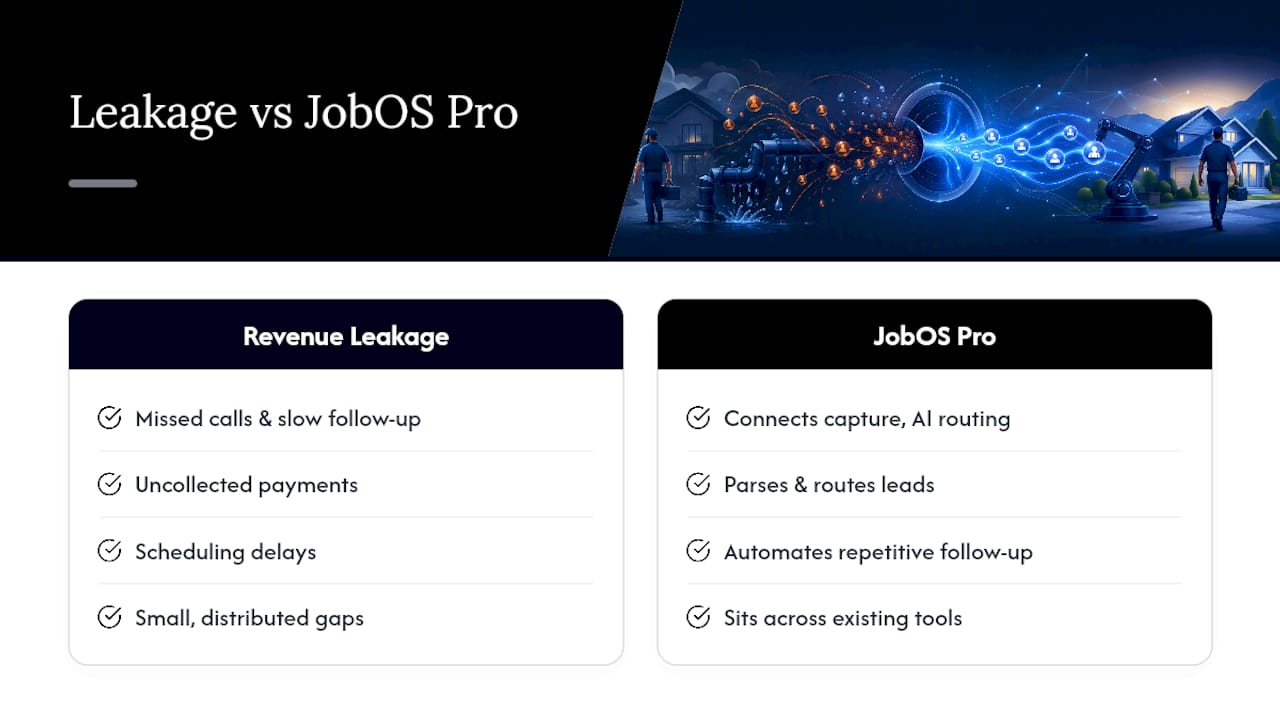
The gap between “we have automation” and “our automation actually recovers revenue” is where most implementations quietly fail. Missed calls, slow follow-up, and scheduling delays don’t show up as a single dramatic loss. They show up as a slow, distributed leak across every location in a network, invisible until someone adds it all up.
That’s exactly what a large-scale revenue leak study did. An analysis of home service revenue leakage found that missed calls, uncollected payments, and scheduling delays compound into significant losses that dwarf what any single location’s owner would guess from their own books. The pattern held across service categories and geographies: leakage isn’t a symptom of bad management, it’s a structural gap between disconnected tools that were never designed to share data in real time.
Revenue leakage in home service businesses rarely comes from one big failure. It comes from a hundred small gaps, a call that rang out, an invoice that sat uncollected, a job that got scheduled two days late, that no single dashboard was built to catch.
JobOS Pro’s architecture responds directly to that finding. Instead of adding another point solution, it connects capture, AI parsing, and routing into a single layer that sits across a franchise network’s existing tools, including Jobber and QuickBooks, rather than replacing them. For multi-location operators, this means AI agents handle repetitive lead follow-up automatically while corporate leadership sees a consistent view of capture performance across every branch, not just the ones with the most attentive local manager.
This analysis draws on the operational research behind the JobOS Pro platform, and further breakdowns of field service automation are tracked on the JobOS Pro blog.
What Do Lead Capture Automation Tools Actually Cost?
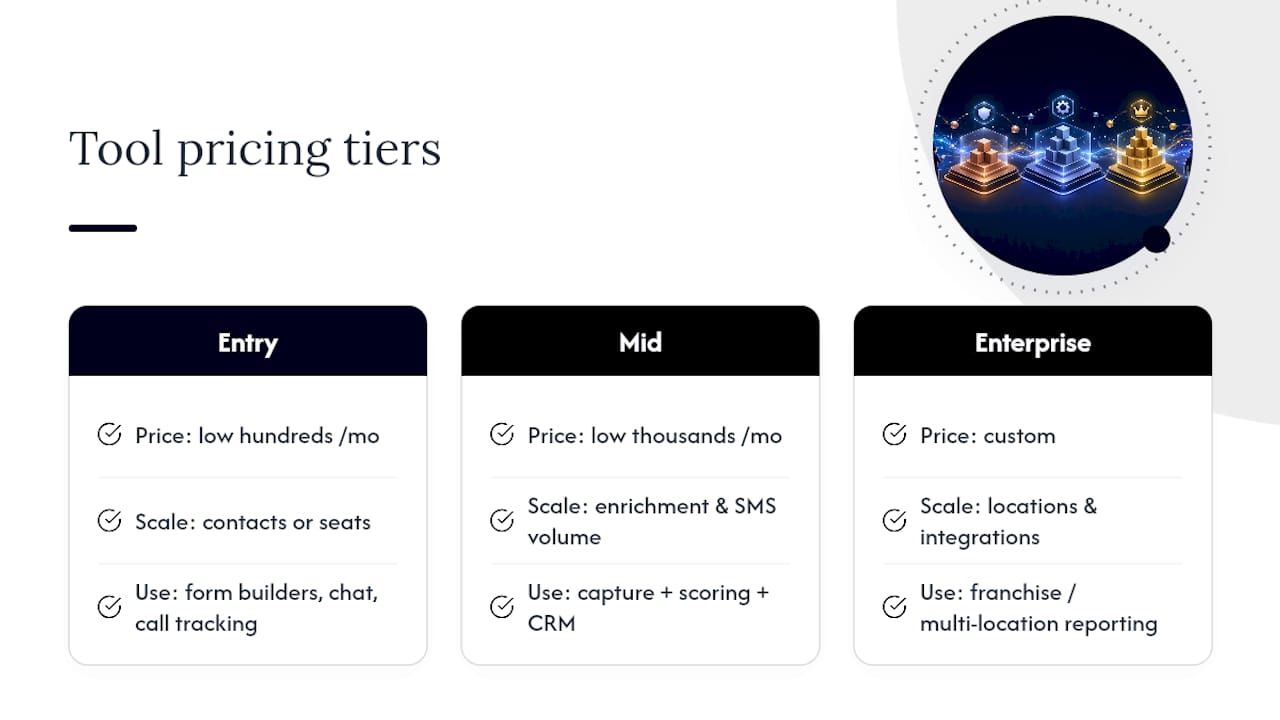
Pricing shapes vary sharply by where a tool sits in the stack. Entry-level capture tools, form builders with basic routing, chat widgets, simple call tracking, typically run in the low hundreds of dollars per month for a small team, scaling with contact volume or seat count. Mid-tier platforms that combine capture with scoring and CRM integration move into the low thousands monthly, especially once you add enrichment credits or SMS notification volume.
Enterprise and franchise-network pricing shifts to a custom model almost universally, since the real cost driver isn’t per-seat licensing but the number of locations, integration complexity with existing FSM and accounting systems, and the level of AI-driven parsing and multi-location reporting required. A single-location HVAC company and a 40-location franchise network are not buying the same product, even if the vendor’s homepage lists one price.
Total cost of ownership extends well past the subscription line. Factor in integration setup time (engineering hours or vendor onboarding fees), the ongoing cost of enrichment data if it’s billed per lookup, and the operational cost of a poorly tuned system: missed SLAs, duplicate outreach, or reps ignoring alerts because false positives trained them to. A cheap tool that generates noisy, low-quality leads often costs more in wasted sales hours than a pricier platform that routes accurately from day one. Budget for the integration and tuning phase as a real line item, not an afterthought, since most of the total cost of ownership shows up there, not in the invoice.
How Long Does a Full Rollout Actually Take?
A single-location business with a straightforward stack can go from planning to a live pilot in two to four weeks, assuming the tools chosen have native connectors to the existing CRM and phone system. That timeline covers persona definition, source inventory, and initial rule design, the first three steps in the implementation roadmap above, plus a short integration test before real leads start flowing through the new pipeline.
Multi-location or franchise rollouts run longer, typically six to twelve weeks for a first cohort of locations. The added time goes almost entirely into integration validation across varied local tech stacks (not every franchisee runs the same CRM version or phone provider) and into building routing rules flexible enough to handle differences in territory size, staffing, and service mix from one location to the next.
Expect a distinct tuning period after go-live, usually two to six weeks, where scoring thresholds and SLA targets get adjusted based on real pilot data rather than assumptions. Teams that skip this phase and declare the rollout finished at go-live tend to see routing accuracy stall well below what a properly tuned system would deliver. Treat the pilot’s first month as a data-gathering phase, not a finished product, and build the tuning window into your timeline from the start rather than treating it as a delay.
What Mistakes Should You Watch for During Implementation?
The biggest failure pattern isn’t a lack of automation. It’s automation deployed without the operational rules that make it mean anything.
Too much automation without SLAs attached is the most common trap. A routing rule that fires a notification means nothing if there’s no deadline tied to it and no accountability when a rep ignores the alert. Automation without a response-time standard just moves the bottleneck from “no one saw the lead” to “someone saw it and still didn’t call for four hours.” Build the SLA before you build the trigger, not after.
Poor data hygiene quietly undermines everything downstream. Skip deduplication logic and your reporting will show inflated lead counts, your reps will call the same prospect twice from two different systems, and your conversion metrics will look worse than reality because they’re diluted by duplicate noise. This is a boring problem to fix and an expensive one to ignore.
Testing for volume instead of quality is the third trap, and it’s the easiest one to fall into because volume is the number that shows up first. Measure conversion by source from week one, not just raw count.
My advice on sequencing: run a pilot on your weakest channel before you touch your strongest one. It isolates whether automation is doing real work or just riding on top of a channel that was already converting well. A pilot-first approach, small scope, real data, honest metrics, beats a full rollout every time, because it surfaces the routing gaps and false-positive scoring rules while the stakes are still low enough to fix quickly.
— Tarun
How JobOS Pro Automates Lead Capture for Home Service Networks
Most lead capture tools stop at the CRM. Some platforms extend functionality by connecting AI parsing, missed-call recovery, and routing directly into the operational reality of running a home service business or franchise network.

Where a generic capture tool logs a form fill, JobOS Pro’s AI agents transcribe and parse missed calls into structured leads automatically, then route them by territory and technician availability without a manual handoff. For franchise operators, that same layer feeds multi-location intelligence so corporate leadership can see which locations are converting captured leads and which ones are quietly leaking them, without waiting on a monthly report from each branch manager.
This approach generally fits buyers such as single-location owners who lose jobs to unanswered calls, multi-location operators needing standardized capture behavior across branches, and franchise networks that require actionable visibility corporate can use. When validating fit in a trial, tracking time-to-first-contact and missed-call recovery rate against your baseline can indicate whether the system is effective.
See how it applies to your trade on the industries page, or book a demo to walk through your current capture gaps with a real person.
Sources
The following sources back the technical and implementation claims made throughout this guide:
- Lead capture (Zapier automation guide)
- Automated lead generation: the complete guide (Leadfeeder)
- 12 Best Tools for Automated Lead Generation 2026 (Wisepops)
FAQ
What Is Lead Capture Automation?
Lead capture automation is software that instantly collects prospect data from forms, calls, chat, and ads, then qualifies and routes that data without manual entry, cutting the delay between inquiry and first contact.
How Is Lead Capture Automation Different from a CRM?
A CRM stores and manages lead records after they exist; lead capture automation is the layer that creates and routes those records the moment a prospect takes action, often feeding the CRM rather than replacing it.
How Much Does Lead Capture Automation Cost?
Entry-level tools run in the low hundreds of dollars monthly, mid-tier platforms with scoring and CRM integration reach the low thousands, and franchise-scale deployments typically move to custom pricing based on location count and integration complexity.
How Long Does It Take to Implement Lead Capture Automation?
A single-location rollout usually takes two to four weeks from planning to pilot, while multi-location or franchise deployments run six to twelve weeks, plus a two-to-six-week tuning period after go-live.
Does JobOS Pro Handle Missed-Call Lead Capture?
Yes. JobOS Pro’s AI agents transcribe and parse missed calls into structured leads and route them by territory and technician availability, which directly targets the missed-call revenue leakage identified in its underlying research.