
Stop Losing $2.3B: Overflow Call Routing Playbook for Home Services
Stop Losing $2.3B: Overflow Call Routing Playbook for Home Services
Automated condition→action overflow routing, built around wait-time and queue-size triggers with an ordered fallback chain, is the fix for calls that die in a full queue. Set thresholds that route excess volume to callbacks, AI receptionists, or a trained overflow group before callers abandon. Done right, this keeps abandonment low during volume spikes and protects your service-level agreement. An AI platform automates the missed-call and callback side of that chain so no lead falls through during the rush.
TL;DR:
- Overflow routing should prioritize delayed agent eligibility in routing profiles to preserve accurate call origin data in reporting.
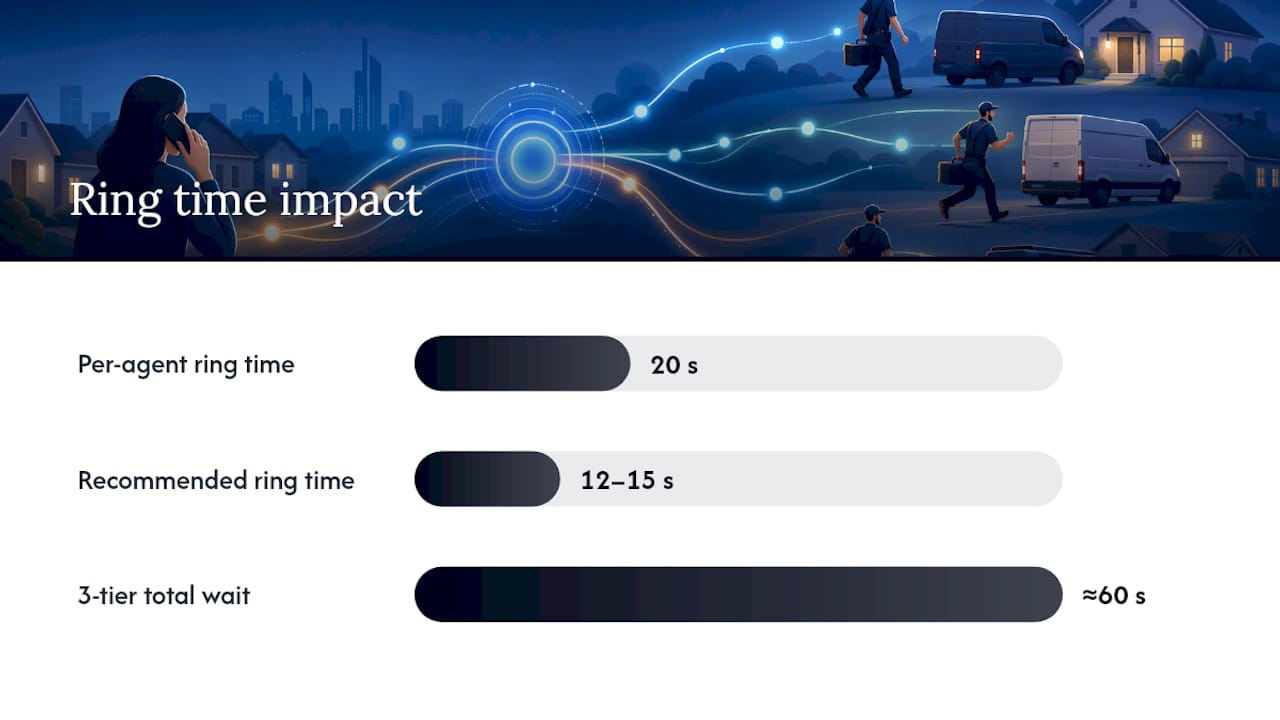
- Shortening ring times to 12-15 seconds for multiple overflow tiers reduces abandonment before callers reach fallback actions.
- Monitoring key KPIs like abandonment rate, average wait time, and overflow frequency helps optimize overflow rules and staffing during volume spikes.
- Choosing an overflow strategy depends on call complexity, SLA costs of missed calls, staffing flexibility, and reporting needs.
- Integrating automated missed-call recovery systems ensures routed calls turn into booked jobs, especially during peak business periods.
Table of Contents
- What Overflow Calls Are and the Triggers That Cause Them
- Core Overflow Routing Methods and When to Use Each
- How to Configure Rule-Based Overflow Actions
- Diagnostics, Monitoring, and KPIs for Overflow Governance
- How to Choose an Overflow Strategy for Your Business
- Where Automated Recovery Fits Into the Overflow Chain
- Get Overflow Calls Working for Your Revenue, Not Against It
- Sources
What Overflow Calls Are and the Triggers That Cause Them
An overflow call is one your primary queue cannot handle, whether that’s because every agent is busy, nobody is logged in, or the caller has waited longer than your rules allow. It’s a routing failure state, not a technology glitch, and it happens to businesses with three agents just as often as it happens to call centers with three hundred.
Most overflow events trace back to a handful of measurable triggers:
- Queue capacity reached: the number of waiting calls exceeds a set limit.
- Wait-time threshold exceeded: a caller has been on hold longer than your target answer time.
- No active or online agents: everyone is offline, on break, or logged out.
- Missed or declined calls: an agent’s phone rang and nobody picked up.
- Business-hours mismatch: the call arrives outside your published hours.
The distinction between pre-queue and in-queue evaluation matters more than most admins realize. Pre-queue overflow checks conditions before a call ever enters the queue, useful for after-hours screening. In-queue overflow reevaluates continuously while a call waits, which is where the real trade-off lives: a low queue-size cap protects wait times but pushes more callers into overflow, while a generous cap keeps calls in queue longer at the risk of higher abandonment.
Core Overflow Routing Methods and When to Use Each
Every overflow strategy is really a menu of fallback actions with different costs and different caller experiences. Choosing the right combination depends on how much you value speed, context retention, and reporting accuracy.
- Overflow queues and routing profiles. Instead of transferring a call away from its original queue, routing profiles with delayed agent eligibility widen the pool of agents who can answer without requeuing the call. This keeps origin data intact for reporting, which matters when you’re trying to measure true queue performance.
- Transfer to an external number. Handing the call to an on-call rep, a partner location, or another office works well after hours or during a total outage, though it usually breaks the reporting chain unless your platform logs the handoff.
- Callback and voicemail-with-callback. Offering a callback instead of hold time keeps the caller in control and takes pressure off agents. Callback offers reduce abandonment far more effectively than plain voicemail, particularly during predictable spikes like Monday mornings.
- AI and virtual receptionists. A conversational AI agent can qualify the caller, resolve simple requests, and capture the context a human agent needs for a clean handoff, cutting the “please repeat your issue” friction that frustrates callers.
- Third-party answering services or BPO overflow. Outsourced capacity solves volume problems fast, but it costs more per call and needs quality controls to keep your brand voice consistent.
Pro Tip: Route overflow through a delayed-eligibility profile whenever your CRM depends on clean queue attribution. Transferring calls between queues is faster to configure but quietly corrupts your reporting.
Each option trades something for something else. Overflow queues preserve data integrity but require platform support for delayed eligibility. External transfers are fast but opaque. Callbacks and AI agents protect the caller experience and your labor costs, but they need a review process to catch mishandled qualifications before they become lost bookings.
How to Configure Rule-Based Overflow Actions
Configuring overflow rules comes down to writing condition→action pairs and then sequencing them so the least disruptive fallback fires first.
Start with the conditions. Common triggers include:
- Waiting time exceeds a set number of minutes (voice channels typically use ranges between 1 and 60 minutes).
- Work item or queue limit exceeds a set count.
- No agents are currently active or logged in.
- The call falls outside published business hours.
- Priority-customer exceptions that bypass standard thresholds entirely.
Then map each condition to a specific action. Microsoft’s overflow framework for Dynamics 365 documents this pattern directly: transfer to a different queue, offer a direct callback, transfer to an external number, send to voicemail, or end the call with a message. Choose the least disruptive action your caller’s situation allows.
Ring-time math deserves its own line item. If each agent rings for 20 seconds and your overflow group has three tiers, a caller could wait a full minute before hitting the last fallback. Shorten individual ring times to 12 to 15 seconds when your overflow chain has more than two tiers, or callers will abandon before ever reaching the safety net you built.
A simple template: If wait time exceeds 3 minutes and queue size exceeds 15, offer a callback; if no agents are active, transfer to the AI receptionist; if outside business hours, route to the after-hours overflow number.
Before going live, test the full chain in a staging environment, confirm your reporting tool logs each overflow action correctly, and run a controlled volume spike to watch the sequence fire in real time.
Diagnostics, Monitoring, and KPIs for Overflow Governance
You can’t tune what you can’t see, and overflow rules degrade quietly if nobody’s watching the logs. Routing diagnostics and route-to-queue logs show you exactly which action handled each call, which is the fastest way to catch a misconfigured rule before it costs you a week of missed bookings.
Track these regularly:
- Abandonment rate: the share of callers who hang up before being answered.
- Average wait time: how long callers sit in queue before resolution.
- Percent answered within SLA: your core service-level metric.
- Callback success rate: how many offered callbacks actually connect.
- Overflow frequency by queue: which queues trigger overflow most often, and when.
| KPI | Healthy target | Action if missed |
|---|---|---|
| Abandonment rate | Low during spikes | Lower the wait-time threshold that triggers callback offers |
| Predicted wait time | Under 2 to 3 minutes before overflow fires | Add an overflow tier earlier in the chain |
| Overflow frequency | Concentrated in known peak hours | Adjust staffing or business-hours rules |
Whenever you have a choice between transferring a call to a new queue or expanding agent eligibility through a routing profile, choose the profile. Keeping the call’s origin queue intact is what makes your reporting trustworthy months later, when you’re trying to prove which channel actually drives revenue.
How to Choose an Overflow Strategy for Your Business
Not every business needs the same fallback chain, and the wrong pick either wastes money or frustrates callers. Use these four factors to decide:
- Call complexity. Simple, transactional calls (appointment confirmations, basic scheduling) fit AI receptionists and self-serve options well. Complex calls (technical troubleshooting, disputes) need a human, fast.
- SLA cost of abandonment. If a missed call means a lost job worth thousands of dollars, invest in overflow capacity even when volume is low.
- Handle time and staffing flexibility. Businesses that can flex remote or on-demand agents during peak windows need less outsourced overflow than those with fixed, in-house teams only.
- Reporting needs. If you require detailed attribution on where leads originate, tracking which source actually produced a customer should shape which overflow method you pick, since some methods (external transfers) obscure that data more than others.
Map your situation this way: low-complexity, high-volume operations do best with AI agents, self-serve options, and callback offers. Medium-complexity operations benefit from overflow queues staffed by trained remote agents. High-complexity, SLA-critical operations justify a dedicated overflow team or a carefully managed BPO relationship with strict quality checks.
Whatever mix you land on, pilot it on one queue or one time window first. Sample calls for quality, use a consistent script template for any outsourced or AI-handled fallback, and build a clear escalation path so a routine call that turns complex doesn’t get stuck in the wrong flow.
Where Automated Recovery Fits Into the Overflow Chain
Overflow rules only solve half the problem. Once a call gets routed to voicemail, a callback queue, or an AI agent, someone still has to act on it fast enough to convert the caller before they book with a competitor. That’s the gap JobOS Pro was built to close for home service businesses.
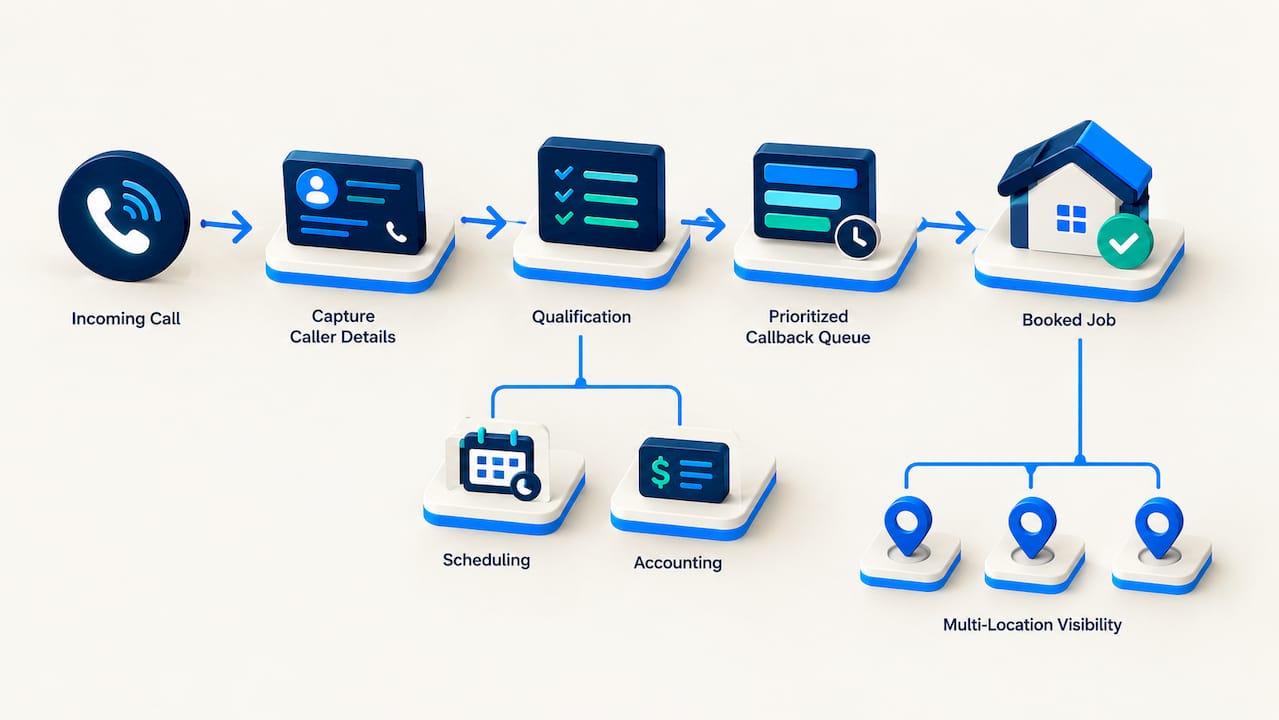
Such platforms pair missed-call recovery with an AI receptionist that captures caller details, qualifies the request, and queues a prioritized callback automatically, sitting right after your overflow action fires rather than replacing it. They connect with common scheduling and accounting tools, so a captured lead turns into a booked job without manual data entry. For multi-location operators, available intelligence tools show which locations are losing calls to overflow most often and why.
The scale of what’s at stake here isn’t small. JobOS Pro’s own research into franchise revenue leakage found $2.3 billion in recoverable revenue lost industry-wide to gaps like missed calls and slow follow-up, exactly the failure points overflow routing is meant to prevent.
Get Overflow Calls Working for Your Revenue, Not Against It
An automation layer that sits behind your overflow rules helps make sure a routed call still turns into a booked job. Where a callback queue or AI transfer stops at “call logged,” an AI receptionist captures the caller’s details, qualifies the request, and pushes a prioritized callback to the right technician automatically, closing the exact gap where home service businesses lose the most revenue.

If you run an HVAC, plumbing, electrical, cleaning, or similar service business, this matters most during your busiest weeks, exactly when overflow spikes and manual follow-up falls apart. Jobospro’s missed-call recovery works alongside the tools you already use, including Jobber and QuickBooks, so nothing about your current setup has to change. Franchise operators get an added layer: multi-location visibility into which sites are bleeding overflow calls and why, so corporate leadership can standardize what’s working.
See how the numbers look for your business. Book a demo and get a walkthrough of how automated capture and callback recovery would run against your actual call volume.
— Tarun