
Run Same Day Scheduling in 3–7 Days for Home Services With AI
Run Same Day Scheduling in 3–7 Days for Home Services With AI
Same-day scheduling works, and it works better than most operators expect once the right systems are in place. Booking and dispatching jobs the moment they come in raises estimate close rates and pulls revenue forward instead of losing it to next-week openings. The rest of this playbook covers the features, workflows, AI role, and rollout steps that make same-day promises reliable instead of risky.
TL;DR:
- Real-time dispatch boards with GPS and status updates are crucial for maintaining visibility on truck locations for effective same-day scheduling.
- Automated intake, triage, and confirmation sequences, especially AI-driven outbound reschedule calls, significantly improve scheduling reliability and customer experience.
- Building in capacity buffers, reserving emergency slots, and verifying inventory before confirming jobs help prevent common breakdowns and broken commitments.
- A minimal setup with a booking widget, live dispatch, and automated notifications can be operational within one week, with full automation taking three weeks.
- Focusing on accurate duration estimates and proper order of steps, rather than pricing, is key to consistently executing same-day service successfully.
Table of Contents
- What Is Same-Day Scheduling for Home Service Businesses?
- What Features Do You Need for Same-Day Jobs?
- How Do You Turn Features Into a Reliable Same-Day Workflow?
- Where Does AI Actually Help With Same-Day Dispatch?
- How Fast Can You Roll This Out?
- What Does Successful Same-Day Scheduling Look Like in Practice?
- What Do Operators Get Wrong About Same-Day Scheduling?
- How JobOS Pro Supports Same-Day Scheduling Operations
- Sources
What Is Same-Day Scheduling for Home Service Businesses?
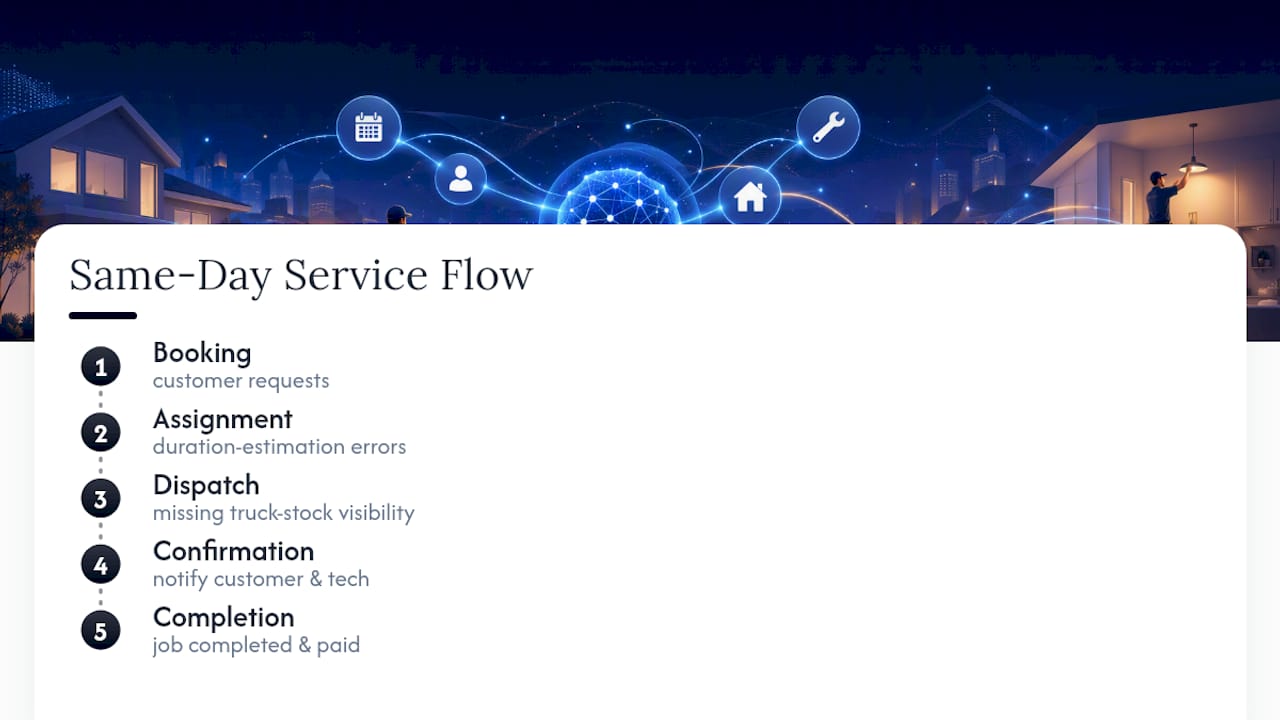
Same-day scheduling is the operational process of booking, assigning, dispatching, confirming, and completing a service job within the same business day it’s requested. That’s the definition this article uses. It has nothing to do with same-day medical appointments or any consumer healthcare scheduling system.
For HVAC, plumbing, electrical, landscaping, roofing, pest control, and cleaning companies, the payoff is direct: jobs booked and completed same-day convert at higher rates, and cash lands in the bank faster than jobs pushed to “we’ll call you tomorrow.” Reserving dedicated estimate slots and offering same-day estimates has been shown to close significantly more jobs than multi-day delays, because the homeowner or property manager is still in decision mode when your technician shows up.
The flow itself is simple to describe and hard to execute: booking, assignment, dispatch, confirmation, completion. Most breakdowns happen in the middle two steps. Duration-estimation error, technicians running long on the previous job, throws off every appointment behind it. Missing visibility into truck stock creates a second failure point when a tech arrives without the part needed to finish. Both problems are fixable with the right platform features, not just good intentions.
What Features Do You Need for Same-Day Jobs?
Auditing your current scheduling stack against a short list of capabilities tells you fast whether you’re set up for same-day work or just hoping for it.
- Real-time dispatch board with GPS and status. You need to see where every truck is right now, not where the schedule says it should be.
- Online booking intake with triage fields and photo upload. Letting customers describe the problem and attach a photo before a human ever touches the request cuts diagnostic time on arrival.
- Tighter service windows with on-the-way ETA notifications. Narrowing windows to one or two hours and sending live ETA texts reduces customer uncertainty and cuts inbound “where’s my tech” calls substantially.
- Skill-based routing and truck-stock awareness. Assigning based on certification and current inventory, not just proximity, prevents wasted rolls.
- Confirmation and reminder sequences. Automated texts at booking, the morning of, and en route keep no-shows down without tying up office staff.
- Reserved emergency and estimate slots. Blocking capacity ahead of time is what makes same-day promises possible instead of aspirational.
Each of these solves a specific failure point in the booking-to-completion chain. Skip one, and the others compensate less than you’d think.
How Do You Turn Features Into a Reliable Same-Day Workflow?
Features only work if the rules behind them are explicit. A practical fix for inefficient dispatching combines real-time visibility, automated assignment logic, and confirmation sequences into one system, and the sequencing of how you build these rules matters as much as the rules themselves.
- Set assignment rules with secondary prioritization. Match by skill and proximity first, then fall back to next-available tech rather than leaving gaps unfilled.
- Reserve one or two emergency slots per technician per day. If they’re unused by mid-morning, convert them to booked estimate work instead of leaving that capacity idle.
- Build in duration buffers and log actual job times. Most scheduling breakdowns trace back to duration-estimation error, not pricing mistakes, so recalibrate your time estimates against logged data every few weeks.
- Define a conflict-reschedule approval flow. Decide in advance who can approve a reschedule and give the office a script for the customer call, before the conflict happens, not during it.
- Verify parts and truck stock before confirming the promise. A dispatcher who checks inventory before texting “confirmed” avoids the single most common reason for a broken same-day commitment.
Pro Tip: Track how often your reserved emergency slots go unused past 10 a.m. If it’s happening most days, you’re overbuilding buffer capacity you could sell.
Where Does AI Actually Help With Same-Day Dispatch?
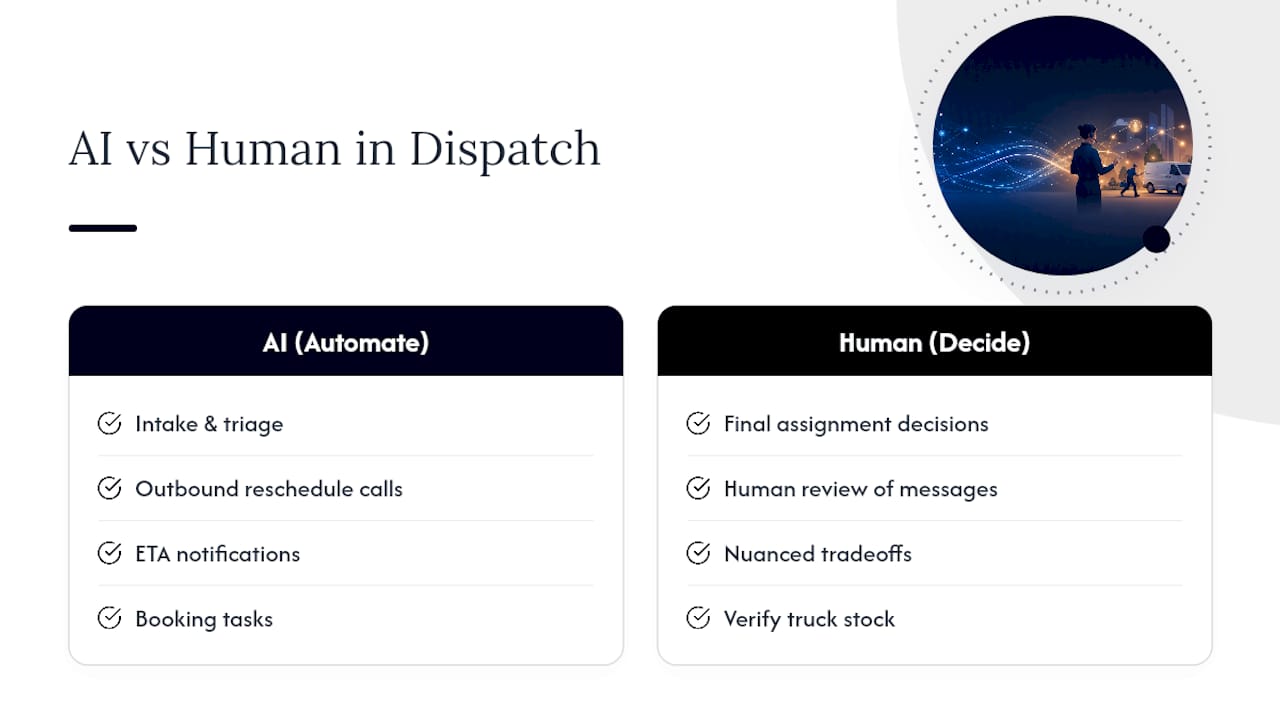
AI earns its keep on the repetitive, emotionally taxing parts of dispatch, not the judgment calls. Automating intake and triage, outbound reschedule calls, and ETA notifications delivers the highest return of any AI application in this workflow, because those tasks are high-volume and rule-based rather than requiring nuanced tradeoffs.
The outbound reschedule call is a good example of where automation pays off fastest. Telling a customer their 2 p.m. window slipped to 4 p.m. is a call dispatchers dread and often delay, which only makes the customer angrier. Automated messaging with a human-review layer handles that friction instantly and consistently.
AI has real limits here, too. It can’t verify truck stock it wasn’t told about, and it won’t out-think an experienced dispatcher juggling twelve trucks against a sudden emergency call. The practical model is hybrid: AI handles booking, triage, ETA texts, and reschedule messaging, while a human keeps final say on complex assignment tradeoffs. An AI-native orchestration layer like JobOS Pro is built around exactly that division of labor, connecting the tools you already run rather than replacing the dispatcher’s judgment.
How Fast Can You Roll This Out?
You don’t need a full platform migration to start booking same-day jobs reliably. The minimum viable setup is a booking widget, a live dispatch board, and automated confirmation sequences. Everything else layers on top.
Build in this order:
- Dispatch visibility first. Get GPS and status visibility working before you automate anything else — automating a broken process just breaks it faster.
- Assignment rules second. Codify skill-based and secondary-priority routing once visibility is solid.
- Confirmation sequences third. Add automated texts and reminders once assignment logic is stable.
- AI receptionist and orchestration last. Layer in intake automation and reschedule handling once the core workflow runs clean.
A small shop can have basic same-day capability running in three to seven days. Full orchestration across booking, dispatch, and AI-handled communication typically takes two to three weeks. Track same-day fill rate and no-show rate weekly for the first 30 to 90 days, alongside jobs per tech per day and time-to-assign, to know if the rollout is actually working.
What Does Successful Same-Day Scheduling Look Like in Practice?
Picture a five-truck plumbing company that used to book same-day requests by having the office manager call around and check who was closest. It worked until it didn’t: two trucks would end up stacked on one side of town while an emergency call on the other side sat unassigned for forty minutes.
Adding a real-time dispatch board fixed the visibility problem first. The office could see truck locations instead of guessing from memory. Assignment rules came next, matching skill and proximity automatically instead of relying on tribal knowledge about who’s “usually free.” Confirmation texts closed the loop, cutting the number of “are you still coming?” calls that used to eat up front-desk time every afternoon.
A landscaping operation running multiple crews across a metro area faces a different version of the same problem: routing efficiency matters more than single-job triage. Reserved estimate slots solved their close-rate issue directly. Instead of quoting a new client three days out, crews could swing by same-day while the homeowner was still comparing options, which is exactly the close-rate advantage same-day estimates are known for.
Neither business needed to rebuild its entire tech stack. Both needed the same three layers: visibility, rules, and confirmation, applied in the right order.
What Do Operators Get Wrong About Same-Day Scheduling?
Most operators worry about pricing accuracy when they should worry about duration accuracy. A job quoted $50 too low costs you $50. A job estimated at ninety minutes that actually takes three hours costs you every appointment scheduled behind it that day, plus the apology calls, plus the trust you burn with three separate customers instead of one.
The habit I’d flag hardest: scheduling next-day work first thing in the morning before same-day slots are locked in. That ordering wastes crew capacity that should go to higher-value same-day and emergency work. If you’re seeing low mobile adoption among your techs, no confirmation texts going out, or zero visibility into truck stock before a promise gets made, those are the three red flags that predict a broken same-day rollout before it starts. — Tarun
How JobOS Pro Supports Same-Day Scheduling Operations
JobOS Pro is the AI-native layer that turns this playbook from a checklist into daily practice, without forcing you to rip out the tools your office already knows.

Instead of adding another disconnected app, JobOS Pro sits on top of what you already run, including Jobber and QuickBooks, and closes the gaps between them: missed calls, unconfirmed jobs, and scheduling delays that quietly leak revenue every week. The platform’s AI receptionist handles intake and triage, automated sequences manage conflict-reschedule calls and ETA texts, and multi-location intelligence gives franchise leaders one view across every site. That orchestration model is grounded in findings from a multi-billion dollar revenue-leak study that shaped how the platform prioritizes fixes.
If you run HVAC, plumbing, or a multi-location franchise network and want to see how same-day dispatch, confirmations, and revenue recovery work together in one system, book a demo and walk through your own dispatch board with the team.
Sources
For deeper technical detail on booking, triage, and AI-assisted dispatch, see JobOS Pro’s dispatch guide and the JobOS Pro blog. For multi-site maintenance orchestration outside home services, Prop Report’s AI property management resource offers a useful parallel model.
- Home Service Scheduling That Actually Works: A Complete Guide | skdul blog
- Stop inefficient dispatching in home services 2026
- Same-day dispatch for HVAC + plumbing: how AI scheduling really works — Pylor
- Same-day estimates close 3x more