SMS Appointment Reminders That Actually Cut No-Shows
SMS Appointment Reminders That Actually Cut No-Shows
Automated two-way SMS appointment reminders integrated with your booking system and operations platform are the fastest way for SMBs to cut no-shows and recover lost revenue. The setup is straightforward, the ROI shows up within weeks, and the technology is accessible to any field-service team without a dedicated IT department.
Start here:
- Enable calendar sync first so reminders fire automatically from confirmed bookings.
- Set a 24-hour reminder and a 1-hour reminder as your baseline cadence.
- Turn on two-way replies so clients can confirm or reschedule without calling your office.
- Route all inbound replies into your ops platform inbox so dispatchers see status changes in real time.
The first reminder to activate is the 24-hour text. It catches clients while they still have time to reschedule, which keeps your schedule from collapsing the morning of the job.
Key Takeaways
Automated two-way SMS appointment reminders integrated with your booking system and ops platform are the highest-ROI, lowest-friction tool available to SMBs for cutting no-shows and recovering lost revenue.
| Point | Details |
|---|---|
| Setup priority | Sync your calendar first, then configure 24-hour and 1-hour triggers before anything else. |
| Two-way replies | Route keyword replies (C/R/STOP) directly to your dispatch board, not a separate inbox. |
| Compliance baseline | Include opt-out language in every message and keep PHI out of SMS bodies entirely. |
| ROI expectation | A no-show reduction on a 10-tech team can recover substantial revenue against modest monthly SMS costs. |
| Jobospro advantage | Jobospro connects SMS confirmations to dispatch, AI receptionist, and invoicing in one platform, closing the full revenue loop. |
Table of Contents
- How do SMS appointment reminders actually work behind the scenes?
- What’s the real business case for text reminders for appointments?
- What U.S. compliance and security rules apply to SMS reminders?
- How do you set up automated appointment reminders step by step?
- What SMS reminder templates actually perform well?
- Which integrations matter most for automating appointment workflows?
- How much do SMS reminder services typically cost?
- How does Jobospro implement SMS reminders and broader automation?
- The part most operators get wrong about SMS reminders
- Jobospro recovers the revenue your no-shows are costing you
- Sources
How do SMS appointment reminders actually work behind the scenes?
Every automated text reminder system has four working parts: a scheduling or booking source, an SMS gateway, a two-way reply handler, and a status sync layer that writes results back to your calendar or ops board.
The message flow looks like this:
- Your booking system creates or updates an appointment.
- A trigger fires based on timing rules (7 days out, 24 hours out, 1 hour out).
- The SMS gateway sends the outbound message to the client’s mobile number.
- The client replies with a keyword (“C” to confirm, “R” to reschedule, “STOP” to opt out).
- The reply handler parses the keyword and updates appointment status in your scheduling system automatically.
Twilio’s documentation on appointment reminders recommends exactly this multichannel, two-way approach, noting that reminders work best when they support conversational texting that updates booking status rather than one-way broadcast messages that require staff to follow up manually.
Timing patterns matter more than most operators realize. A 7-day reminder gives clients maximum lead time to reschedule. The 24-hour message is your highest-value touchpoint because it reaches clients while they can still act. The 1-hour message catches last-minute conflicts and doubles as a prep or ETA notification. Running all three costs almost nothing extra and meaningfully reduces day-of cancellations.
Pro Tip: Configure your reply handler to write status changes directly into your ops platform inbox, not just your calendar. When a dispatcher sees “Confirmed” or “Reschedule Requested” on the board without opening a separate app, they can act in seconds instead of minutes.
What’s the real business case for text reminders for appointments?
No-shows are a direct revenue drain. A missed appointment is not just a lost hour; it is a lost job, a wasted technician drive, and a scheduling gap that is rarely filled on short notice.
Primary benefits for SMBs:
- Fewer no-shows and last-minute cancellations.
- Higher schedule utilization because reschedules happen in advance, not the morning of.
- Faster turnaround on filling open slots when clients cancel early.
- Reduced staff time spent on manual confirmation calls.
AppointmentReminder reports that businesses using their two-way SMS system see a meaningful reduction in no-shows, and most go live within minutes of setup. That is a meaningful signal for any SMB running a tight schedule.
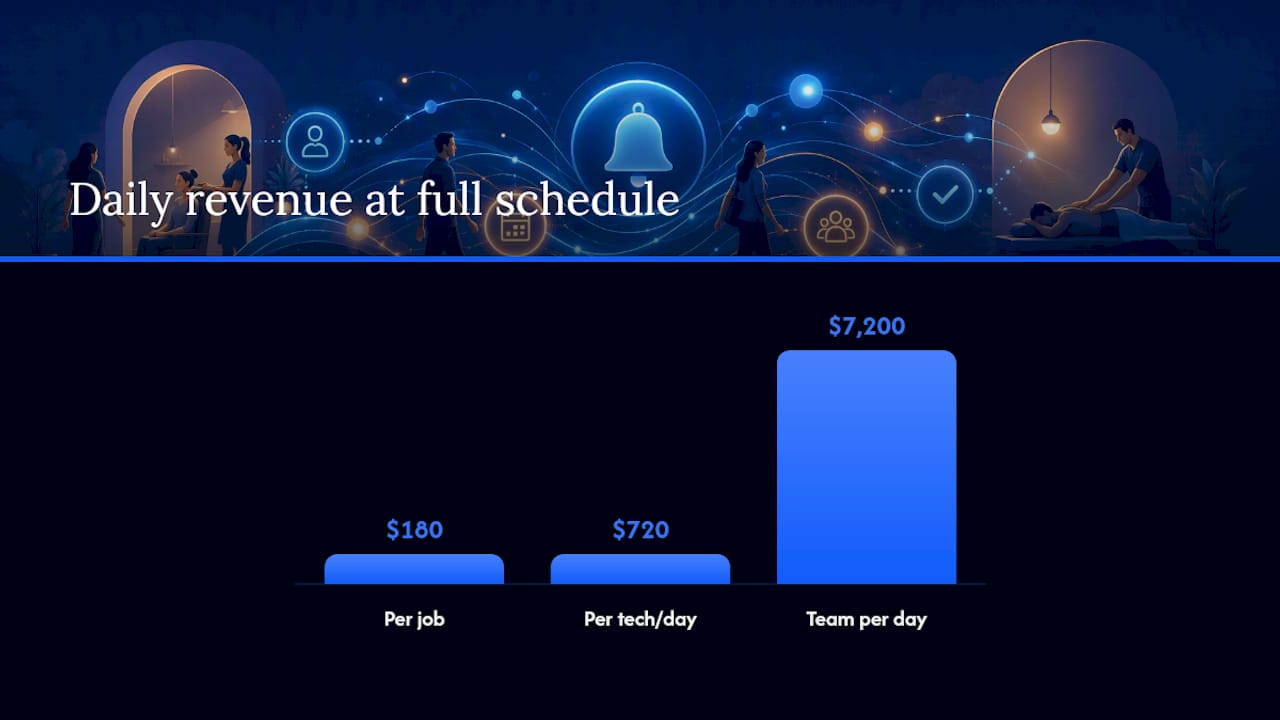
The ROI math is simple. Consider a home service business running 10 technicians, each averaging 4 appointments per day at $180 per job. A typical no-show rate can mean several missed jobs per day across the team, risking hundreds of dollars in daily revenue. Effective SMS reminders can recover a substantial portion of that lost revenue, far exceeding their modest monthly cost.
SMS also outperforms email on reach. Text messages are opened at rates that far exceed email, and responses arrive faster, which means your team gets confirmation data while there is still time to backfill a cancellation. Phreesia’s research on automated reminders confirms that routing responses back into staff dashboards, rather than leaving them in a separate inbox, is what turns confirmation data into real schedule improvements.
Pairing reminders with a card-on-file policy adds another behavioral lever. Square’s appointment reminder documentation shows that combining automated SMS and email reminders with disclosed no-show fees changes client behavior and improves attendance rates beyond what reminders alone achieve.
What U.S. compliance and security rules apply to SMS reminders?
Two federal frameworks govern appointment-related SMS in the United States: the Telephone Consumer Protection Act (TCPA) and, for healthcare businesses, HIPAA.
TCPA basics for any SMB:
- Obtain prior express written consent before sending marketing texts; transactional appointment reminders require prior express consent at minimum.
- Include a clear opt-out instruction in every message (“Reply STOP to unsubscribe”).
- Honor opt-out requests immediately and document them.
- Limit message frequency to what clients reasonably expect given the appointment cadence.
- Keep consent records with timestamps and the specific language the client agreed to.
HIPAA scope for healthcare and related businesses:
HIPAA applies when your business is a covered entity (a healthcare provider, health plan, or healthcare clearinghouse) and the SMS message contains Protected Health Information (PHI). PHI in a reminder context includes diagnosis details, treatment descriptions, provider names tied to a condition, or any combination of identifiers that reveals a health condition. A message that says “Your appointment is confirmed for Tuesday at 2 PM at [Clinic Name]” is generally considered low-risk. A message that includes a provider specialty, a medication name, or a procedure description is a different matter.
Safer alternatives for covered entities include encrypted messaging platforms with Business Associate Agreements (BAAs), patient portal notifications, or voice reminders. DrChrono’s appointment reminder system is one example of a platform that ties text and email confirmations directly to EHR status updates while operating within a healthcare compliance framework.
Vendor security controls to require:
- Encryption in transit (TLS) and at rest for message logs.
- Role-based access controls limiting who can view reply content.
- Deliverability reporting so you can audit which messages were sent and received.
- A signed BAA if you are a covered entity under HIPAA.
Compliance note: Appointment reminder SMS that avoids PHI and follows TCPA consent rules is manageable for most SMBs. However, if your business operates in healthcare, mental health, substance use treatment, or any other sensitive category, confirm your specific obligations with qualified legal counsel before deploying any SMS reminder system. The rules vary by state and by the nature of the information transmitted.
Pro Tip: Keep PHI out of the message body entirely. Your reminder can say “Your appointment is confirmed for [Date] at [Time] with [Business Name]. Reply C to confirm.” That wording is useful, compliant, and contains no health information.
See Jobospro’s security and compliance documentation for details on how the platform handles data protection for home service operators.
How do you set up automated appointment reminders step by step?
Most SMBs can go from zero to live in under an hour if they already have a booking system or calendar in place.
Step 1: Choose your SMS gateway and ops platform. Decide whether you want reminders built into your existing scheduling software or a dedicated SMS reminder service connected via API or Zapier. Built-in options (like those in Square Appointments) require less configuration. Dedicated gateways give more control over timing, templates, and two-way handling.
Step 2: Sync your calendar or booking source. Connect Google Calendar, Outlook, or your booking app to the SMS platform. Google Calendar’s SMS reminder integrations let small businesses trigger texts directly from calendar events without a full booking system. For businesses already using a booking app, use the platform’s native calendar sync or webhook support. A practical walkthrough for Google Calendar as a booking source shows how even simple operators can wire calendar events to SMS flows.
Step 3: Map appointment types to message templates. Create a template for each appointment type (initial visit, follow-up, estimate, recurring service). Each template should include the client’s name, date, time, business name, and a clear CTA.
Step 4: Configure timing triggers. Set three triggers per appointment: 7 days out, 24 hours out, and 1 hour out. Adjust based on your average job length and rescheduling lead time.
Step 5: Set up two-way reply handling. Define keyword rules: “C” or “Confirm” marks the appointment confirmed; “R” or “Reschedule” opens a reschedule workflow; “STOP” logs an opt-out and suppresses future messages.
Step 6: Configure opt-out compliance. Every outbound message must include opt-out language. Add “Reply STOP to unsubscribe” to every template.
Step 7: Test before going live. Send test messages to your own number for each template and each trigger. Verify that replies update appointment status in your scheduling system. Check that opt-out responses suppress future messages correctly.
Go-live checklist:
- All templates reviewed and approved.
- Opt-out language present in every message.
- Reply keywords mapped to status updates.
- Test confirmations and reschedules verified.
- Staff briefed on how to handle edge cases (clients who call instead of replying).
What SMS reminder templates actually perform well?
The best-performing appointment reminder texts are short, specific, and give the client exactly one thing to do. Textedly’s library of appointment reminder templates demonstrates this consistently: concise wording with a single CTA outperforms longer messages with multiple options.
Template 1: Standard confirmation reminder (24 hours out)
Hi [Name], this is [Business Name] reminding you of your appointment tomorrow, [Date] at [Time] at [Address]. Reply C to confirm or call us at [Phone] to reschedule. Reply STOP to unsubscribe.
Template 2: Two-way reschedule flow (7 days out)
Hi [Name], your [Business Name] appointment is scheduled for [Date] at [Time]. Reply C to confirm or R to request a reschedule. Questions? Call [Phone]. Reply STOP to opt out.
Template 3: Last-minute ETA or prep reminder (1 hour out)
[Name], your [Business Name] tech is on the way and will arrive around [Time]. Please ensure access to [specific area, e.g., “the backyard gate”]. Questions? Call [Phone].
Wording best practices:
- Keep messages under 160 characters when possible to avoid multi-part SMS charges.
- Always open with the client’s first name and your business name.
- Use one CTA per message, not two or three.
- Never include diagnosis details, treatment names, or any health-related information.
- Include opt-out language in every message, not just the first one.
Tokens to use in every template: [Name], [Date], [Time], [Address], [Business Name], [Phone]
Pro Tip: Test your templates on both iOS and Android before deploying. Some special characters render differently across devices and can make a professional message look broken. Plain ASCII text is the safest choice.
Which integrations matter most for automating appointment workflows?
The integrations that deliver the most operational value are calendar sync, booking platform webhook support, and a two-way SMS gateway that writes replies back to your core system. Everything else is secondary.
Integration priority order:
- Calendar sync (Google Calendar, Office 365): the booking source that triggers all reminder logic.
- Booking platform webhooks: real-time event triggers so reminders fire the moment an appointment is created or modified, not on a polling delay.
- Two-way SMS gateway: parses reply keywords and pushes status updates back to the scheduling board.
- CRM or field ops board: logs confirmation status so dispatchers and techs see the same data.
Common workflow patterns:
- Confirm-only: client replies C, appointment status updates to “Confirmed,” no further action required.
- Confirm + reschedule: client replies R, system sends a follow-up message with available slots or routes to a human for scheduling.
- Automated backfill: when a cancellation comes in more than 4 hours before the appointment, the system triggers a message to the next client on a waitlist or flags the slot for the dispatcher to fill.
Twilio’s multichannel reminder framework recommends building these reply flows so that any channel (SMS, email, voice) can trigger the same status update in the core system. Phreesia’s approach extends this to voice, noting that some client segments respond better to a phone call than a text, and that routing those responses back into staff dashboards is what makes the data actionable.
For healthcare practices, DrChrono’s integration shows how text confirmations can update EHR appointment status automatically, eliminating the manual tracking step that typically consumes 10–15 minutes of front-desk time per confirmation.
Pro Tip: Log every SMS reply as a note in your CRM or field ops board, not just as a status flag. When a dispatcher can read “Client confirmed at 8:14 AM” rather than just seeing a green checkmark, they make faster, more confident routing decisions.
Jobospro’s AI receptionist handles two-way conversation routing at scale, including SMS replies, so your dispatch board stays current without manual data entry.
How much do SMS reminder services typically cost?
SMS reminder pricing falls into three models: per-message fees, monthly subscription tiers, and blended unlimited plans. The right model depends on your message volume and how many appointment types you run.
Common pricing structures:
- Per-message: typically $0.01–$0.05 per outbound SMS in the U.S. on major gateways. Two-way sessions may add a small per-reply fee.
- Monthly subscription: flat monthly fee covering a set message volume, often $20–$100/month for SMB tiers.
- Blended unlimited: higher monthly fee with no per-message charge, suited for high-volume operations.
Cost drivers to watch:
- Domestic vs. international delivery (international rates are significantly higher).
- Short codes vs. long codes (short codes cost more but deliver faster and at higher volume).
- Two-way session fees on some gateways.
- Overage charges when you exceed your monthly message allotment.
For a 10-tech field team running 4 appointments per tech per day, a subscription tier in the $50–$100/month range typically covers all three reminder touches per appointment with room to spare. Against the $5,000+ monthly recovery estimate from the ROI model above, the cost is negligible.
Square’s built-in reminder features are included with Square Appointments subscriptions, which makes them a zero-marginal-cost option for businesses already on that platform. The trade-off is less flexibility in two-way handling and template customization compared to a dedicated SMS gateway.
For home service businesses tracking missed call and revenue recovery, SMS reminder costs should be evaluated alongside the full cost of a missed appointment, including the technician’s drive time, the scheduling gap, and the customer acquisition cost of replacing a lost client.
How does Jobospro implement SMS reminders and broader automation?
Jobospro is built specifically for home service businesses, and SMS reminder automation is one component of a broader revenue recovery and operational intelligence platform. The difference between Jobospro and a standalone SMS tool is that replies, confirmations, and reschedules feed directly into the scheduling and dispatch board in real time, not into a separate inbox that someone has to check manually.
Core capabilities relevant to appointment reminders:
- Calendar and booking sync with automatic trigger-based SMS outbound messages.
- Two-way SMS handling with keyword parsing (confirm, reschedule, cancel) that updates job status on the dispatch board.
- AI receptionist integration that handles inbound calls and texts when your team is in the field, routing reschedule requests without human intervention.
- Automated status updates that keep dispatchers, techs, and clients aligned without manual data entry.
- No-show recovery reporting that shows which appointment types and time slots have the highest cancellation rates, so you can adjust reminder timing or add a second touchpoint.
- Multi-location intelligence for franchise operators, with benchmarking across locations to identify which sites have the highest no-show rates and what reminder cadences are working.
Trust signals worth noting: Jobospro offers a free trial, supports enterprise and franchise network deployments, and publishes security and compliance documentation at Jobospro. The platform integrates with Jobber, QuickBooks, and common FSM tools, so you are not replacing your existing stack to get SMS automation.
For HVAC, plumbing, landscaping, and other field-service verticals, Jobospro’s HVAC scheduling and dispatch platform and plumbing operations software include SMS reminder workflows as part of the core product.
The part most operators get wrong about SMS reminders
Most SMBs treat SMS reminders as a notification tool. Set it up, send the texts, done. That framing leaves most of the value on the table.
The real leverage is in what happens after the reply. A client who texts back “R” to reschedule is giving you a gift: advance notice, a chance to fill the slot, and a signal that they still want the service. If that reply lands in a generic SMS inbox that nobody monitors until the next morning, you have converted a potential reschedule into a no-show anyway.
The businesses that see the largest reductions in no-shows are the ones that wire reply handling directly into their dispatch workflow. When a dispatcher sees a reschedule request the moment it arrives, they can offer a new slot within minutes. That speed matters because clients who reschedule quickly are far more likely to follow through than clients who are told “we’ll call you back.”
There is also a staff training gap that most implementation guides skip. Your team needs to know what happens when a client calls instead of replying by text, when a reply comes in outside business hours, and when a client sends a message that does not match any keyword. Those edge cases are not rare. Build a simple handling protocol before you go live, not after your first confused dispatcher calls you at 7 AM.
Measure success in the first 30–90 days with three KPIs: no-show rate by appointment type, reschedule lead time (how many hours before the appointment the reschedule request arrives), and slot fill rate for cancellations. If your reschedule lead time is improving but your slot fill rate is not, the problem is in your backfill workflow, not your reminders.
Jobospro recovers the revenue your no-shows are costing you
No-shows are not just a scheduling problem. They are a revenue leak, and for a 10-tech home service team, that leak can exceed $5,000 per month before accounting for wasted drive time and re-acquisition costs.

Jobospro connects SMS reminder automation to your full operations stack: dispatch board, AI receptionist, invoicing, and multi-location reporting. When a client confirms by text, your dispatcher knows instantly. When a client reschedules, the slot opens automatically. When a job is done, the invoice goes out without anyone touching a keyboard. Start your free trial and see how quickly the platform pays for itself. Visit Jobospro’s AI dispatch guide to get a hands-on look at how the scheduling and reminder workflows operate, or go straight to the HVAC software page if you are ready to see the full platform in your vertical.
Sources
The sources below back the claims in this article and are worth bookmarking for implementation and compliance reference.
- Appointment reminder texts and emails
- Appointment Reminders for Any Business — Appointment Reminder
- Automated Appointment Reminders | Phreesia
- Appointment Reminder Software for Medical Practices | DrChrono
- Free SMS & Email Appointment Reminder Software
