
Fix 6 Technician Scheduling Weaknesses Operations Managers Must Solve
Fix 6 Technician Scheduling Weaknesses Operations Managers Must Solve
Technician scheduling matches the right skill set, part, and travel window to every job, and it decides whether your team bills eight productive hours or burns three of them driving and waiting. Get one thing right before anything else: enforce skills matching, travel-aware routing, and mobile confirmations at every dispatch. That single change moves utilization, first-time fix rate, and technician productivity faster than a full platform overhaul ever will on its own.
TL;DR:
- Skills matching and real-time mobile confirmations are essential to prevent scheduling errors, improve first-time fix rates, and increase technician utilization.
- Travel-aware route optimization combined with parts staging can significantly reduce travel time and boost billable hours without needing platform upgrades.
- Tracking key KPIs such as utilization, first-time fix rate, travel time, and jobs per day through automatic logs ensures accurate assessment of scheduling effectiveness.
- Automated, AI-driven scheduling platforms that integrate with existing tools deliver higher ROI by reducing manual work, improving compliance, and standardizing across multiple locations.
- Successful implementation relies on conducting pilot tests with clear metrics, verifying integrations, and understanding legal considerations related to overtime and licensing.
Table of Contents
- What Is Technician Scheduling and Why Does It Matter?
- What Features Actually Matter in Scheduling Software for Technicians?
- Which KPIs Show Whether Scheduling Is Working?
- How Do You Reduce Travel Time and Increase Billable Hours?
- How Do You Evaluate and Pilot a New Scheduling Approach?
- How Does AI-Native Scheduling Close the Gaps Manual Systems Miss?
- What Does Scheduling Software Cost, and What ROI Should You Expect?
- What Legal and Compliance Rules Apply to Technician Scheduling?
- An Operations Manager’s Take on What Actually Moves the Needle
- Ready to See AI-Native Scheduling in Action?
- Sources
What Is Technician Scheduling and Why Does It Matter?
Technician scheduling is the process of assigning field jobs to specific people based on their skills, certifications, location, and open time slots, then confirming and adjusting those assignments as the day unfolds. A wall calendar or a spreadsheet can hold appointment times. It cannot cross-reference a technician’s HVAC certification against a job requiring EPA refrigerant handling, or reroute a crew when a job runs long. That gap is where manual scheduling breaks down.
The operational cost of getting this wrong shows up in a handful of predictable places:
- Technicians sit idle between jobs because dispatchers built routes around clock time, not drive time.
- Callbacks pile up when the wrong skill level gets sent to a complex repair.
- Trucks arrive without the part the job needs, turning one visit into two.
- Service-level commitments slip because nobody flagged a scheduling conflict until the technician was already thirty minutes late.
Reviews of field-service operations point to travel, admin work, and parts delays as the biggest hidden drains on a technician’s day, often larger than managers assume when they only look at the calendar. Scheduling is the limiting factor when jobs are getting assigned but not completed efficiently. If the real bottleneck is a parts shortage or an undertrained crew, better scheduling software will not fix it. Diagnose which failure you actually have before you buy or rebuild anything.
What Features Actually Matter in Scheduling Software for Technicians?
Not every feature on a vendor’s list moves the needle. These six do the heavy lifting for field technician management, in roughly the order they pay off:
- Skills and certification matching. The system should block a dispatcher from assigning a licensed electrician’s job to an apprentice, automatically, without relying on someone remembering the roster.
- Real-time dispatch with mobile confirmation. Technicians accept, start, and close jobs from a phone, and the office sees status changes the moment they happen instead of at end of day.
- Travel-aware route optimization. Slotting that accounts for actual drive time between stops, not straight-line distance or arbitrary one-hour blocks.
- Parts and truck inventory visibility. Dispatch should know what is on each truck before sending a technician to a job that needs a part he does not have.
- Integrations with CMMS, CRM, and accounting. Scheduling data that does not sync with invoicing or your customer records creates double entry and delayed billing.
- Automation and AI-assisted matching. Systems that auto-suggest the best available technician based on skill, location, and workload, rather than making a dispatcher guess.
Pro Tip: Test the skills-matching feature with your messiest real-world case first, a job needing two certifications and a specific part, not the vendor’s clean demo scenario. That is where most platforms actually fail.
Integration depth deserves extra scrutiny. A scheduling tool that cannot talk to your accounting software will eventually create a reconciliation problem, even if the dispatch board looks great on day one.
Which KPIs Show Whether Scheduling Is Working?
Five metrics tell you almost everything: utilization, first-time fix rate (FTFR), average travel time, mean time to repair (MTTR), and completed jobs per technician per day. Each one exposes a different failure mode, so track the group, not just your favorite.
- Utilization measures billable hours against total hours worked. Low utilization with a full calendar usually points to travel or admin drag, not a lack of demand.
- First-time fix rate tracks the share of jobs closed on the first visit. A low FTFR often means skills mismatches or missing parts, not technician skill.
- Travel time as a percentage of the workday. Anything trending upward signals your routing logic needs attention.
- MTTR shows how long, start to finish, a repair takes once a technician is on site.
- Jobs per day is a blunt but useful check on overall throughput.
Collect these numbers from mobile timestamps, arrival and completion events logged automatically, rather than technician-reported estimates, since manual tracking tends to undercount travel and admin time. Vendor guidance on technician productivity recommends exactly this kind of automated capture for reliable benchmarking.
Utilization is rarely the whole story. Busy does not equal productive. A technician logging nine billable hours but generating low first-time fixes and thin revenue per visit is not actually helping your bottom line. If utilization looks fine but revenue lags, check FTFR and jobs per day next, in that order.
How Do You Reduce Travel Time and Increase Billable Hours?
Five tactics consistently move the numbers, and none require a platform migration to start.
- Cluster routes by territory, not by whoever answered the phone first, so a technician’s stops sit within a tight geographic radius instead of crisscrossing the service area.
- Stage parts before the job, using historical data on common repairs for that job type so a truck rolls with the right inventory instead of guessing.
- Scope jobs clearly before dispatch, with a checklist the technician can review in the truck rather than discovering scope mid-repair.
- Build slotting buffers that absorb overruns without triggering unplanned overtime, typically a 10 to 15 minute cushion between stops on complex job types.
- Send automated ETA messages and two-way status updates so customers are not calling dispatch to ask where the technician is, freeing up office time for actual scheduling work.
Documented case tactics show that route clustering and parts staging repeatedly raise first-time fix rates in real operations, not just in theory.
Pro Tip: Protect one planned-maintenance block per technician per week and refuse to let reactive dispatch eat into it. Teams that let every day run fully reactive lose the compounding benefit of preventive work, and it shows up in callback rates within a month.
Cross-training matters here too. A technician tagged for two skill categories instead of one gives dispatch more slotting flexibility on a tight day, which directly reduces the odds of an idle afternoon.
How Do You Evaluate and Pilot a New Scheduling Approach?
Run a structured pilot before committing to a full rollout. Four steps make that pilot mean something.
- Build an evaluation checklist first. List must-have capabilities (skills matching, mobile confirmations, route optimization) and required integrations (accounting, CRM, CMMS) before you look at a single vendor.
- Measure your baseline for 30 to 60 days. Track utilization, FTFR, and travel time on your current process so the pilot has something real to compare against. Skipping this step is the most common reason pilots produce ambiguous results.
- Pilot on a limited scope, one or two routes or a single crew, over a 30 to 90 day window, with clear success thresholds defined in advance, not judged after the fact.
- Train and collect technician feedback weekly, not just at kickoff. Frontline resistance kills more scheduling rollouts than any software limitation does.
Set your go/no-go decision on the pre-agreed metrics, not gut feel. If utilization and FTFR both move in the right direction against your baseline, expand. If only one does, dig into which root cause the pilot missed before scaling further.
How Does AI-Native Scheduling Close the Gaps Manual Systems Miss?
An AI-native platform treats scheduling as one connected system rather than a calendar bolted onto separate tools. In practice, that means automatic missed-call capture that turns an unanswered ring into a booked job, skill-aware matching that assigns the right technician without a dispatcher cross-checking a roster, and dispatch logic that adjusts in real time when a job runs long.
For operators running multiple locations or franchise territories, the harder problem is not having one schedule. It is knowing whether Location A’s dispatch discipline actually beats Location B’s, and why. Multi-location intelligence surfaces that comparison automatically instead of waiting for a quarterly report.
Before trusting any vendor’s claims here, ask for:
- Before-and-after KPI data from a real pilot, not a demo environment
- Integration logs showing the platform actually syncing with tools like Jobber or QuickBooks, not just claiming compatibility
- A documented support SLA for what happens when dispatch logic fails mid-shift
Jobospro built its approach around a $2.3 billion revenue leak study documenting exactly where missed calls, scheduling delays, and uncollected payments erode field-service revenue, which is the kind of evidence worth requesting from any platform you evaluate.
What Does Scheduling Software Cost, and What ROI Should You Expect?
Pricing for technician scheduling tools ranges from basic dispatch boards bundled into entry-level field service management suites, to full operating platforms with AI-assisted matching, route optimization, and multi-location reporting, typically priced as tiered monthly subscriptions scaled to technician count and feature depth. The cheapest tier usually strips out route optimization and skills-matching automation, the two features that generate most of the return.
Return on investment depends far more on adoption than on sticker price. A Forrester-style ROI study on modernizing field-service operations found that integrated platforms combining scheduling, routing, and resource allocation delivered strong returns specifically because they removed friction across multiple daily tasks at once, not because any single feature carried the whole result. That is the core argument for choosing an integrated platform over a patchwork of point tools: the value compounds when scheduling, inventory visibility, and invoicing all sit on the same system instead of requiring manual handoffs between them.
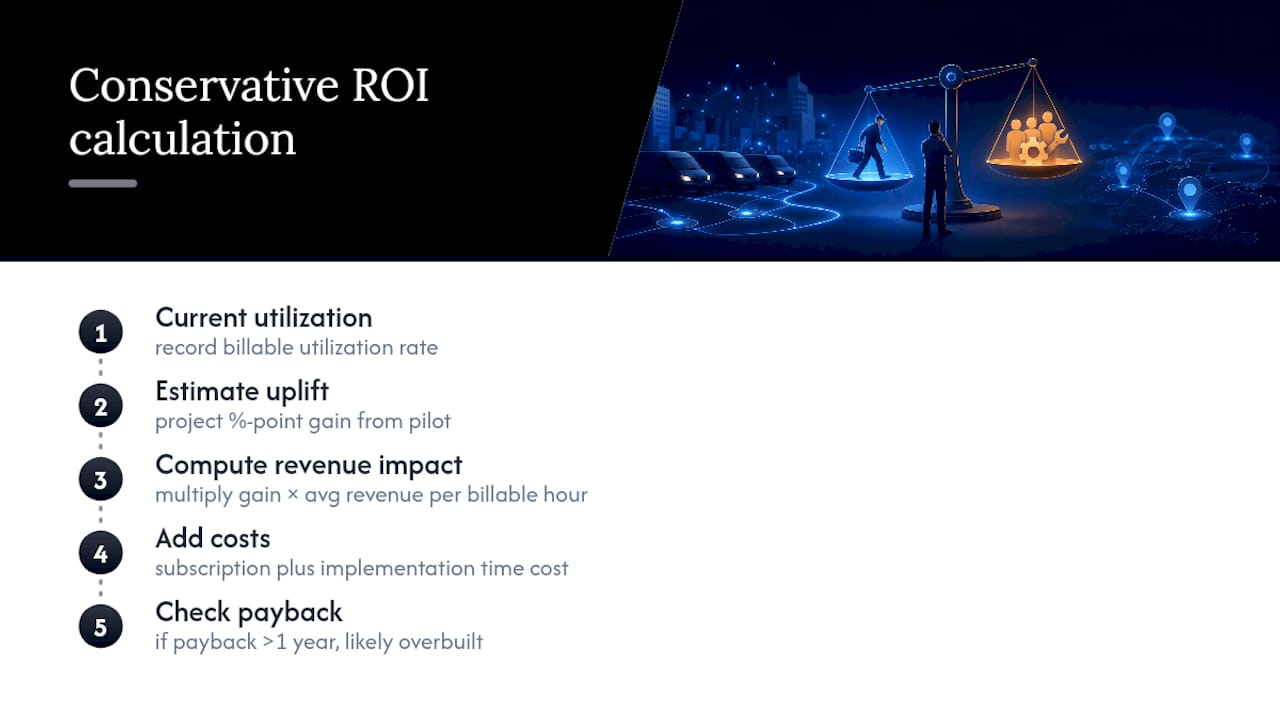
Calculate your own expected ROI conservatively. Take your current billable utilization rate, estimate the percentage-point gain a serious scheduling upgrade is likely to produce based on your pilot data, and multiply by average revenue per billable hour. Weigh that against subscription cost plus implementation time. If the payback period stretches past a year, the platform is probably overbuilt for your current team size.
What Legal and Compliance Rules Apply to Technician Scheduling?
Scheduling decisions carry legal weight the moment they touch overtime, break requirements, or on-call pay. Federal law under the Fair Labor Standards Act requires overtime pay for non-exempt technicians working more than 40 hours in a week, and several states layer on daily overtime thresholds or mandatory rest-break rules that federal law does not require. A dispatch system that fills every gap in a technician’s day without flagging cumulative weekly hours can trigger unplanned overtime liability without anyone noticing until payroll runs.
On-call and travel-time pay rules add another layer. Time spent traveling between job sites during the workday is generally compensable, while a technician’s home-to-first-job commute usually is not, though the line shifts depending on whether the employer requires the technician to carry equipment or respond to dispatch during that drive. Scheduling software that logs travel segments accurately gives payroll a defensible record instead of a guess.
Certification and licensing compliance belongs in the scheduling logic itself, not in a separate spreadsheet. Assigning an uncertified technician to a job requiring specific licensing, refrigerant handling, electrical work, pesticide application, creates liability exposure well beyond a bad customer review. Skills-matching rules that block those assignments automatically are a compliance control, not just an efficiency feature.

None of this replaces guidance from an employment attorney familiar with your state’s specific rules, since overtime and break requirements vary meaningfully by jurisdiction.
An Operations Manager’s Take on What Actually Moves the Needle
Consistent utilization gains beat one flashy quarter every time. I would rather see a team climb two percentage points a month for six months than spike ten points and slide back. Fix routing and parts staging first, since those pay off in weeks. Then invest in the platform. Treat scheduling as an operational control you monitor weekly, not a project you finish once.
— Tarun
Ready to See AI-Native Scheduling in Action?
Some platforms give operations teams what a dispatch board alone cannot: automatic missed-call recovery, skills-aware assignment, and real-time visibility across multiple locations, often integrating with tools like Jobber and QuickBooks.

Before you commit to any platform, including this one, request three things in a demo: sample pilot metrics showing utilization and FTFR movement, proof that integrations with your existing CMMS or accounting software actually sync in real time, and a clear support SLA for when dispatch issues happen mid-shift. If you run HVAC, plumbing, electrical, or cleaning operations, the industry-specific breakdowns show how these features apply to your trade specifically. Franchise operators managing multiple locations can see how multi-location intelligence standardizes scheduling discipline across every territory instead of hoping each location figures it out independently. Book a demo and bring your current utilization numbers. That is the fastest way to know whether the gap is worth closing.
Sources
- NetSuite: Measuring & improving technician productivity
- Sockeye Technologies: How to calculate and improve technician productivity