
Text to Pay for Merchants: How to Implement and Get Paid Faster
Text to Pay for Merchants: How to Implement and Get Paid Faster
Text to pay sends your customer a secure SMS link, they tap it, enter their card or digital wallet details on a hosted checkout page, and the payment posts to your system in seconds. No login required, no paper invoice to chase, no phone call to collect. For any merchant dealing with outstanding invoices or on-site collections, enabling SMS-based payments is one of the fastest ways to cut days sales outstanding and recover cash that would otherwise sit in your AR queue for weeks.
The recommended starting point: turn it on for your invoices and on-site milestone payments first, where the speed advantage is most immediate. Jobospro is the recommended implementation path for home service businesses, combining automated invoicing, TCPA-compliant SMS workflows, and PCI-DSS-compliant hosted checkout in one platform. Before you go live, two compliance checkpoints matter most: PCI-DSS (your payment page and tokenization setup) and TCPA (documented customer consent before any billing text). Get those right and SimpleTexting’s survey data shows why the channel pays off: Many US consumers check a text message quickly after receiving it.
Key Takeaways
Text-to-pay shortens collections to same-day when implemented with proper PCI-DSS tokenization, TCPA consent workflows, branded hosted pages, and a disciplined message cadence tied to your invoicing system.
| Point | Details |
|---|---|
| How it works | An SMS delivers a unique secure link; the customer pays on a hosted page; tokenization keeps card data off your servers. |
| Security non-negotiables | Use a PCI-DSS Level 1 processor, hosted checkout, HTTPS, and webhook signature validation before going live. |
| TCPA compliance | Document written consent, honor STOP replies immediately, and check state-specific rules in California, Florida, and Texas. |
| Cost structure | Budget for setup, monthly platform fee, per-transaction percentage plus flat fee, and per-message SMS costs before comparing providers. |
| Rollout checklist | Register your SMS sender, integrate via API, customize your hosted page, capture consent, test in sandbox, then verify production end-to-end. |
| Jobospro as implementation path | Jobospro combines automated invoicing, TCPA workflows, PCI-DSS checkout, and QuickBooks/Jobber integration in one platform for home service businesses. |
Table of Contents
- How does text to pay work from SMS to confirmation?
- Which businesses get the most value from text-based payments?
- Benefits and drawbacks worth weighing before you commit
- Security and compliance basics every merchant must get right
- What does text-to-pay cost, and how do you compare providers?
- Step-by-step implementation checklist
- How to choose a text-to-pay provider, and why Jobospro fits
- Practical tips to increase conversion and reduce disputes
- How to handle failed payments and disputes
- Customer support and troubleshooting
- Why implementation discipline matters more than the technology
- Jobospro makes text-to-pay faster to launch and easier to manage
- Frequently asked questions
- Sources
How does text to pay work from SMS to confirmation?
The full flow runs in one direction: your system generates a unique payment link, an SMS gateway delivers it to the customer’s phone, the customer taps through to a hosted, mobile-optimized checkout page, the payment processor tokenizes the card data, and a webhook fires back to your backend confirming the transaction. NMI describes this architecture as a secure, mobile-optimized payment link backed by tokenization and hosted pages that keep raw card data off your servers entirely.
The practical implication: your business never touches the card number. The processor stores a token; your system stores the token reference. That separation is what makes PCI-DSS compliance achievable without building a full cardholder data environment.
System components you need to provision:
- SMS gateway — delivers messages via short codes (shared or dedicated) or 10DLC long codes registered for business messaging
- Payment gateway/processor — handles authorization, tokenization, and settlement
- Hosted checkout page — mobile-optimized, HTTPS, branded with your business name and logo
- Backend/webhooks — receives real-time payment status updates and triggers receipts or job status changes
- Accounting/POS integration — syncs payment records to QuickBooks, your field service management tool, or CRM
- Logging and reconciliation — stores transaction IDs, timestamps, and status codes for dispute resolution
Common integration patterns:
- API link generation: your backend calls the payment processor API, receives a unique checkout URL, and passes it to the SMS gateway for delivery.
- Webhook callbacks: the processor posts a signed payload to your endpoint when a payment succeeds, fails, or is disputed.
- Hosted checkout vs. inline form: hosted pages (where the customer leaves your SMS to a processor-owned URL) are the PCI-DSS-preferred model; inline card forms embedded in your own page require a higher compliance scope. Stripe’s open sample repositories on GitHub include working webhook and hosted-checkout implementations worth reviewing before you build.
Which businesses get the most value from text-based payments?
Stripe positions text-to-pay as especially strong for remote invoicing and follow-ups, where the customer is not physically present to swipe a card. That covers a wide range of business models.
Industries and transaction types that benefit most:
- Home services (HVAC, plumbing, electrical, roofing, landscaping, cleaning): milestone payments collected on-site the moment a job phase completes, reducing the gap between work done and cash received
- Utilities and telecom: balance-due reminders sent when an account approaches a cutoff date, reducing inbound call volume
- Healthcare: co-pay and balance collection after a visit, where patients are more likely to pay promptly via a familiar channel
- Parking and municipal services: quick in-person payments at meters or permit kiosks; the city of Sausalito, California, deployed text-to-pay at parking meters as a real-world example of the model at scale
- Event vendors and food service: post-event invoices or tab settlements sent immediately after service
- Taxis and ride services: fare collection when a card terminal is unavailable or the rider prefers a digital receipt
The scenario that shows the clearest ROI for field service businesses: a technician finishes an HVAC repair, triggers a payment request from their mobile app, and the homeowner pays before the truck leaves the driveway. Services like PayXT demonstrate exactly this flow, generating a secure link on-site in seconds and collecting milestone payments immediately. That single change eliminates the invoice-to-collection lag that typically stretches 14–30 days for many service businesses. Sinch Engage’s use-case documentation reinforces this, showing how CRM and billing integration turns those one-off payment requests into automated reminder sequences that run without manual follow-up.
Benefits and drawbacks worth weighing before you commit
Text-to-pay’s primary business benefit is friction reduction: it meets the customer on a channel they already check constantly, which shortens the payment cycle and lowers the cost of collections. The main tradeoff is channel dependency — if a customer hasn’t opted in, or if your SMS messages look unfamiliar, the link goes ignored or gets flagged as phishing.
Pros:
- Higher open and response rates than email-based invoices
- Faster collections, with payments often received same-day
- Lower cost per transaction than mailed invoices or outbound collection calls
- No app download required for the customer
- Supports cards, Apple Pay, and Google Pay on a single hosted page
- Reduces manual follow-up labor for billing staff
Cons:
- Per-message SMS costs add up at high volume
- TCPA opt-in requirements add a compliance step before you can message any customer
- Customers unfamiliar with the sender may ignore or report the link as spam
- Tech dependency: a gateway outage or webhook failure can delay payment confirmation
- Chargebacks are possible and require documented transaction records to dispute
The engagement case in numbers: SimpleTexting’s 2026 survey found that A high percentage of US consumers check text notifications shortly after receipt; no email campaign, mailed statement, or voicemail comes close to that response window. For a business trying to cut days sales outstanding, that speed advantage alone justifies the setup cost.
Security and compliance basics every merchant must get right
Text-to-pay is secure when you use tokenization, a PCI-DSS-compliant hosted checkout, HTTPS throughout, and clear sender identification. Skip any of those and you expose your business to both data liability and customer distrust. PayPal’s consumer guidance is direct on this: customers should only pay through trusted providers and hosted pages, and card details should never travel through the SMS message itself.
PCI-DSS compliance checklist:
- Use a hosted payment page owned by your processor, not a self-built card form
- Never store raw card numbers, CVVs, or full magnetic stripe data on your servers
- Confirm your processor is a PCI-DSS Level 1 certified service provider
- Verify HTTPS and TLS 1.2+ on all payment page URLs
- Authenticate webhooks using signed payloads (HMAC signatures) to prevent spoofed callbacks
- Define and document a data retention policy for transaction logs
TCPA and SMS compliance checklist:
- Obtain documented written consent before sending any billing-related text
- Include your business name and a clear description of message frequency in the opt-in disclosure
- Honor STOP replies immediately and log the opt-out with a timestamp
- Never send payment requests to numbers that have opted out
- Keep consent records for a minimum of four years
- Check state-specific rules: California, Florida, and Texas each have additional consumer messaging regulations that may impose stricter consent or disclosure requirements beyond federal TCPA standards
Pro Tip: Use a branded, consistently named sender ID and a payment page that displays your business logo and contact number. NMI’s research confirms that branded pages and clear business identification directly improve acceptance rates and reduce the phishing confusion that causes customers to abandon the link. Jobospro’s Security & Trust Center documents the platform’s specific controls if you need to review them with your compliance team.
What does text-to-pay cost, and how do you compare providers?
There is no single price. Expect a combination of setup fees, monthly platform fees, per-transaction fees, per-message SMS costs, chargeback fees, and optional integration or support costs. The total cost of ownership depends heavily on your transaction volume and average ticket size.
High-volume merchants almost always benefit from the higher monthly fee and lower per-transaction rate; low-volume merchants should stay on usage-based pricing.
Questions to ask any prospective provider:
- Is your pricing all-in, or are there per-message, chargeback, and integration fees billed separately?
- What is your dispute/chargeback process and typical resolution time?
- Do you offer volume discounts and at what threshold?
Jobospro simplifies this by combining invoicing, payment collection, and reconciliation in one platform, so you are not manually reconciling SMS gateway bills against processor statements against your accounting software.
Step-by-step implementation checklist
The rollout sequence is: select a provider, integrate, test, launch, and monitor. Each step has a concrete deliverable your IT or billing team can check off.
- Define requirements. List the payment types (invoices, milestones, recurring), average ticket size, monthly volume estimate, and the accounting/FSM tools you need to sync with.
- Select a provider. Evaluate PCI-DSS certification, hosted checkout customization, webhook reliability, TCPA opt-in tooling, and pricing transparency.
- Register your SMS sender. Apply for a 10DLC long code or dedicated short code through your SMS gateway; 10DLC registration typically takes 3–7 business days.
- Integrate via API. Connect your backend to the payment processor’s link-generation API and configure webhook endpoints for payment success, failure, and dispute events.
- Customize the hosted checkout page. Add your logo, business name, support phone number, and invoice reference fields.
- Build consent capture into your workflow. Add an opt-in checkbox to your booking form, estimate acceptance, or onboarding flow. Log the timestamp and IP address.
- Write your message templates (see below).
- Run sandbox testing. Simulate successful payments, declines, and webhook failures before going live.
- Verify production end-to-end. Process a real $1 test transaction, confirm the webhook fires, and check that the payment posts correctly in your accounting system.
- Set up monitoring and KPIs. Track payment link open rate, conversion rate, average time to payment, and chargeback rate weekly.
Sample message templates:
- Initial request: “Hi [Name], your invoice #[INV-001] for $[Amount] from [Business Name] is ready. Pay securely here: [link]. Questions? Call [phone].”
- 48-hour reminder: “Reminder from [Business Name]: invoice #[INV-001] for $[Amount] is still open. Tap to pay: [link]. Reply STOP to opt out.”
- Failed payment: “[Business Name]: your payment for $[Amount] didn’t go through. Please retry here: [link] or call us at [phone].”
- Confirmation: “[Business Name]: payment of $[Amount] received. Thank you! Reference: [TXN-ID]. Keep this for your records.”
Testing checklist before go-live:
- Confirm payment links open correctly on iOS Safari and Android Chrome
- Simulate a card decline and verify the customer-facing error message is clear
- Verify webhook signature validation rejects unsigned or tampered payloads
- Run a reconciliation test: confirm the transaction ID in your processor dashboard matches the record in QuickBooks or your FSM tool
- Test Apple Pay and Google Pay flows on a real device, not just a browser emulator
How to choose a text-to-pay provider, and why Jobospro fits
The right provider balances security, integration depth, messaging controls, reporting, and cost transparency. Jobospro meets those needs specifically for home service businesses, combining the technical requirements with AI-native automation that reduces manual billing labor.
Provider evaluation checklist:
- PCI-DSS Level 1 certified payment processing
- Hosted, customizable checkout pages with branding controls
- Reliable webhooks with retry logic and delivery logging
- Native integration with accounting tools (QuickBooks), FSM platforms (Jobber), and CRM
- TCPA opt-in workflow built into the platform, not bolted on manually
- Reporting and reconciliation dashboards that show open rate, conversion, and DSO
- Support SLAs with a defined response time for payment failures
Jobospro checks each of those boxes and adds capabilities that standalone payment tools don’t offer: an AI receptionist that can trigger payment requests automatically after a job closes, multi-location benchmarking so franchise operators can compare collection rates across sites, and real-time revenue leak detection that flags unpaid invoices before they age. The platform integrates with Jobber and QuickBooks, so payment data flows into your existing systems without manual export. For home service businesses specifically, that means a technician closing a job in the field can trigger a payment link automatically, without touching a billing dashboard.
Pro Tip: Ask any provider for their webhook failure rate and retry policy. A gateway that drops webhook callbacks without retry means your system may show a job as unpaid even after the customer has paid, creating unnecessary follow-up calls and customer friction. Jobospro’s platform overview details its reliability and integration architecture if you want to compare it against your current stack.
Practical tips to increase conversion and reduce disputes
Clear sender ID, concise messaging, branded secure pages, appropriate timing, and simple receipts are the five variables that move conversion rates. Get them right and you reduce both abandoned payments and post-payment disputes.
Do:
- Send payment requests during business hours (9 AM–6 PM local time) to maximize same-day response
- Keep the message under 160 characters so it sends as a single SMS, not a split multi-part message
- Include the invoice number and amount in the message body so the customer recognizes the charge before tapping
- Use a consistent sender name or number so customers recognize you across multiple messages
- Send one reminder at 48–72 hours if the initial request goes unpaid, then a final notice at 7 days
- Include the service description and job address on the hosted checkout page to reduce “I don’t recognize this charge” disputes
- Send a receipt immediately after payment with a transaction reference number
Don’t:
- Send payment links after 8 PM or before 8 AM (TCPA quiet hours apply)
- Use a generic short code shared with unrelated businesses — customers can’t identify the sender
- Send more than two reminders before escalating to a phone call or a different collection method
- Skip the opt-out instruction in reminder messages — every billing text must include a STOP option
- Use URL shorteners that obscure the payment domain — customers are trained to distrust shortened links for financial transactions
For dispute avoidance specifically: the invoice reference number, service date, and technician name on the checkout page give the customer enough context to confirm the charge is legitimate. That context also becomes your evidence if a chargeback is filed.
How to handle failed payments and disputes
A declined payment is not the end of the transaction. Most declines are soft declines (insufficient funds, temporary hold, or card issuer friction) that resolve on a retry. Build a retry sequence into your workflow: attempt once at the time of decline, send a failed-payment SMS within 15 minutes, and offer a retry link with an option to use a different card or digital wallet.

For hard declines (stolen card, account closed, fraud flag), do not retry automatically. Flag the account in your CRM, pause automated reminders, and route the customer to a manual follow-up call. Retrying a hard-declined card repeatedly can trigger additional fraud flags with the issuer and increase your chargeback exposure.
Dispute and chargeback process:
When a customer files a chargeback, your processor will notify you with a response deadline, typically 7–21 days. Your evidence package should include the signed consent record, the original payment link delivery timestamp, the transaction ID, the service description, and any communication logs. Platforms that log webhook events and SMS delivery receipts make this straightforward. Merchants without that documentation routinely lose disputes they should win.
State-level consumer protection laws add another layer: California’s CCPA and similar statutes in other states may affect how you store and present transaction records in a dispute. Keep transaction logs for a minimum of 18 months, and confirm your processor’s dispute documentation requirements before you go live.
Customer support and troubleshooting
The most common support issues after launch are customers who can’t open the payment link, payments that post in the processor but don’t sync to your accounting system, and opt-out requests that weren’t logged correctly.
For link failures, the most frequent cause is a corporate email or SMS security filter that rewrites or blocks URLs. Test your payment links on multiple carriers (AT&T, Verizon, T-Mobile) before launch, and consider using a dedicated short code or a domain that is pre-approved by major carrier filtering systems.
For sync failures between your processor and accounting tool, webhook retry logic is your first line of defense. Set up an alert for any webhook that fails three consecutive delivery attempts, and build a manual reconciliation report that runs nightly to catch any gaps.
For opt-out handling, the safest approach is a dedicated STOP keyword that routes to an immediate opt-out confirmation and flags the number in your CRM within seconds. Delayed opt-out processing is one of the most common TCPA violation triggers. Train your billing team to check the opt-out log before any manual outreach campaign, not just automated sequences.
Why implementation discipline matters more than the technology
The businesses that see the fastest collections improvement from text-based payments are not the ones with the most sophisticated gateway setup. They are the ones that get the consent workflow right, send messages at the right time, and keep the payment page clean and recognizable. A technician who triggers a payment request the moment a job closes, with the customer’s name and invoice amount in the message, will outperform a fully automated system that sends generic links at 7 PM.
The gap between what text-to-pay promises and what most businesses actually experience comes down to one thing: treating it as a payment feature rather than a customer communication touchpoint. When the message reads like it came from a real business, lands at a sensible hour, and leads to a page that looks like your brand, customers pay. When it reads like a bulk notification from an unknown number, they ignore it or report it.
Jobospro makes text-to-pay faster to launch and easier to manage
Home service businesses that want faster collections without building a custom payment stack have a direct path: Jobospro’s AI-native platform handles automated invoicing, TCPA-compliant SMS workflows, PCI-DSS-compliant hosted checkout, and real-time reconciliation with QuickBooks and Jobber in one subscription. You get branded payment pages, webhook reliability, and multi-location reporting without stitching together a gateway, an SMS tool, and a billing platform separately.

The practical difference for a field service owner: a job closes, a payment request fires automatically, and the cash posts to your books before the next job starts. No manual billing step, no AR queue to manage at the end of the week. Jobospro’s AI automation layer handles the trigger logic, and the collections workflow tracks every open invoice in real time so nothing ages past your target DSO. Start a free trial at Jobospro to see how the platform fits your current stack.
Frequently asked questions
Is text-to-pay legal in the United States? Yes, with conditions. You must obtain documented TCPA consent before sending any billing text, honor opt-out requests immediately, and follow FCC quiet-hours rules. State laws in California, Florida, and Texas impose additional requirements. This is general information; confirm current rules with a qualified attorney or the FCC directly.
Does text-to-pay require the customer to create an account? No. Hosted checkout pages accept card and digital wallet payments without account creation, which is one of the primary reasons conversion rates are higher than email-based invoice portals.
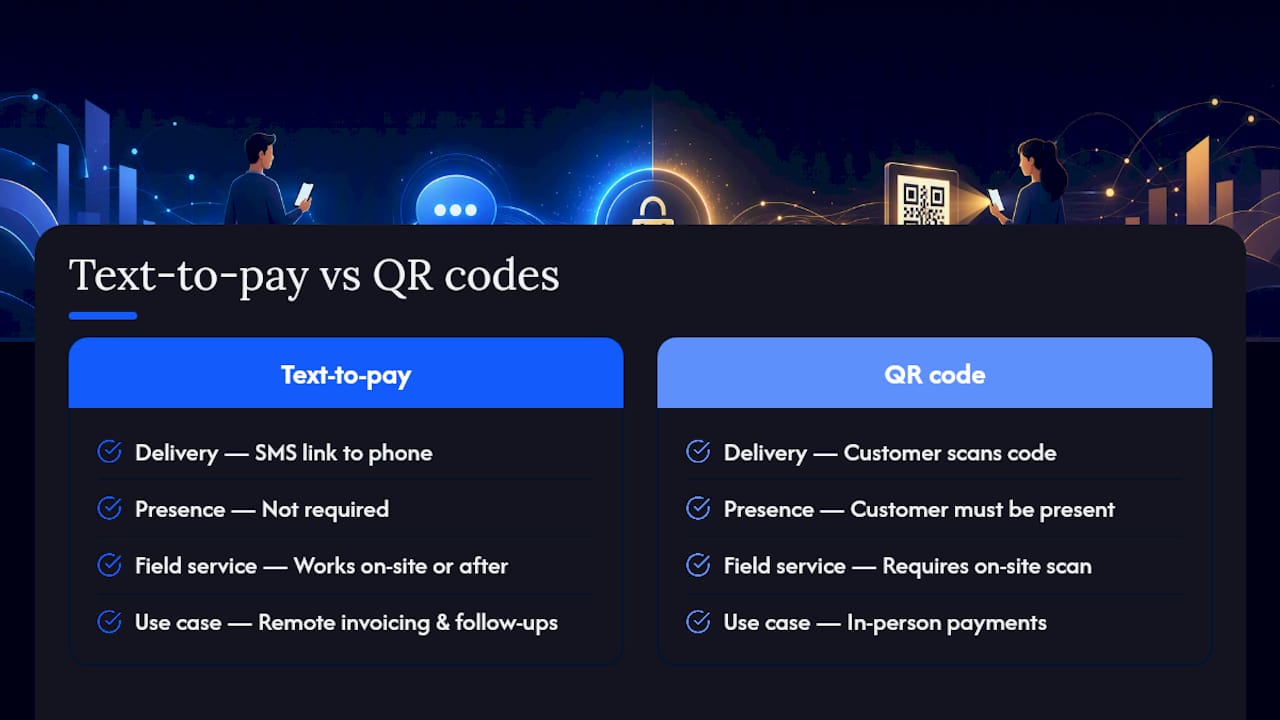
What is the difference between text-to-pay and QR code payments? Text-to-pay delivers the payment link directly to the customer’s phone via SMS, making it effective for remote invoicing and follow-ups. QR codes require the customer to be physically present and scan a code. For field service businesses collecting payment after a job, text-to-pay works whether the technician is on-site or has already left.
How do I handle a customer who says they never received the payment link? Check your SMS gateway delivery log for the message status. Common causes are carrier filtering, an incorrect phone number, or a full message inbox. Resend the link and confirm the customer’s preferred number. If delivery continues to fail, offer an email link as a fallback.
Can text-to-pay integrate with QuickBooks or Jobber? Yes. Most enterprise-grade payment platforms offer native or API-based integration with QuickBooks and Jobber. Jobospro integrates with both, syncing payment records automatically so you don’t reconcile manually.
What happens if a customer disputes a text-to-pay charge? Your processor will issue a chargeback notice with a response deadline. Respond with your consent record, SMS delivery timestamp, transaction ID, and service documentation. Platforms that log these automatically give you a significant advantage in dispute resolution.
Sources
- Text To Pay - NMI
- What is Text to Pay: Benefits and implementation notes | Stripe
- Texting & SMS marketing statistics | SimpleTexting