
99% Phone-Number Extraction: Voicemail to Text for U.S. Home Services
99% Phone-Number Extraction: Voicemail to Text for U.S. Home Services
Voicemail to text converts a spoken voicemail into a written transcript you can read instead of listen to, and every major carrier now offers a built-in version for free or a small monthly fee. For most people, turning on carrier or phone transcription (iPhone Live Voicemail, Google Phone, or a carrier add-on) is the fastest path. For business, legal, or high-stakes calls, export the audio file and run it through a dedicated transcription service instead.
TL;DR:
- Carrier or phone OS transcription is convenient but often produces inaccurate results with background noise or fast speech.
- Exported audio files and dedicated transcription services provide the highest accuracy for business or legal calls.
- Automated transcriptions typically reach 70% to 85% word accuracy, but manual review improves clarity for critical messages.
- Transcription methods should be chosen based on call volume, importance, and integration needs with existing systems.
- Using transcriptions to extract caller information and trigger fast follow-up significantly reduces revenue loss from missed calls.
Table of Contents
- Carrier, App, or Cloud Service: Which Voicemail-to-Text Method Fits You?
- How to Turn on Voicemail Transcription on Your Phone or Carrier
- How to Export a Voicemail and Get a More Accurate Transcript
- Why Voicemail Transcripts Get Words Wrong (and How to Fix It)
- Choosing the Right Voicemail Transcription Setup for Your Needs
- How Transcripts Turn Missed Calls Into Recovered Revenue
- What Actually Matters When You Rely on Automated Transcription
- Turn Every Transcribed Voicemail Into a Tracked Follow-Up
- Sources
Carrier, App, or Cloud Service: Which Voicemail-to-Text Method Fits You?
Three approaches cover almost every use case, and they trade accuracy for convenience in opposite directions.
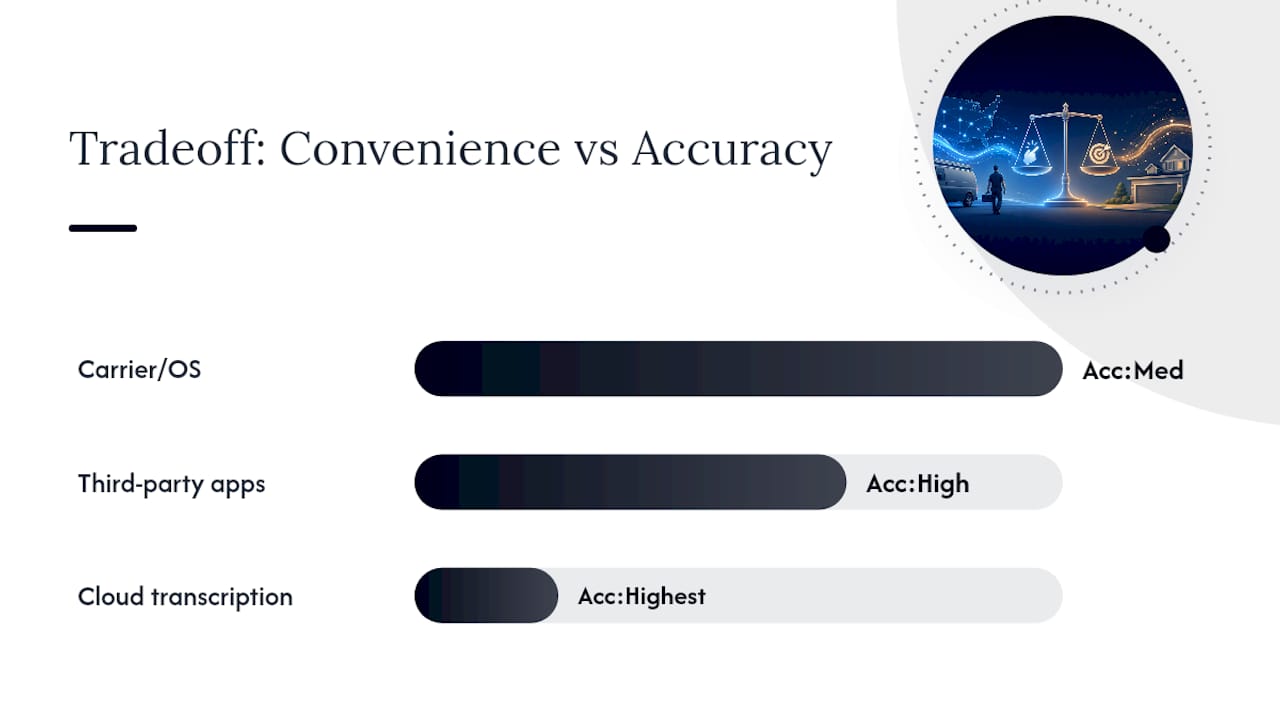
Carrier and phone-OS transcription is the easiest option. It works the moment you flip a switch, requires no new app, and costs nothing or close to it. The tradeoff is inconsistent accuracy, especially with background noise or fast talkers.
Third-party voicemail-to-text apps replace your visual voicemail screen entirely. YouMail and Voxist, for example, add spam call blocking, custom greetings, and sometimes translation on top of transcription, which makes them worth it if you get voicemails daily and want a single inbox for everything.
Cloud upload services deliver the highest accuracy but require the extra step of exporting the audio file yourself.
- Carrier/OS transcription: delivered in-app or via SMS, free to low-cost, moderate accuracy
- Third-party apps: in-app delivery, added features like spam filtering, usually a monthly subscription
- Cloud transcription services: email or download delivery, highest accuracy, priced per-minute or per-transcript
Pick based on how often you deal with voicemail and what’s riding on getting it right.
How to Turn on Voicemail Transcription on Your Phone or Carrier
Setup differs by device and carrier, but each takes only a few minutes.
- iPhone (iOS): Live Voicemail transcribes calls in real time as they come in, showing text on screen while the caller is still talking. This works independently of carrier transcription, though Verizon’s Voicemail to Text can run alongside it and sometimes duplicates the transcript in Messages.
- Android/Google Phone: Open the Phone app, go to Voicemail settings, and enable transcription if your device supports it. Google Voice users can download the app separately for transcription plus visual voicemail on non-Pixel phones.
- Verizon: Add Voicemail to Text through My Verizon or the My Verizon app; some plans include it, others charge $2.99 a month. Premium Visual Voicemail bundles transcription with additional visual voicemail features.
- AT&T: In Unified Messaging settings, toggle on transcription so voicemails arrive as text in the app or forwarded to email. AT&T’s support documentation notes accuracy depends heavily on how clearly the caller speaks and how much background noise is on the line.
- T-Mobile: Visual Voicemail Premium adds transcription on top of standard visual voicemail; enable it through the Visual Voicemail app or your account settings.
Compatibility issues usually come down to one thing: older phones or basic plans sometimes lack transcription support entirely, forcing you toward a third-party app or manual export.
How to Export a Voicemail and Get a More Accurate Transcript
When carrier transcription garbles a phone number or misses a name, exporting the audio and running it through a dedicated service almost always fixes it.
On iPhone, open the voicemail, tap the share icon, and save the file (it exports as .m4a). On Android, most Phone apps let you tap the three-dot menu on a voicemail and choose “Share” or “Save,” producing an .m4a or .amr file. Google Voice exports as .mp3 through the same share function. If your phone’s share option is missing entirely, playing the voicemail on speaker and recording it with a second device works as a last resort.
- Export the file as soon as carrier transcription looks wrong or the call matters for business
- Upload it to a one-shot transcription tool like VexaScribe or ElevenLabs for fast, model-based accuracy
- For legal-grade or verbatim needs, send it to a human transcription service like SpeakWrite
- After transcription, cross-check the phone number against caller ID before logging it anywhere
Pro Tip: Save transcribed voicemails straight into your CRM or a shared drive with the timestamp intact. A transcript without a date attached is nearly useless once you’re looking back through a week of calls.
Why Voicemail Transcripts Get Words Wrong (and How to Fix It)
Carrier systems are built for speed, not precision. That tradeoff is baked into the infrastructure that VexaScribe notes explains why re-transcribing exported audio on a stronger model usually cleans up what the carrier missed.
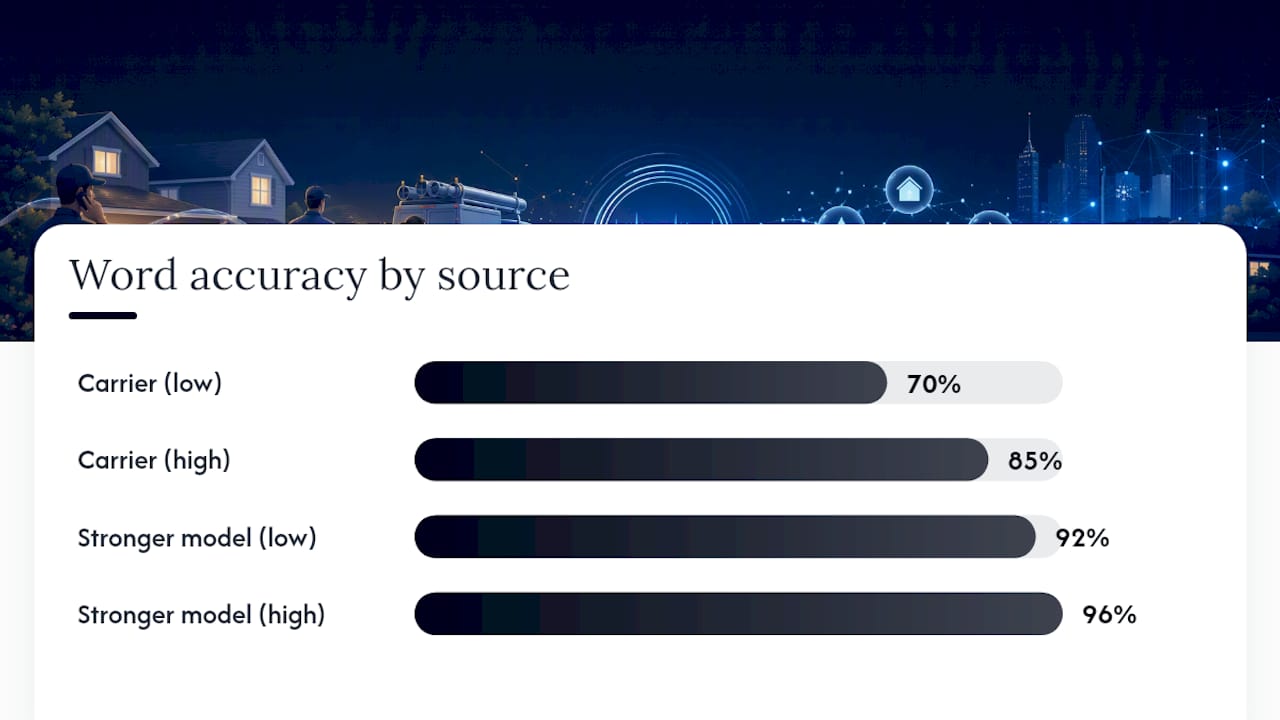
Accents, mumbled speech, speakerphone calls, and background noise are the biggest culprits. Numbers and proper nouns fail most often because ASR models guess at sounds rather than context. Automated systems typically land between 70% and 85% word accuracy on standard carrier transcription, while stronger models or human review can push that closer to 92% to 96% on the same audio.
A few fixes make a real difference:
- Ask callers, through your own voicemail greeting, to state phone numbers slowly and repeat them
- Avoid speakerphone when leaving voicemails for anyone who needs a clean transcript
- Re-run any garbled transcript through an export-and-upload service before acting on it
- Reserve human transcription for calls where a single wrong digit or name creates real risk
Automated transcription is fine for routine triage. Anything tied to a contract, a legal matter, or a large invoice deserves a human set of eyes first.
Choosing the Right Voicemail Transcription Setup for Your Needs
Match the tool to the stakes, not the other way around.
- Decide how much accuracy you actually need. Casual personal use tolerates the occasional dropped word; business callbacks and legal records don’t.
- Weigh volume against cost. Someone fielding five voicemails a week doesn’t need a subscription service; someone fielding fifty a day probably does.
- Check integration options. Does the service deliver by email, SMS, or API, and can it feed a CRM without manual copy-paste?
- Confirm language support and speaker labeling if your calls involve multiple speakers or languages other than English.
- Ask about data retention and security before uploading anything sensitive, especially for regulated industries.
Individuals triaging personal calls are fine with built-in carrier or OS transcription. Small businesses fielding regular customer calls benefit from a dedicated app with CRM delivery. Professionals handling legal or compliance-sensitive voicemails should default to human review, even if it costs more per call.
How Transcripts Turn Missed Calls Into Recovered Revenue
A transcript is only useful if it triggers action. For service businesses, that means pulling the caller’s phone number and intent out of the voicemail fast enough to call back before the customer moves to a competitor. Providers like Nexiwave have built entire products around this, reporting phone-number extraction accuracy near 99% because that single data point drives the follow-up.
- Transcript arrives and phone number is auto-extracted
- Message is tagged by keyword (“estimate,” “urgent,” “reschedule”)
- Callback gets queued and assigned automatically instead of sitting in a voicemail box
Jobospro’s own research into home service operations found $2.3 billion in aggregate revenue leakage tied to missed calls and slow follow-up across the industry, which is exactly the gap an AI receptionist workflow is built to close.
What Actually Matters When You Rely on Automated Transcription
Automation is good enough for most day-to-day voicemail. It stops being good enough the moment a wrong digit or a garbled name creates real risk, and that’s the line worth drawing for yourself before you need it.
For businesses, chasing perfect verbatim transcripts is often the wrong priority. What matters is getting the phone number right and getting it into a callback queue fast.
— Tarun
Turn Every Transcribed Voicemail Into a Tracked Follow-Up
Getting a clean transcript solves half the problem. The other half is making sure that transcript actually turns into a callback instead of sitting in an inbox until the customer books with someone else. That’s the gap Jobospro was built to close for home service businesses: it pulls call and voicemail data into one operational view, flags missed follow-ups automatically, and routes them into your dispatch board before the lead goes cold.

Jobospro isn’t a voicemail transcription tool. It’s the operations layer that acts on the transcript once you have it, whether that transcript came from your carrier, an app like YouMail, or an export-and-upload service. It works alongside systems you already run, like Jobber and QuickBooks, so nothing has to be ripped out and replaced.
If missed calls and slow callbacks are costing your business real revenue, see how it fits your operation on the industries page, or go ahead and book a demo to see the follow-up queue in action.
Sources
- Voicemail to Text for iPhone FAQs | Verizon Customer Support
- Get AT&T Voicemail-to-Text for Unified Messaging - AT&T Home phone Customer Support
- Essential Guide for Voicemail-to-Text Transcription (2024)
- Voicemail to Text — Clean Transcript from Any Voicemail | VexaScribe
- Convert voicemails to text with AI | ElevenLabs